Table of Contents
This article examines New YouTube Features Help You Get Complete Information About the Songs in the Video You. It presents the main facts, practical implications, and key points in a clearer, easier-to-follow format.
Understanding New YouTube Features Help You Get Complete Information About the
Recently, YouTube released a new sunshine called '. Music in this video ' - ' Music in this video ', which provides information about the music included in the video you are watching.
Such information includes the name of the song, musician, singer, producer, publisher and their official YouTube channel link if available. This makes it easier for users to search for music and information while ensuring the rights of artists who own the song.
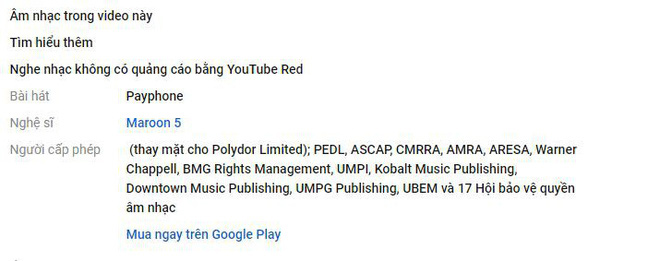 New YouTube features provide more information about music tracks used in videos.
The new 'Music in this video' feature appears in the caption just below the video, to see information about music tracks, simply select 'Show more'.
But, now this feature seems to work only with videos that use a full track, which may not be applicable to cut, remix or incomplete tracks. Even due to limitations in YouTube's database, some videos, even using a single track, are not supported. Hopefully in the future this feature will be upgraded to improve the situation.

"Music in this video" is considered an expanded version of Content ID system - a system that allows users to monitor and manage the content they produce, being used by YouTube to limit the infringement. license. Content ID allows users to decide what to do with videos using their content.
YouTube said that this feature has been applied to about 500 million videos and will continue to expand in the near future.
- Quick, accurate video search tips on YouTube.
- The mobile YouTube application is about to be incognito.
- 8 apps to help you watch YouTube videos in Chrome floating window.
- Which criteria do YouTube calculate Top Trending?
FAQ
What is the main point of New YouTube Features Help You Get Complete Information About the Songs in the Video You?
Recently, YouTube released a new sunshine called '. Music in this video ' - ' Music in this video ', which provides information about the music included in the video you are watching.
Why is New YouTube Features Help You Get Complete Information About the Songs in the Video You important?
New YouTube Features Help You Get Complete Information About the Songs in the Video You matters because it can affect how readers understand, choose, use, or respond to the subject discussed in the article.
What should readers verify about New YouTube Features Help You Get Complete Information About the Songs in the Video You?
Check the date, product or software version, compatibility, and any current guidance before acting, especially when technology, security, health, or pricing is involved.
Related Articles
 The YouTube App on Android TV Is Redesigned3 minutes read
 How to Display Lyrics Automatically on YouTube?6 minutes read
 Guide 3 Ways to Block Ads on YouTube Videos: Turn Off Video Ads4 minutes read
 YouTube Will Soon Bring Picture-in-Picture Feature to the Desktop4 minutes read
 How to Get YouTube Video Links on Phones and Computers4 minutes read
 All the Errors on YouTube and How to Fix It: YouTube Error14 minutes read
Reader Comments 0
Sign in with email or Google to join the discussion.