Table of Contents
Understanding Mozilla requires more than a headline. The overview below breaks down the key facts, changes, and user impact.
New Australis Interface
Mozilla appears to like the synchronization between Firefox and Thunderbird when developing these two software. The best evidence is that the new mail manager looks more like Firefox. A significant change lies in the menu and toolbar styles that the company aims to repeat the new style and feel of Mozilla Firefox. In addition, the upcoming Australian interface will be a common interface for all of the company's software packages. This interface includes a new tab style that enhances the user experience. The company also plans to implement the interface on Firefox.

Integrate Ubuntu One
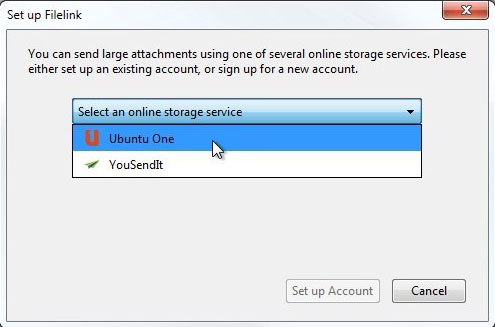
In June, Mozilla introduced a new feature called Thunderbird Filelink. The feature allows users to upload large attachments to an online storage (cloud). This is very meaningful for users, helping to avoid the hassle of attaching a large file to email. Mozilla has now added Ubuntu One to the Filelink settings controls next to YouSendits. Ubuntu One is also a cloud storage service like Dropbox and is primarily aimed at Linux users.
Do Not Track
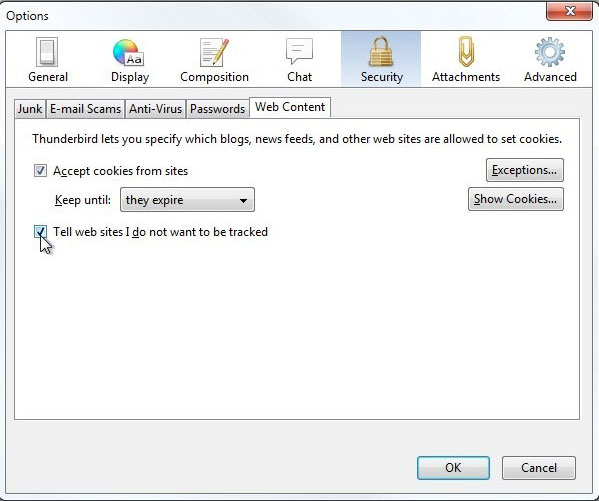
This anti-tracking feature has been in Firefox for a long time but has only appeared on Thunderbird in version 15. To enable the feature, click Options from the Tools menu and then select the Security tab. Click Web Content and check the option Tell web sites I don't want to be tracked.
Instant Messaging and Chat
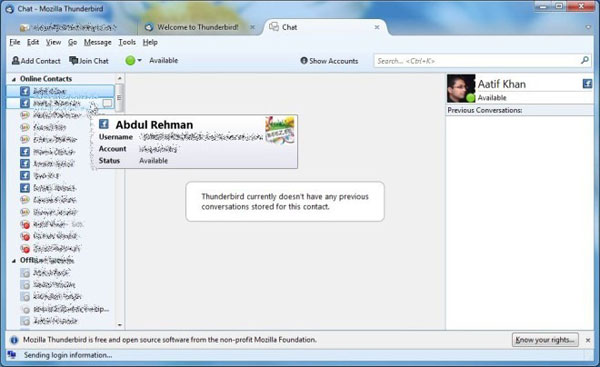
Thunderbird now allows users to send instant messages to friends on Facebook, Twitter, GTalk, IRC and XMPP. To configure Chat settings, from the File menu, hover over the New submenu and then click on Chat Account. Follow some simple steps to get connected to your favorite services. Chat feature is opened on a separate tab and displays a list of users' contacts on the left.
In addition to the above changes, the company has fixed some security issues and patched several bugs in Thunderbird 15.
FAQ
What does Mozilla Thunderbird 15: New Features explain?
Understanding Mozilla requires more than a headline.
Who is most affected by Mozilla?
The overview below breaks down the key facts, changes, and user impact.
What are the key takeaways from this topic?
New Australis Interface Mozilla appears to like the synchronization between Firefox and Thunderbird when developing these two software.
Related Articles
 Mozilla Thunderbird 68.6.05 minutes read
 Thunderbird 3.0 Re-Exported with Many Outstanding Improvements5 minutes read
 Mozilla Will Stop Developing Thunderbird3 minutes read
 Instructions for Setting up Mozilla Thunderbird to Set up Email8 minutes read
 Firefox 10: The Fox Fire Wakes Up5 minutes read
 12 Add-Ons Are Indispensable for Thunderbird: Tutorial5 minutes read
Reader Comments 0
Sign in with email or Google to join the discussion.