Table of Contents
Microsoft Listas - Online 'Handbook' of Wiki Format is easier to understand when the core ideas are paired with practical examples. The sections below explain the topic clearly, highlight useful steps, and point out details that can prevent common errors.
Microsoft 's Live family has just launched a new member, Listas, a service that allows users to create and share various types of lists, styled by Wikipedia. Listas is not only for sharing list categories, it can also be used to share announcements, favorites lists or other types of public information. Like the way Wiki works, lists can be shared and published publicly, allowing the entire user group to edit information depending on the permissions that the creator set up.
Although only in the testing phase of technology, Microsoft Listas is also favored to add a toolbar for Internet Explorer browser, support users to select information from websites whether the search results, a good part whole website and put them on your personal list at Listas. Users can also subscribe to RSS feeds from lists shared by other members.
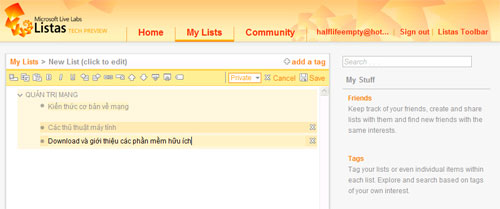
Listas interface to create shared list: very simple, good support Vietnamese.
The Listas interface is simple but users will need some time to get used to it. The layout of the modules is also clear, it is possible to search lists via tags, editors that support shortcuts. " Users will easily use Listas for meeting notifications, tags, shopping list, fun plans or anything they can create their own way, " the group said. Live Labs introduces Listas. Listas has just released a test version, users can register and use their current Hotmail or MSN account here. Thanh Truc
FAQ
What is Microsoft Listas - Online 'Handbook' of Wiki Format?
Microsoft 's Live family has just launched a new member, Listas, a service that allows users to create and share various types of lists, styled by Wikipedia.
Why is Microsoft Listas - Online 'Handbook' of Wiki Format important?
A clear understanding of Microsoft Listas - Online 'Handbook' of Wiki Format helps you make informed decisions, avoid common mistakes, and use the relevant tools or techniques more effectively.
How should beginners approach Microsoft Listas - Online 'Handbook' of Wiki Format?
Start with the fundamental concepts, follow the examples step by step, and test each change in a safe environment before applying it to important systems or data.
Related Articles
 DokuWiki or Wiki.js: Is the Self-Hosted Wiki Right for You?8 minutes read
 7 Keys for Selecting and Managing Company Wiki12 minutes read
 How to Convert Word Files to PDF Format: Clear Instructions8 minutes read
 Laptop Battery Handbook11 minutes read
 How to Create a Personal Wiki Using Microsoft Onenote10 minutes read
 How to Convert Online Video Format with Zamzar5 minutes read
Reader Comments 0
Sign in with email or Google to join the discussion.