Table of Contents
Overview
This guide covers Microsoft access 2021 in clear, practical terms. It covers the key concepts, recommended steps, common limitations, and useful checks so you can make a better-informed decision.
Microsoft Office Access - abbreviated as MS Access or simply Access - is a database management software (DBMS) provided by Microsoft.
MS Access is often packaged in the Microsoft Office suite and is a popular database management system - because of its convenience, ease of use and ability to meet most common office applications. MS Access is one of the database management systems widely used in computers today.
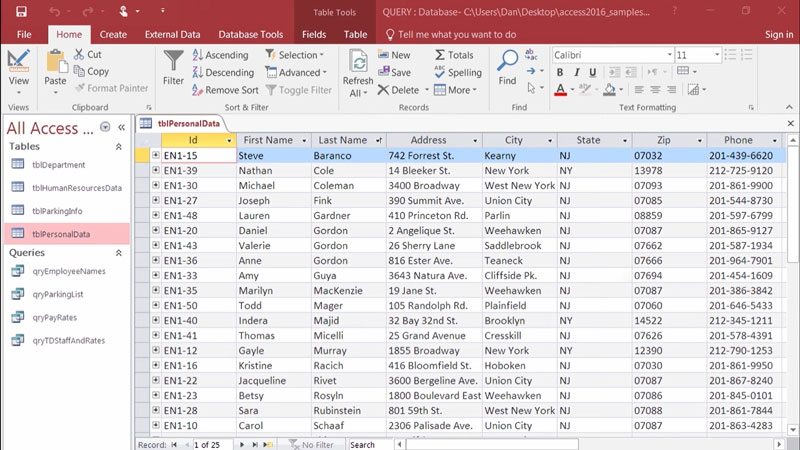
Key Features of Microsoft Access
With the ability to add, edit, delete, store and retrieve data. Microsoft Access helps you manage your data effectively, specifically:
- Set up, create data tables
- Import data tables from formats such as Excel, Database, Web Content,…
- Create links between tables
- Retrieve information from one or more tables through a join
- Export data to Excel, CSV, Access, PDF files, etc.
- Automate Processes with VBA
- Report Design
- Data synthesis and calculation
Microsoft Access is truly a tool for managing and working with data, especially data that is linked together to form a complete information system.
Because it is integrated into the Microsoft Office suite, Access is very popular. It will be a great start for users who are new to databases and database systems; it is a premise for users to start getting acquainted with the basic concepts of data types, data architecture, relationships between tables and start learning SQL.
Key Takeaways
Use the guidance above as a practical reference for Microsoft access 2021. Check compatibility, follow the steps carefully, and verify important details with official documentation when software, security, accounts, health, or purchases are involved.
FAQ
What is the main point of this article?
This article explains Microsoft access 2021, including the central facts, context, practical implications, and details needed to understand the topic.
Why does this topic matter?
It may affect performance, cost, safety, convenience, purchasing decisions, or how people understand a broader development.
Could the information change over time?
Yes. Product details, software features, prices, policies, codes, and news developments can change, so verify time-sensitive information with official sources.
Related Articles
 The Microsoft Access Test Has a P3 Answer5 minutes read
 5 Best Free Alternatives for Microsoft Access7 minutes read
 TOP Best Microsoft Access Replacement Software for Databases5 minutes read
 Useful Access Shortcut Key: Access Shortcuts7 minutes read
 What Is Microsoft Access? Instructions on How to Use Microsoft Access15 minutes read
 Microsoft Access Test Has the Answer P14 minutes read
Reader Comments 0
Sign in with email or Google to join the discussion.