Table of Contents
This guide provides a clearer, better-organized overview of Link to Download ISO File Windows 10 Ver 1909. It focuses on the essential facts, practical steps, and common questions readers are most likely to have.
Under information provided by Microsoft, the public release of Windows 10 1909 will be sent to users in October of this year. This is the first time Microsoft has used a major feature update to improve and fix errors in previous updates. Therefore, this is considered the safest Windows 10 update ever. Let's learn about the new features of this update as well as the link to download the current Windows 10 1909 ISO.
Instructions for Downloading ISO File Windows 10 Ver 1909
With the trick to download the official Windows 10 1909 ISO file from Microsoft that TipsMake will guide below, you need to use the Chrome browser on the computer. If you don't have it yet, you can quickly download and install it through the Chrome browser download it from the official source: - Download Chrome browser from the official provider: Download Chrome After you have installed the browser, follow the instructions below to download The file. ISO Windows 10 1909 . Step 1: Open Chrome browser on your computer and access the link from the official provider . 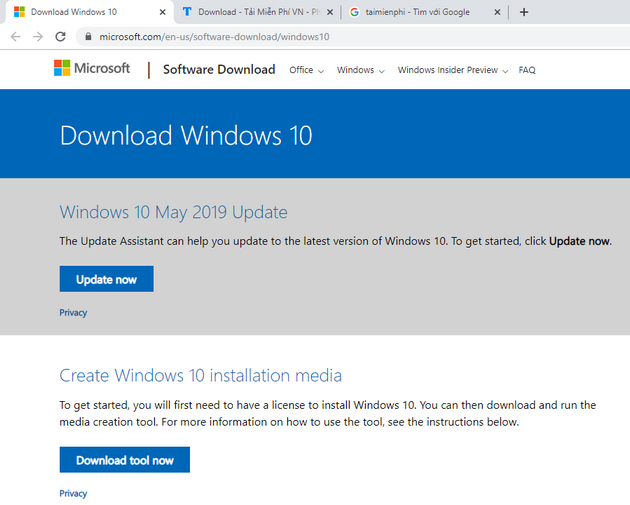
Step 2: Next, select F12 on the keyboard, to switch toDeveloper Tools Mode.
Step 3: Here, select the Toggle device toolbar Located in the upper left corner of the Developer Tools Window or use the keyboard shortcut Ctrl + Shift + M To adjust the view.
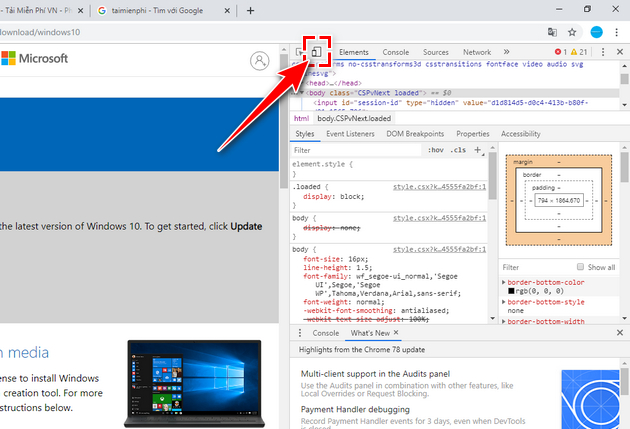
Step 4: In the newly displayed toolbar, select the arrow icon and select iPad To switch to viewing the website as if using an iPad.
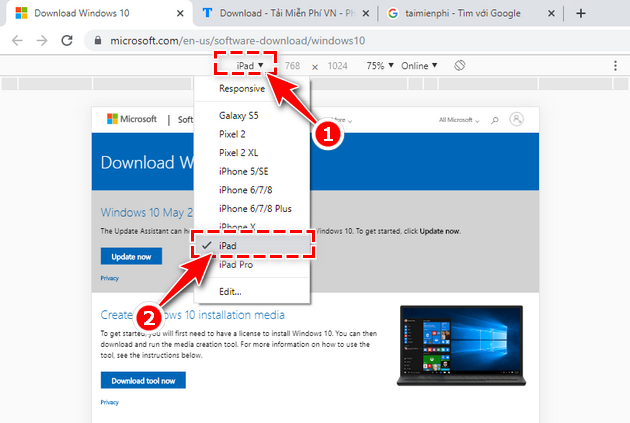
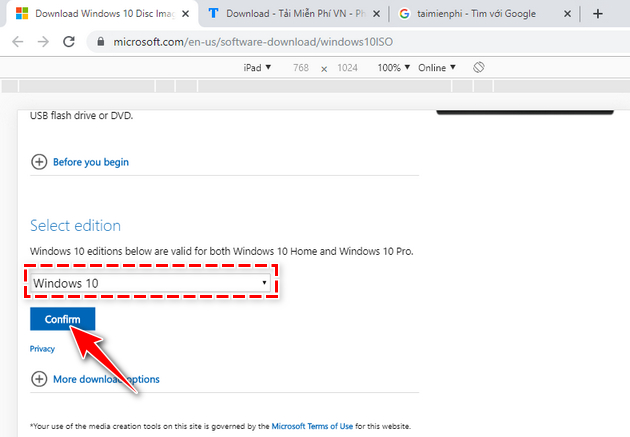
Step 5: Select F5 To reload the page. Returning to the website interface screen, you will see a new section called Select Edition Appear. Now select and select Windows 10 , then choose Confirm .
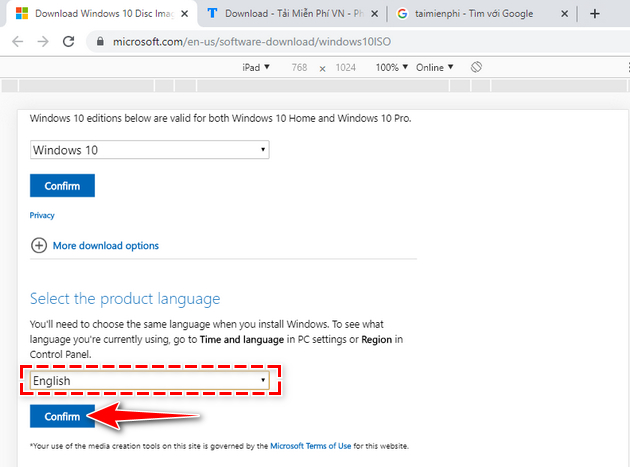
Step 6: The Select the product language Dialog boxappears, choose the language that you feel is most suitable. After selecting, select Confirm .
Step 7: Finally, select to download the 32-bit Or 64-bit Version depending on your computer's configuration.
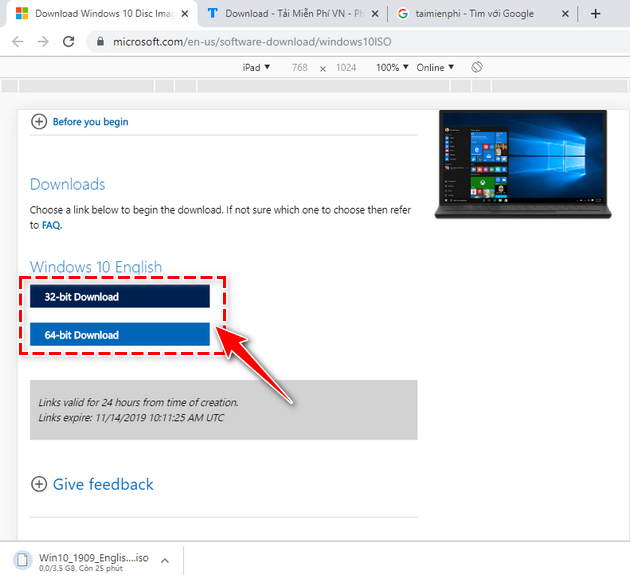
At this point, the Windows 10 19H2 download process begins, please wait patiently.
New Features on Windows 10 1909
Under Microsoft, the Windows 10 1909 update will have fewer new features than previous update versions. In this 19H2 update, the company mainly focuses on fixing bugs, improving performance and introducing other small features. However, Windows 10 1909 still has valuable changes that users pay attention to.
Update Windows Interface
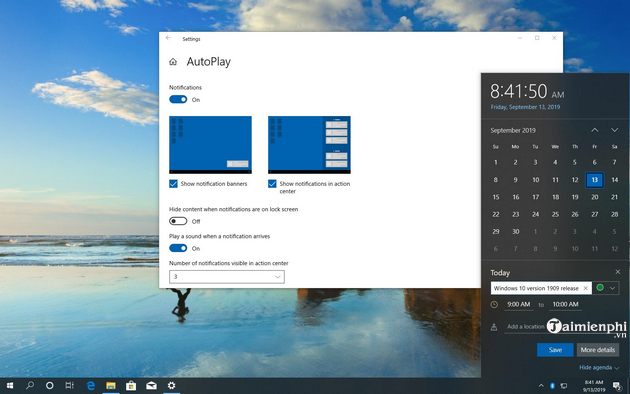
- With the new interface, you can easily create an event directly from the Calendar window on the Taskbar. - Manage notifications Button added to Action Center. With this addition, you can easily set up notifications on your computer. - The navigation window on the Start menu will be expanded when the user hovers over it. So from now on you can easily see where you are clicking when using. - Shows options to configure as well as disable app/website notifications right on the notification. Even as notifications and in Action Center.
Setting
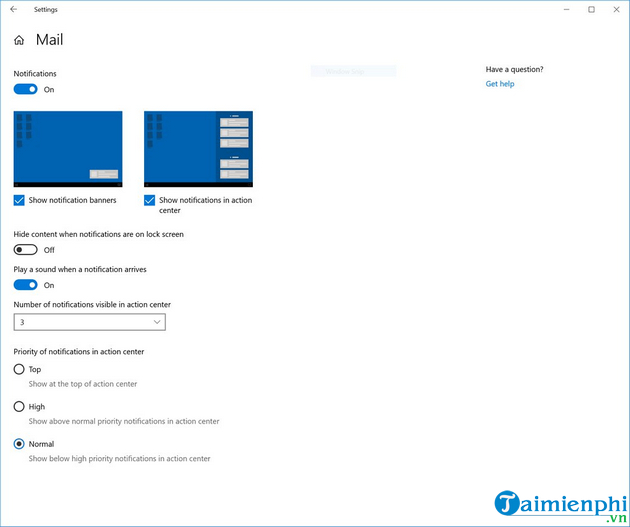
- Notification settings in Settings -> System -> Notifications will now default to sorting notification senders by the most recently displayed notification, instead of the sender's name. So you will easily find and configure the most frequent and recent senders. Additionally, this update adds an option to mute the sound when notifications appear.
- Thumbnail previews feature has now been added to the notification settings area to show the meaning of "banner" and "Action Center".
Other New Updates
- Win 10 1909 update improves battery life and computer performance. - Allow third-party voice-activated assistants on the Lock screen. - Updated search box in file Explorer. This change helps integrate OneDrive content into search results. - This update fixes and allows OEMs to better optimize the hardware when used on Windows 10 1909. - Key roll or Key rotation feature lets you securely roll passwords. Also prevents the disclosure of recovery passwords to manually unlock BitLocker by users. - Enable Windows Defender Credential Guard for ARM64 devices to help improve security. - In addition, Several other small updates.
Link to Download the Current Windows 10 1909 ISO
This way, you will download the ISO file right on TipsMake's website. This is a website that always provides a full range of software, computer tips and tricks, downloads the operating system (OS), apps or games with all official versions in the fastest and safest way.
As soon as the Windows 10 1909 ISO is publicly released, TipsMake will update this update right on its website. Then, you download using the download the official provider:
- Download the current Windows 10 ISO file from the official provider.
Next, you will read introductory information about Windows 10 versions along with instructions for installing Windows 10. At the end of the article there will be a link for you to download Windows 10 updates. You choose the Windows 10 1909 ISO version. Then choose the 32bit or 64bit version to download and get the ISO file you need.
Download the Windows 10 1909 ISO File Using Windows ISO Downloader
To download Windows 10 32bit and 64bit ISO files, you will use the Windows ISO Downloader Tool to select and download the ISO file to suit the user's needs.
After downloading, Simply open it and you can use it immediately without having to install it. The image below is an interface When you open Windows ISO Downloader.
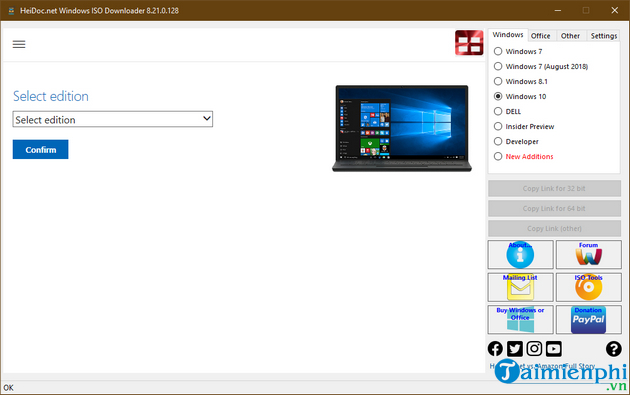
For detailed instructions on how to download the original ISO file and how to use Windows ISO Downloader, please review the instructions for Downloading the original ISO file from Microsoft from the official provider.
With The link to download the Windows 10 ver 1909 ISO file And an introduction to the new features of the current Windows update, we hope readers will have the best overview before downloading to update and use.
In addition, If you need to reinstall Windows, the best way to install Windows is to do it from USB, because currently using CD/DVD is no longer as popular as before. you can use how To create a USB to install Windows 10 from the official provider and you can do it yourself to immediately have the Windows 10 installer along with the current ISO file. Good luck!
FAQ
What is the main point of Link to Download ISO File Windows 10 Ver 1909?
Under information provided by Microsoft, the public release of Windows 10 1909 will be sent to users in October of this year.
Why might the details change over time?
Software versions, prices, policies, services, and product availability can change. Check the official source before making a purchase or changing important settings.
How can I use this information safely?
Follow official instructions, verify downloads and claims, back up important data, and avoid sharing passwords or sensitive account information.
Related Articles
 Link to Download Windows 10 20H1 ISO File, Latest Windows 103 minutes read
 Link to Download the ISO File Windows 10 20H1 Directly from4 minutes read
 Why Does the Windows 11 ISO Download Link Disappear?6 minutes read
 How to Know for Sure a Safe File Before Downloading?: Download Link6 minutes read
 Download Link for Windows 10 Build 19603 ISO File4 minutes read
 6 Ways to Check If a Downloaded File Is Safe Before Using It10 minutes read
Reader Comments 0
Sign in with email or Google to join the discussion.