Table of Contents
Quick Overview
Haikyuu Legends : Get a clear, practical overview of Haikyuu Legends, including Latest Haikyuu Legends Codes and How to enter Haikyuu Legends code.
Haikyuu Legends Roblox is a game based on the famous anime Haikyuu. Although it is a sports game, with attractive resources for characters in the game, topping up to get more skins or spins is also necessary.
You will get the game's giftcode to exchange for currency or spins in the game to gain power for your character. the editorial team. com. com would like to update the latest Haikyuu Legends giftcode and how to exchange the code for rewards.
Latest Haikyuu Legends Codes
| Giftcode | Bonus | Code status |
UPDATE2 |
Redeem this code for Yen, some spins, other items. | Active (New) |
UPDATE1 |
Redeem this code for Yen, some spins, other items. | Active (New) |
PROTORIONTWITTER |
Redeem this code for Yen, some spins, other items. | Active (New) |
LAUNCH |
Redeem this code for Yen, some spins, other items. | Active (New) |
Currently, the game does not have any expired codes. Take advantage of this time to receive rewards before the codes expire.
How to enter Haikyuu Legends code
Quick Guide
Follow these steps to enter the code and receive gifts with Haikyuu Legends code.
- Step 1: Open the Haikyuu Legends game on Roblox.
- Step 2: Select Shop from the menu at the bottom of the screen.
- Step 3: Click on Codes on the right.
- Step 4: Enter a valid code in the Type code here box.
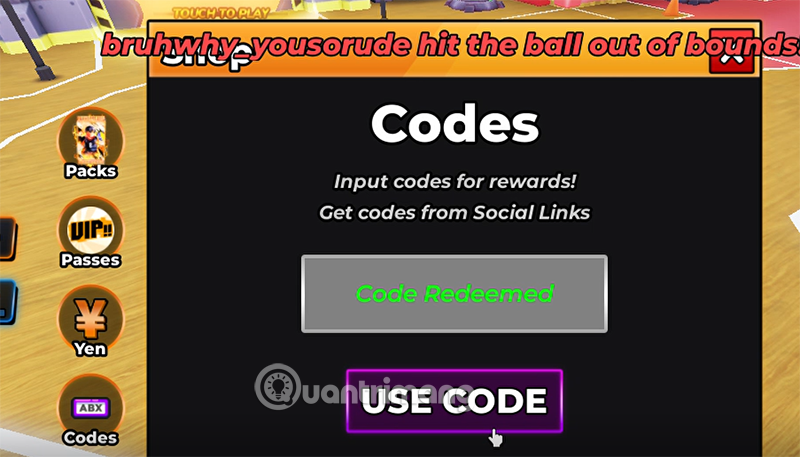
- Step 5: Click Use Code to receive the reward.
Specific instructions
Step 1: Select the Shop icon in the game's official interface.

Step 2: Select the Codes icon at the bottom of the feature list in the Shop. Enter all the codes in the code table above into the Type code here section and select Use Code to redeem the code for rewards.

Step 3: If the code you entered is still valid, you will see the message Code Redeemed. The reward will be transferred to your inventory or added to your available money and spins.
How to find more Haikyuu Legends codes?
To find the latest codes, follow the game's official community. You can join:
- Haikyuu Legends Discord Server: New codes are often shared by the developers in the announcement channel and compiled in the code channel.
- Developer X @Protori_ : This is where they post game updates and game codes from the developer.
- Groups Volleyball on Roblox: Join the developer's gaming group for more fun rewards.

If you don't want to find giftcodes in the game yourself, please save this website of ours. the editorial team. com. com always updates giftcodes not only for Haikyuu Legends, but also for Blox Fruit codes, Anime Vanguard codes, Fantastic Beasts codes.
FAQ About Haikyuu Legends
What is Haikyuu Legends?
Haikyuu Legends Roblox is a game based on the famous anime Haikyuu
Why is Haikyuu Legends important?
Take advantage of this time to receive rewards before the codes expire
How can you use or manage Haikyuu Legends effectively?
How to enter Haikyuu Legends code Quick Guide Follow these steps to enter the code and receive gifts with Haikyuu Legends code
Related Articles
 Latest CF Legends Codes and How to Redeem Them: Explained9 minutes read
 Full Code Dodgeball Legends Latest and How to Redeem4 minutes read
 Pokémon Legends ZA Mystery Giftcode and How to Redeem4 minutes read
 Latest Volleyball Legends Roblox Codes and How to Redeem Codes: Key Facts5 minutes read
 Latest Muscle Legends Codes (April 228 minutes read
 How to Redeem Roblox Anime Crusaders Codes and the Latest List of Codes9 minutes read
Reader Comments 0
Sign in with email or Google to join the discussion.