Table of Contents
The developer’s Dead Camp page on Roblox lists BIGUPD for a Golden Tung. Redeem it from the Codes menu inside the game. The developer can change or retire codes, so check the game page when a code stops working.
Dead Camp codes
| Code | Reward or status |
|---|---|
BIGUPD | Golden Tung, as listed by the developer |
RELEASE | Older code. Roblox Den lists the reward as Bagels equipment. |
3million | Older code. Current availability is unverified. |
How to redeem a Dead Camp code
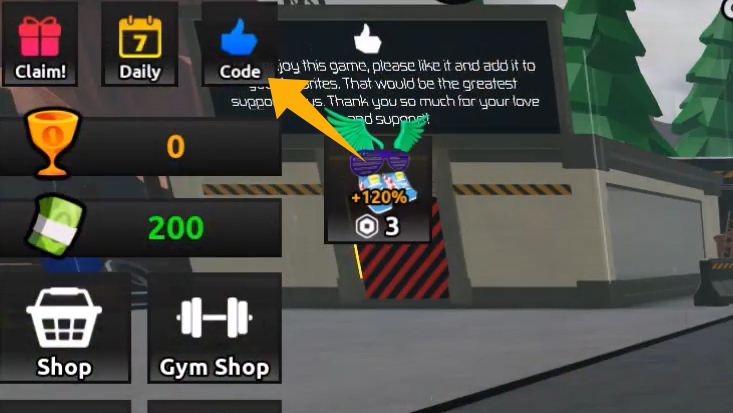
- Open Dead Camp in Roblox and select the Codes icon on the left side of the game screen.
- Enter the code in the box, then select Claim!
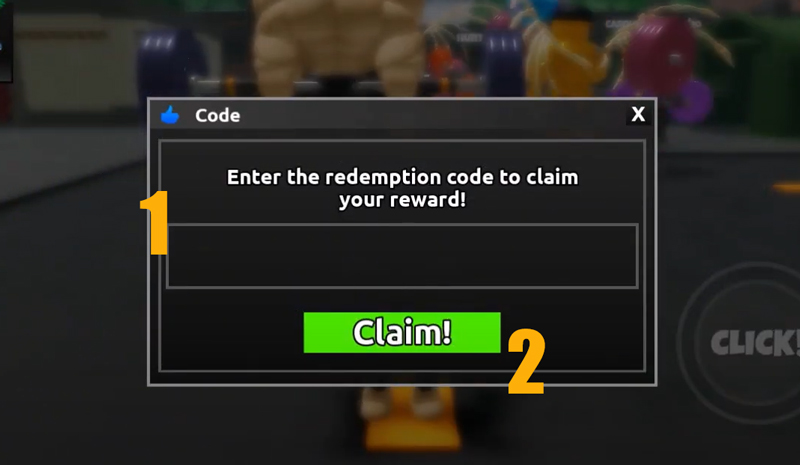
If the code fails, check that you copied the whole code without extra spaces. It may have expired or already been redeemed on your account.
Where to check for new codes
Start with the description on the official Roblox game page. For community announcements, follow the links from the game’s listing or developer profile.
Related Articles
 Latest Tay Du Mini Code and how to redeem code for rewards
 Latest Muffin Start Code and how to redeem code
 Latest Capybara Go codes and how to redeem them.
 Raise Animals Codes: How to Redeem and Check Older Listings
 Brainrot Evolution code full latest rewards and how to redeem code
 Latest Three Kingdoms 3D Code and how to redeem code
Reader Comments 0
Sign in with email or Google to join the discussion.