Table of Contents
Raise Animals codes are redeemed inside the Roblox experience, usually through its Settings menu. The codes below come from an older list and should not be treated as newly verified giveaways. Check the developer's current announcements and the game's response before counting on a reward.
Older Raise Animals codes
These entries are retained for reference. Current redemption and reward amounts have not been confirmed in-game, so no code is labeled active.
| Code | Current status |
|---|---|
SryForTheGamepassIssue | Older listing; not verified working |
10MVisitsTysm | Older listing; not verified working |
10KActiveTysm | Older listing; not verified working |
Release! | Older listing; not verified working |
FREE RANDOM ANIMALS | Older listing; not verified working |
Do not translate a code or remove punctuation. The spaces in FREE RANDOM ANIMALS and the exclamation mark in Release! are part of the listed strings.
How to redeem a code
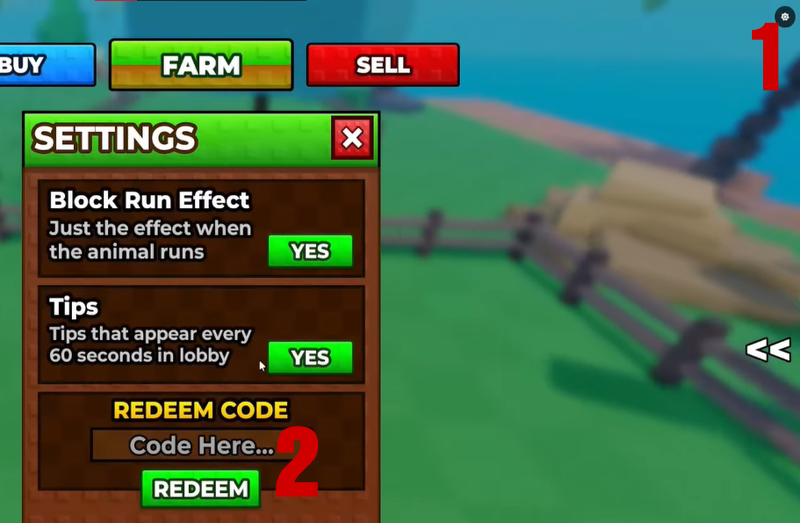
- Open Raise Animals in Roblox and finish any introductory steps required by the game.
- Open the gear-shaped Settings menu.
- Find the code field, shown as “Code Here” in the older interface.
- Paste one code exactly, without extra spaces before or after it.
- Select Redeem and read the response.
Interface labels can change. If you cannot find the field, check the current game description rather than entering the code on an unrelated website. A reward is only confirmed when the game accepts it and credits the account.
If a code does not work
- Expired: a correctly typed code can stop working when a promotion ends.
- Already redeemed: check whether you used it on this account earlier.
- Invalid: compare spelling, spaces, capitalization, and punctuation with the developer's announcement.
- Requirement not met: read the game's stated conditions, such as tutorial completion or playtime. Do not assume every code has the same rules.
If the interface appears stuck, rejoin once and check your balance before trying again. Repeated attempts will not reactivate an expired code.
Where to check for new announcements
Start with the Roblox experience's description and its linked developer community. Follow social or Discord links from that verified listing so you can distinguish the developer's channels from similarly named fan sites.
Code rewards belong to the specific game. Claims of free Robux, a required payment to unlock a code, or requests for your Roblox password are unrelated to ordinary in-game redemption. Do not install a “code generator” or provide login codes to claim a giveaway.
Use the game's current response to decide whether an old entry still works; a website's “new” label is not proof.
Related Articles
 Latest Tay Du Mini Code and how to redeem code for rewards
 Latest Muffin Start Code and how to redeem code
 The latest Escape Mad Beasts For Animals codes and how to redeem them.
 Latest Capybara Go codes and how to redeem them.
 Brainrot Evolution code full latest rewards and how to redeem code
 Latest Three Kingdoms 3D Code and how to redeem code
Reader Comments 0
Sign in with email or Google to join the discussion.