Table of Contents
If Copilot says your account is suspended or you cannot sign in, first identify what is actually blocked. Copilot access can fail because the entire Microsoft account is locked, a work or school administrator has disabled a license, the wrong account is signed in, or a paid subscription is inactive. Each situation has a different recovery path.
Do not rely on a fixed waiting period or create another account to bypass a restriction. Read the exact message, follow the link shown by Microsoft, and keep a copy of the error code and any case number.
1. Record the exact error
Take a screenshot that includes the message and error code, but hide your email address, phone number, payment details, recovery codes, and other private information before sharing it. Note where the problem appears: the Copilot website, Windows, a Microsoft 365 app, or the Microsoft account sign-in page.
Then try signing in to account.microsoft.com in a private browser window. This helps distinguish an account restriction from stale cookies, an extension conflict, or the wrong signed-in profile.
2. Determine which type of access is affected
- The Microsoft account is locked: Microsoft may ask for a security code or display a reinstatement link. Follow the on-screen unlock process.
- Only Copilot is unavailable: confirm that other Microsoft services work, check the Copilot service status or product message, and contact Copilot support if the restriction persists.
- A paid Copilot benefit is missing: verify the subscription and the account used for the purchase.
- A work or school account is affected: contact the organization's Microsoft 365 administrator. Consumer account recovery cannot change an organizational license or policy.
- The account may be compromised: secure the device and account before resuming normal use.
Unlock a locked personal Microsoft account
Microsoft's locked-account instructions say to sign in at account.microsoft.com and request a security code when that option is offered. The receiving phone number does not have to be attached to the account, but it must be able to receive text messages.
- Open the Microsoft account sign-in page and enter the affected account.
- Follow the security-code prompt exactly as displayed.
- Enter the code and create a new password if Microsoft requests one.
- After access is restored, review recent sign-in activity and security information.
If the screen does not offer a Next option and instead shows a link beginning with aka.ms/, use that specific link to submit the reinstatement information. Microsoft states that its Online Safety team reviews these requests by email. Do not submit repeated forms for the same case, because duplicate requests can delay review.
If you cannot complete sign-in or receive the code, use Microsoft's account sign-in help. A support agent cannot simply override account security or disclose account data; identity and reinstatement must go through the designated process.
Check the Copilot subscription and signed-in account
A billing problem is not the same as an account suspension. If the Microsoft account works but paid Copilot features do not, confirm that you are using the same personal account that purchased the subscription.
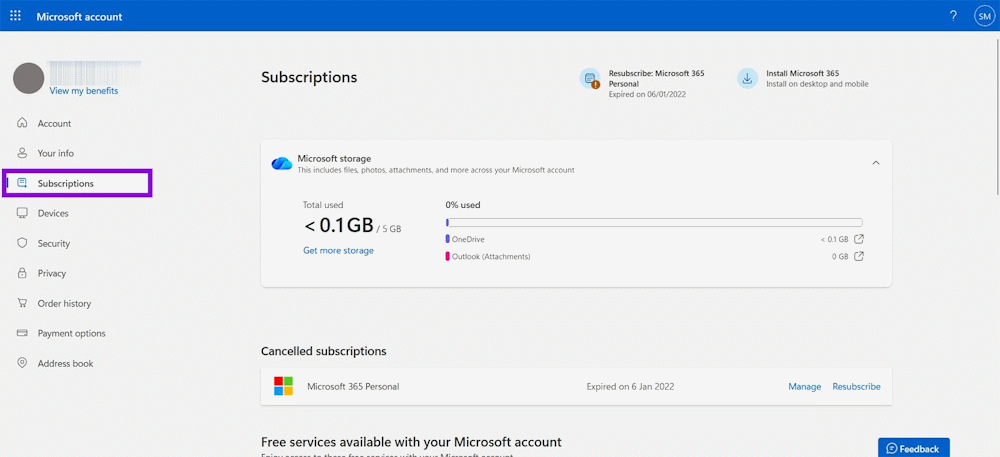
- Sign in at Services & subscriptions.
- Find the applicable Microsoft 365 or Copilot subscription and open Manage.
- Check its status, renewal date, payment method, and any past-due notice.
- If the purchase was made through Apple or Google, manage billing through that store.
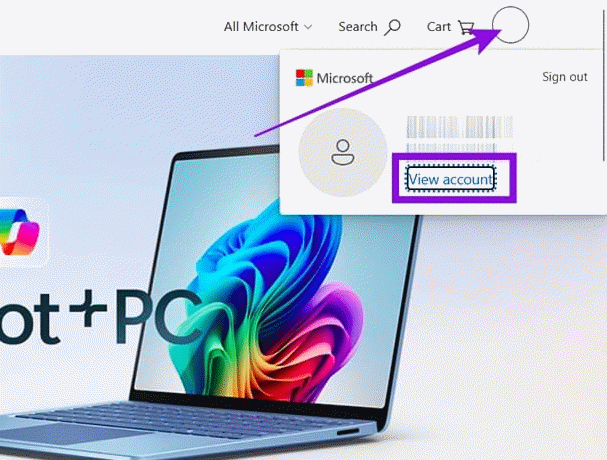
Do not purchase a second subscription until you have confirmed that the original subscription is absent or expired. Signing in with a different Microsoft account is a common reason a valid benefit appears to be missing.
If the account may have been compromised
Unexpected sign-in alerts, unfamiliar recovery information, or changes you did not make are signs to secure the account. Microsoft recommends checking the device for malware, changing or resetting the password, and reviewing account settings. Also:
- sign out of unfamiliar sessions;
- remove unknown aliases, forwarding rules, app passwords, and connected apps;
- replace any password reused on another site;
- enable two-step verification or a passkey; and
- do not provide security codes or recovery codes to anyone claiming to be support.
Use Microsoft's compromised-account guide for the current sequence.
Work or school Copilot accounts
Access to Microsoft 365 Copilot or an organization's Copilot service is controlled by the tenant's licenses, policies, identity system, and administrator settings. If the same work account can sign in but Copilot is missing, ask the IT administrator to check:
- whether the correct license is assigned;
- whether the user or sign-in is blocked in the organization's identity service;
- whether a conditional-access or compliance policy denied the session;
- whether Copilot is enabled for the relevant app and account; and
- whether the organization has a service advisory affecting access.
Provide the administrator with the timestamp, app or URL, screenshot, and correlation or request ID if the error supplies one. Do not post organizational diagnostic details on a public forum.
Contact Microsoft Support when the official flow does not work
For a Copilot product, subscription, or billing issue that is not resolved by the steps above, open Contact Microsoft Support, sign in if possible, select the relevant product, and describe the problem. Available channels depend on the product, account, and region.
Include:
- the affected account type, without sharing the password;
- the exact error text and where it appears;
- the approximate time the issue began;
- the steps already attempted;
- the subscription order number if billing is involved; and
- the existing support or reinstatement case number.
Avoid making recovery harder
- Do not submit multiple reinstatement forms for the same restriction.
- Do not pay third parties that promise to unlock a Microsoft account.
- Do not share passwords, security codes, or recovery codes with support contacts.
- Do not use automation or account switching to evade a usage restriction.
- Do not assume an inactive subscription proves that the account was suspended.
- Do not repeatedly request verification codes after a usage-limit message; follow Microsoft's troubleshooting guidance instead.
The fastest safe route is determined by the exact message: complete the security-code flow for an ordinary lock, use the displayed reinstatement link for a policy lock, ask an administrator about a work account, and use Services & subscriptions for billing. Keep all communication inside official Microsoft pages and support channels.
Related Articles
 How to Recover a Locked Facebook Account: Step-by-Step Guide4 minutes read
 How to Unsubscribe and Delete Your Copilot Account3 minutes read
 How to Recover Locked WhatsApp Account: Complete Guide4 minutes read
 Instructions to Temporarily Deactivate Icloud3 minutes read
 How to Unlock Your Yahoo!: Yaoo3 minutes read
 How to Recover a Hacked ROBLOX Account: Clear Instructions7 minutes read
Reader Comments 0
Sign in with email or Google to join the discussion.