Table of Contents
IOS 26 features Visual Look Up, which automatically recognizes and explains laundry symbols. Just take a photo of any clothing label and your iPhone will explain what all the symbols mean.
IOS 26 has a Visual Look Up feature that automatically recognizes and explains laundry symbols. Just take a picture of any clothing label and your iPhone will explain what all the symbols mean. So you don't have to manually look up each information and symbol anymore. Here's how to read clothing labels on your iPhone.
How to read clothing label information on iPhone
Step 1:
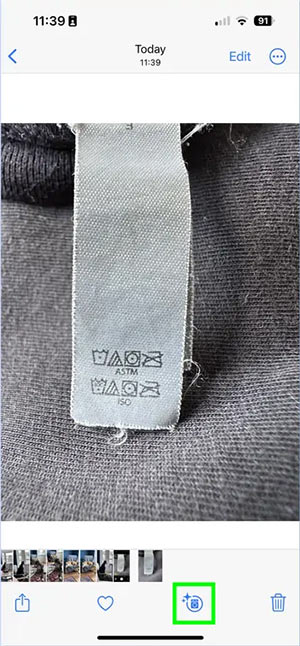
Open the Camera app on your iPhone and Take a clear photo of the clothing label with the Care instructions. Make sure the symbols are well lit and clear for best recognition results.
Open the newly captured label image, then Tap the "i" info button At the bottom of the screen.
If Visual Look Up detects Laundry symbols, you'll see the information icon change to a washing machine symbol with sparkles around it.
Step 2:
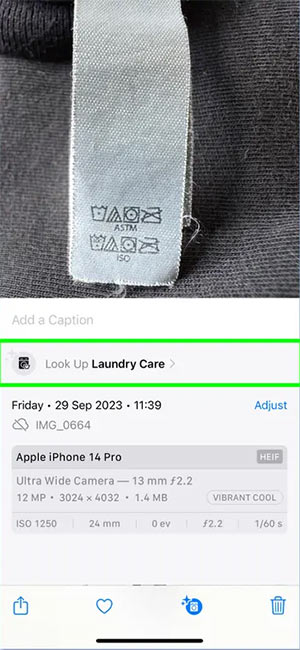
Tap Look Up Laundry Care To see an explanation of each laundry icon Visual Look Up has identified.
Step 3:
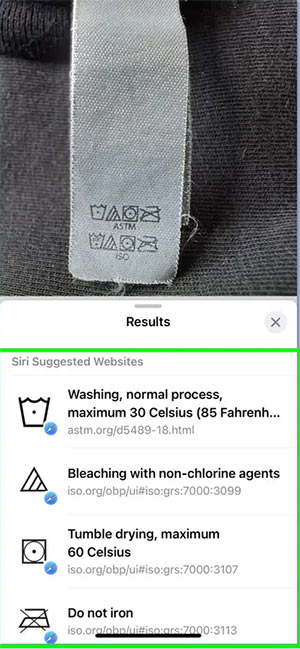
Below the display is the meaning of each symbol in plain English, including specific instructions on washing temperature, drying method, ironing settings and special care requirements.
FAQ
How do you read clothing label information on iPhone?
In practical terms, iOS 26 features Visual Look Up, which automatically recognizes and explains laundry symbols. Just take a photo of any clothing label and your iPhone will explain what all the symbols mean.
What should you check before getting started?
Review the requirements, compatible device or software version, and any warnings described in the guide before making changes.
What should you do if the steps do not work?
Repeat the steps in order, confirm that your app or system is up to date, and review the troubleshooting details provided above.
Related Articles
 Gmail Supported 'Label in Label'2 minutes read
 5 Best Ebook Reader Apps for iPhone6 minutes read
 Create Label in Word 2010: Instructions3 minutes read
 What Is the Volume Label for a Volume?8 minutes read
 10 Great Benefits of Reading Every Day9 minutes read
 8 Popular Book Reading Software on iPhone Worth Trying15 minutes read
Reader Comments 0
Sign in with email or Google to join the discussion.