Table of Contents
When you sign in to Copilot with your Microsoft account, you can share a Copilot conversation or page as a link.
When you sign in to Copilot with your Microsoft account, you can share a Copilot chat or page as a link. Once the link is shared, the recipient will see a copy of your conversation from the moment the link was created. If you continue the conversation, the recipient will not see any content you added after the link was created. Here's how to copy a Copilot chat link.
How to copy the link of the Copilot chat
Step 1:
You log in to Copilot on your computer, then Click on your avatar And Select Settings In the displayed list.
Switch to the new interface, the user Selects Privacy .
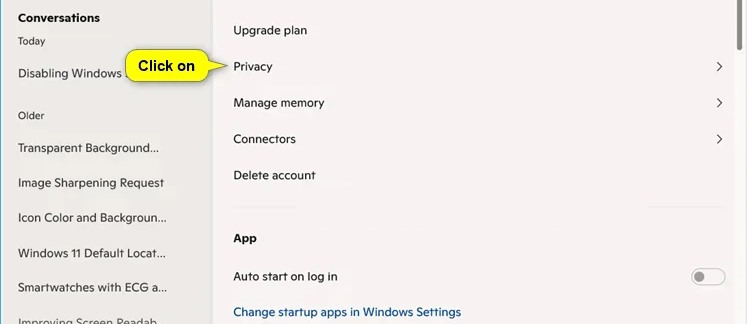
Step 2:
Switch to the new interface and continue To select Manage shared conversations To manage the conversations you want to share.
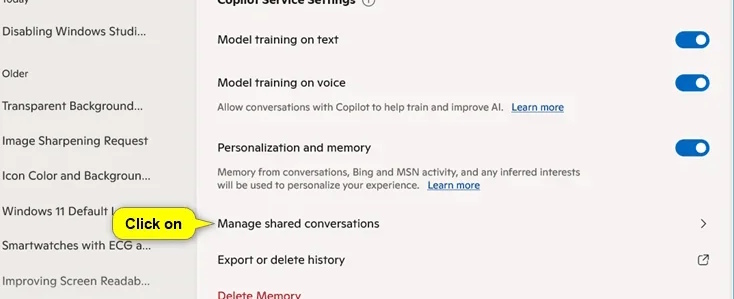
Step 3:
Now we just need To click on the copy icon Of the shared link whose URL you want to copy. You can copy the link of the shared conversation or Copilot page.
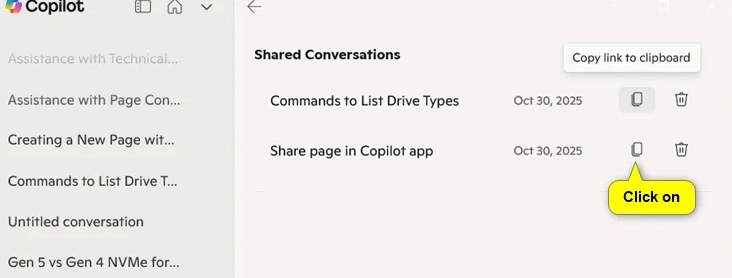
When you create a shared link, anyone with the link can access it.
FAQ
How do you copy the chat link Copilot in Windows?
In practical terms, when you sign in to Copilot with your Microsoft account, you can share a Copilot conversation or page as a link.
What should you check before getting started?
Review the requirements, compatible device or software version, and any warnings described in the guide before making changes.
What should you do if the steps do not work?
Repeat the steps in order, confirm that your app or system is up to date, and review the troubleshooting details provided above.
Related Articles
 How to Share Chat on Copilot4 minutes read
 How to Turn Off Copilot in Windows 11: Step-by-Step Guide4 minutes read
 How to Install Copilot on Whatsapp3 minutes read
 minutes read
 Instructions to Enable Hey Copilot Command Windows 113 minutes read
 Instructions on Disabling New Tab Copilot on Microsoft Edge3 minutes read
Reader Comments 0
Sign in with email or Google to join the discussion.