Table of Contents
With its clean GNOME interface, Carburetor fits perfectly into your Linux desktop. Let's explore its main features, along with how to install and use it on Linux.
Have you ever wished you could surf the web without leaving a trace? Maybe you're tired of ads following you everywhere, or maybe you just want to keep your online activity private. Sure, you could use a VPN or set up Tor manually, but that can be difficult and time-consuming. That's where Carburetor comes in. It's a simple, one-click Linux app that runs a local Tor proxy, meaning it takes all the data coming in and out of your computer and routes it securely through Tor's multiple layers of encryption.
With its clean GNOME interface, Carburetor fits perfectly into your Linux desktop. Let's explore its main features, along with how to install and use it on Linux.
Carburetor Setup
Carburetor is available as a Flatpak on Flathub. In practice, you can get consistent installation and reliable performance on all major Linux distributions. Before you begin, however, make sure Flatpak is installed on your system. Most modern Linux distributions include Carburetor by default or allow it to be easily enabled.
Once Flatpak is set up, install Carburetor with the following command:
Flatpak install flathub io.frama.tractor.carburetorThat's it! Flatpak packages the app with all its dependencies, so you don't have to worry about Python packages, GTK runtime, or version conflicts.
Carburetor is also available in AUR (Arch User Repository) and some community repositories for other distributions. However, for the latest and most stable releases of Carburetor, you should use the Flatpak installation method.
Note: Since Flatpak runs in a Sandbox environment, Carburetor may request access to network resources or system functions. This is completely normal and necessary to set up local proxies and manage network routing.
How to use Carburetor
Once installed, launch it from the Applications menu or by using the following command:
Flatpak run io.frama.tractor.carburetorYou'll see a simple, clean window. Click Connect , and Carburetor will automatically start the Tor daemon and establish a secure connection.
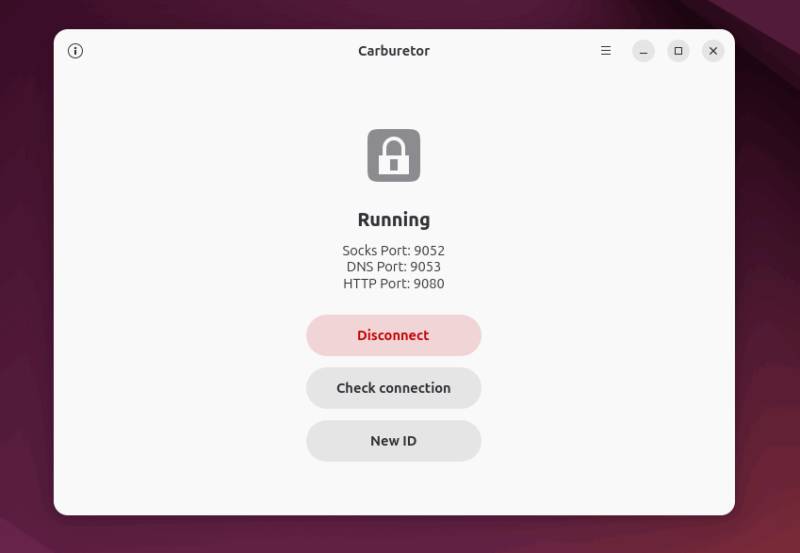
By default, Carburetor creates a SOCKS5 proxy on your local machine at address 127.0.0.1 and port 9052. This proxy acts as a private internal gateway to the Tor network that only your computer can access.
Once Carburetor is connected, it's time to verify that it's actually working. Simply open a web browser and visit any website that displays your IP address. If Carburetor is working, you'll see an IP address that isn't yours.
Some sites, like the Check Tor Project, even confirm that you're using Tor, which is a sign that you're now invisible to anyone trying to track your real location.
Advanced options
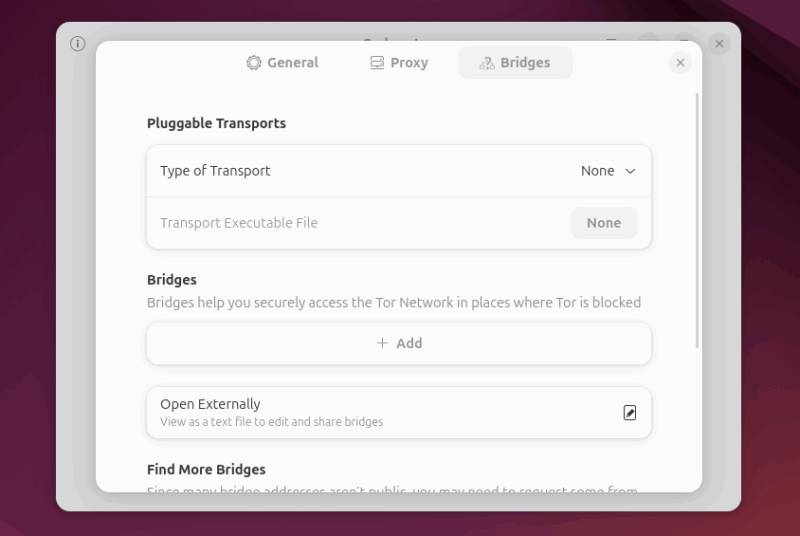
Carburetor also gives you some advanced options, such as changing the proxy port, checking connection logs, setting up a bridge if you're in a Tor-blocked area, and selecting specific exit nodes or countries (if supported). You can access these options from the Preferences menu.
Remember that Tor anonymizes your connection, not your identity. Avoid logging into accounts associated with you, just use HTTPS sites whenever possible, and be prepared for slower speeds as Tor routes traffic through multiple relays.
Manual proxy configuration
By default, Carburetor exposes a SOCKS proxy on 127.0.0.1 (localhost). On most systems, the default port is 9050, although it may be slightly different depending on your setup (some configurations use 9052 or others). To route your applications through Tor, simply point them to this SOCKS proxy.
For example, in Firefox, go to Preferences -> Network Settings And select Manual proxy configuration . Then set SOCKS Host To 127.0.0.1 , Port To 9050 , and port type to SOCKS v5 . Also, check DNS Proxy when using SOCKS v5 to prevent DNS leaks.
Once saved, visit Check Tor Project again to verify your connection. It should say ' Congratulations, this browser is configured to use Tor'. If not, double-check your proxy settings or make sure Carburetor is still connected.
Many people are looking for easy ways to hide themselves online, and the Carburetor Linux tool makes it simple even for beginners. Additionally, you can also apply some useful methods to improve the privacy and security of your Linux system, or even consider privacy-focused Linux distributions.
FAQ
How do you use carburetor to make yourself invisible online: step-by-step guide?
In practical terms, with its clean GNOME interface, Carburetor fits perfectly into your Linux desktop. Let's explore its main features, along with how to install and use it on Linux.
What should you check before getting started?
Review the requirements, compatible device or software version, and any warnings described in the guide before making changes.
What should you do if the steps do not work?
Repeat the steps in order, confirm that your app or system is up to date, and review the troubleshooting details provided above.
Related Articles
 Hidden: How to Make an Invisible File5 minutes read
 How to Send Invisible Messages on iPhone2 minutes read
 This Little Trick Can Make Your Widget Invisible on iOS 143 minutes read
 Samsung Launches an Invisible Keyboard That Works with the Selfie3 minutes read
 Anonymous on Facebook, Hide Activities on Facebook, Completely7 minutes read
 How to Make Vietcombank Online Card4 minutes read
Reader Comments 0
Sign in with email or Google to join the discussion.