Table of Contents
Keep TeamViewer updated through its built-in updater whenever possible. In the current TeamViewer Remote interface, you can check manually from Help > Check for new version or configure automatic updates in the device's advanced settings. TeamViewer Classic uses a different menu, so the correct path depends on which interface you have.
Before updating an unattended or remote PC, save work, confirm that somebody can recover the device if the connection does not return, and make sure the new version is allowed by your organization's license and deployment policy.
Check which TeamViewer interface you use
- TeamViewer Remote: the current interface, with account sign-in and device settings.
- TeamViewer Classic: the older full client, usually identified by its three-line menu or classic gear-shaped Options control.
- TeamViewer Host or managed deployment: an unattended endpoint that may receive settings from an administrator policy or MSI deployment.
Do not follow a Classic screenshot blindly if your menus look different. TeamViewer continues to document both paths.
Update TeamViewer Remote manually
- Open TeamViewer and sign in to the account used to manage the device.
- Select Help in the lower-left area.
- Select Check for new version.
- If an update is available, select Update.
- Allow TeamViewer to close, install the update, and restart.
- Open Help or the About information again and confirm that the version changed.
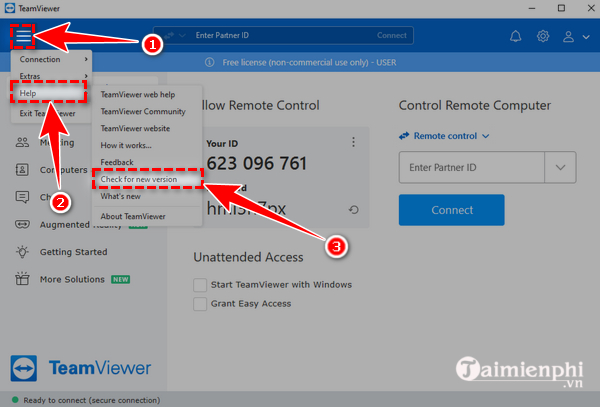
If the updater says the installation is current, no further action is needed. Avoid downloading an unofficial “newer” build merely because a third-party page shows a different version number.
Enable automatic updates in TeamViewer Remote
- Open Settings.
- Select Go to this device's settings.
- Open Advanced settings, then select Open advanced settings.
- Find the update controls and choose the allowed automatic-update level. TeamViewer recommends keeping auto-update enabled.
- Save the settings and confirm that they are not being overridden by an organization policy.
TeamViewer's current documentation says the client checks for updates weekly by default. A managed company device may use a centrally enforced schedule instead; do not work around it by installing a consumer package manually.
Update TeamViewer Classic
Check manually
- Open TeamViewer Classic.
- Select the three-line menu.
- Select Check for new version.
- If prompted, confirm the update and let the application restart.
Turn on automatic updates
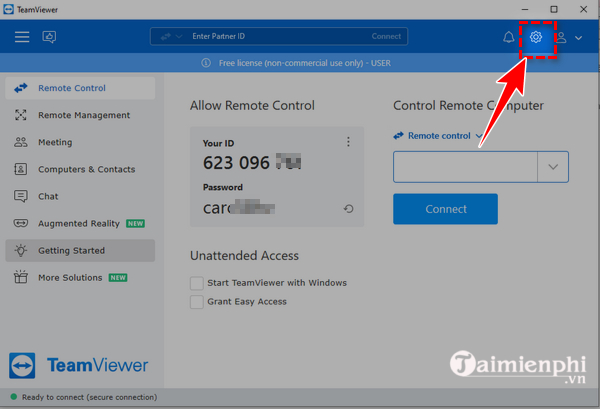
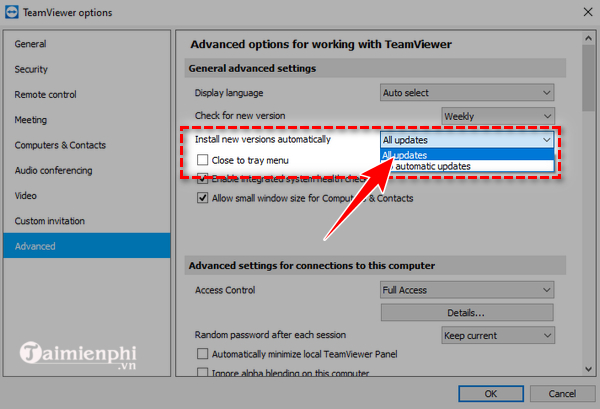
- Open the Classic full client and select the gear-shaped Options control.
- Select Advanced.
- Find Install new versions automatically.
- Choose All updates if your license and organization permit major-version updates, then save the setting.
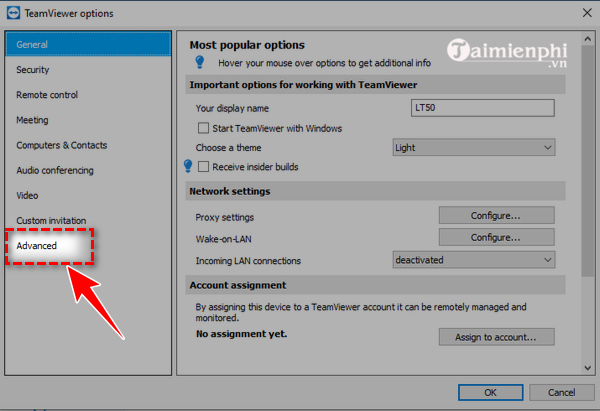
The old guide referred to version 15.24.5, but that number is not a target to install today. Use the newest version offered by TeamViewer for your supported product channel, operating system, and license.
Update a computer during a remote session
- Connect to the authorized remote device.
- Save open work and tell the remote user that TeamViewer will restart.
- In the remote-control toolbar, select Remote update. In some layouts it is under Actions > Remote Update.
- Review the current and proposed versions, then confirm Update.
- Wait while TeamViewer closes and installs the new version. The official workflow attempts to reconnect automatically afterward.
- Confirm that the device appears online and that a new remote session works.
Do not remotely update the only access path to a critical server without a recovery method such as local staff, approved out-of-band management, or a documented maintenance window.
Managed and business deployments
Business, Premium, Corporate, and Tensor administrators can use TeamViewer policies to control how frequently devices check and which update types install automatically. Enforcing the policy prevents end users from changing the update selection. This is preferable to configuring every endpoint by hand.
For larger Windows deployments, TeamViewer recommends its MSI package for eligible Corporate and Tensor licenses. Test an update on a representative group before broad deployment, especially when scripts, custom Hosts, remote printing, or security controls are part of the environment.
If the update fails
- Restart TeamViewer and Windows: a pending restart or locked service file can prevent replacement.
- Confirm administrator rights: a machine-wide TeamViewer installation may require elevation. Ask the administrator rather than disabling controls.
- Check free disk space: the installer needs room for the new files and temporary extraction.
- Use the official installer: if the built-in updater repeatedly fails, download the current package from TeamViewer's official site and run it over the existing installation. Preserve the existing configuration when the installer offers that choice.
- Check policy: application control, a TeamViewer policy, or an MSI-managed installation may intentionally block user updates.
- Check security software logs: do not switch off antivirus protection. Verify the download and ask the administrator or vendor to resolve a false positive.
- Keep both ends compatible: update the local client if it cannot connect to a much newer remote endpoint.
Verify the update
- Open TeamViewer's Help or About information and record the installed version.
- Confirm that the TeamViewer service starts if the device needs unattended access.
- Test an authorized connection from the normal controlling device.
- Check that assignment, Easy Access, device groups, custom Host branding, and policy settings remain intact.
- Review the automatic-update setting so the same device does not remain outdated again.
The official TeamViewer update guide documents current Remote, Classic, automatic, manual, and in-session update paths. For other remote-access choices, compare TipsMake's remote computer control software overview and its broader list of remote access tools.
Security note
Remote-access software is a high-value target because it can expose a full desktop. Apply supported updates promptly, remove unused clients, require strong account authentication, review assigned devices, and disable unattended access that is no longer justified. An update improves the software but does not make an unknown support caller trustworthy—never grant a remote session solely because someone claims to represent TeamViewer, a bank, or a government agency.
Related Articles
 Detecting Security on TeamViewer Allows Hackers to Steal the System3 minutes read
 How to Download the Latest Teamviewer 14 for New Users3 minutes read
 How to Update Itunes to the Latest Version6 minutes read
 How to Update Your iPhone to the Latest iOS Version5 minutes read
 How to Install the Latest Version of TeamViewer 15 to Remotely Control a PC4 minutes read
 What Is TeamViewer? Explained2 minutes read
Reader Comments 0
Sign in with email or Google to join the discussion.