Table of Contents
This article examines Snapchat and explains the main developments, practical implications, and context readers should understand.
Snapchat Overview
Although location sharing is quite useful, you'll definitely want full control of this feature. With Snap Map you can customize location sharing based on demand. For example, you can disable Snap Map completely or choose location sharing for a few individuals.
Note, Snapchat uses your location for some features like Geofilters, Snap Map and Search. So, if you turn off location positioning, you will not be able to get relevant search results or use Geofilters.
How to turn off location sharing in Snapchat on your phone
Note: Steps to perform the same location sharing off on iPhone and Android.
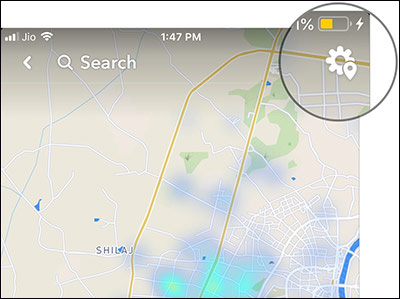
Step 1. Open the Snapchat application, use your finger to drag the screen as shown to open Snap Map.

Step 2. Now, click on the gear icon in the top right corner.
Step 3. Here, you have 3 options:
- Ghost mode (Disable location sharing)
- My friend (Display location for all friends using Snapchat)
- Only These Friends (Show only locations for certain people)
If you don't want anyone to see your location, turn on the switch next to Ghost Mode. Then, select the time period you want to turn off location sharing.
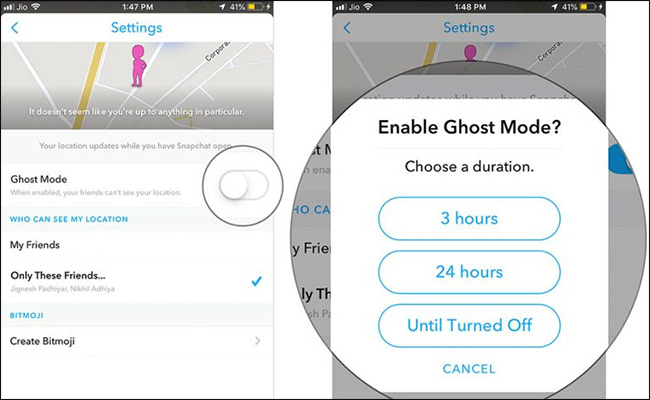
For example, you can turn it off for 3 hours, 24 hours or until you turn the switch back on.
If you want to display the location for some friends, click Only These Friends, then select in the list of friends. Finally, touch Done to confirm.
So done, you can prevent others from knowing your location by turning on the switch next to Ghost Mode.
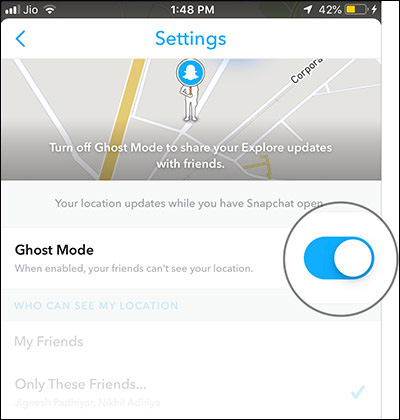
In addition to the above, you can also access the Setting application and edit location permissions.
- Instructions for using Snapchat without sharing the location
- Instructions for sharing location in iMessage via Apple Maps
- Instructions for sending Google Maps location on PC to smartphone
- Did you know how to block Facebook tracking?
FAQ
How does Snapchat work?
This article examines Snapchat and explains the main developments, practical implications, and context readers should understand.
What should you prepare before using this method?
Snapchat Overview Although location sharing is quite useful, you'll definitely want full control of this feature.
What should you do if the process does not work as expected?
With Snap Map you can customize location sharing based on demand.
Related Articles
 Instructions for Using Snapchat Without Sharing the Location2 minutes read
 How to Turn Off Location Positioning on iOS 114 minutes read
 How to View Someone's Location on Snapchat7 minutes read
 5 Easy Location Sharing Apps on Android7 minutes read
 Turn Off Location Sharing on Android: Step-by-Step Guide5 minutes read
 Snapchat Successfully Helped a Kidnapped Hostage3 minutes read
Reader Comments 0
Sign in with email or Google to join the discussion.