Table of Contents
Like Windows Update, you can no longer permanently disable automatic app updates in the Microsoft Store. The Store has removed the persistent on/off switch and now only lets you pause updates for 1 – 5 weeks. While this is better for security, it's annoying for users who want complete control. If you want to block automatic app updates, there are a few settings you can try.
Turn off Microsoft Store update schedule
Step 1:
You type Task Scheduler in the search bar on your computer. In the new interface, you access the path Task Scheduler Library > Microsoft > Windows > InstallService .
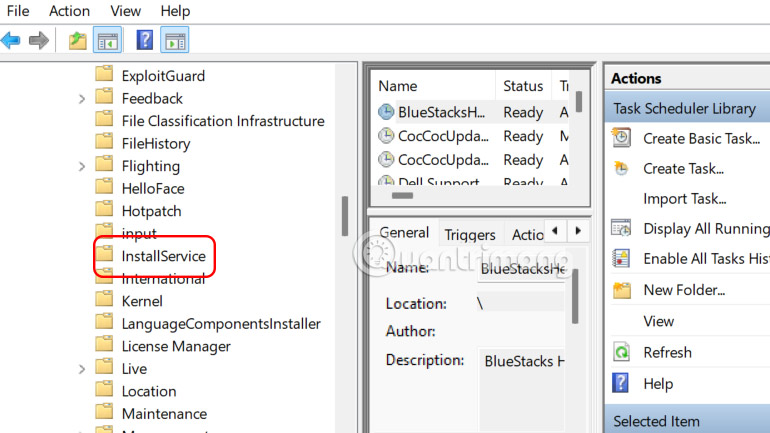
Step 2:
Disable both ScanForUpdates and ScanForUpdatesAsUser entries by right-clicking on them and selecting Disable .
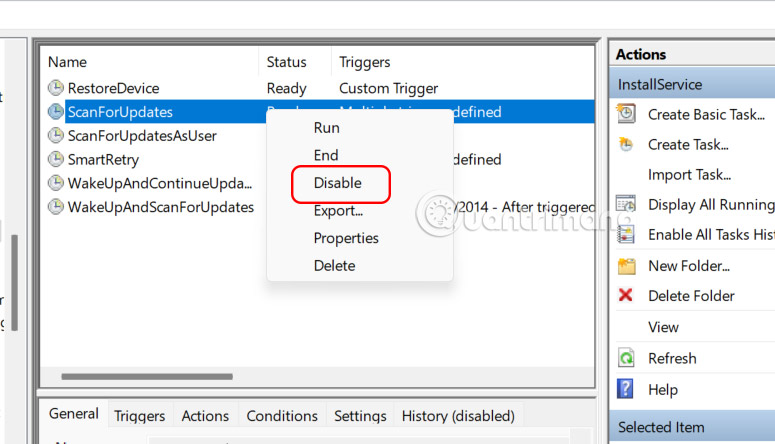
Disable Microsoft Store installation service
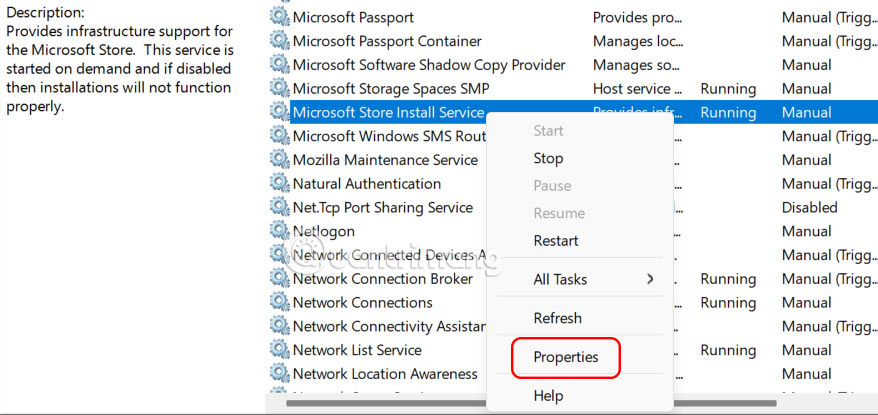
You type services in the search bar on your computer. We find the Microsoft Store Install Service service , then right-click and select Properties .
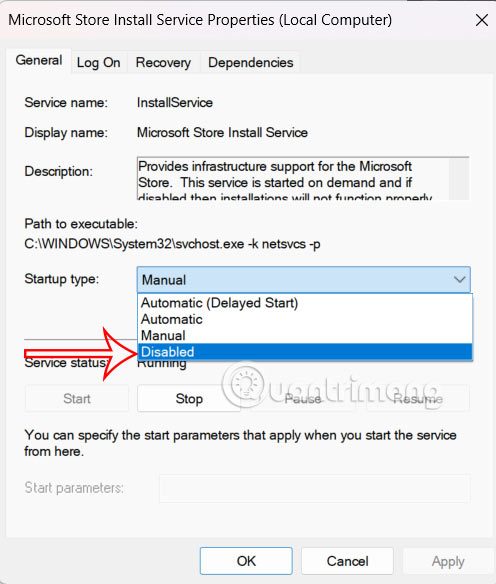
Click the Stop button to stop the current session, then select Disabled in the Startup type field .
Use Policy Editor to disable application updates
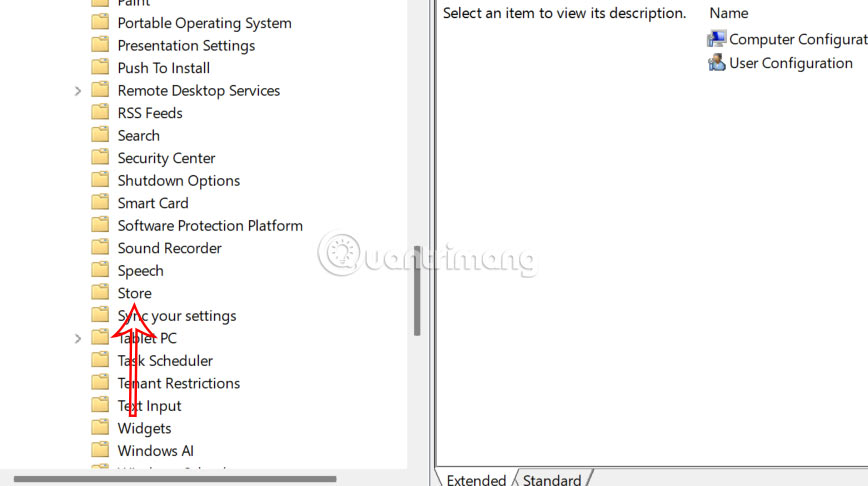
You open Edit Group Policy on your computer, then access the path Computer Configuration → Administrative Templates → Windows Components → Store .
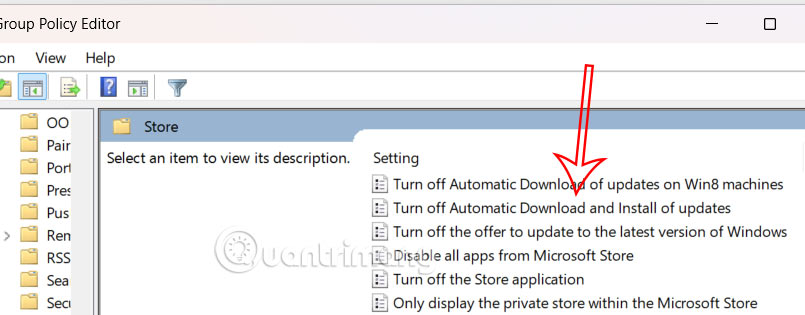
In the right panel, double-click Turn Off Automatic Download and Install of updates as shown.
Finally, you will click Enabled to activate the automatic download and update mode of applications on Microsoft Store.
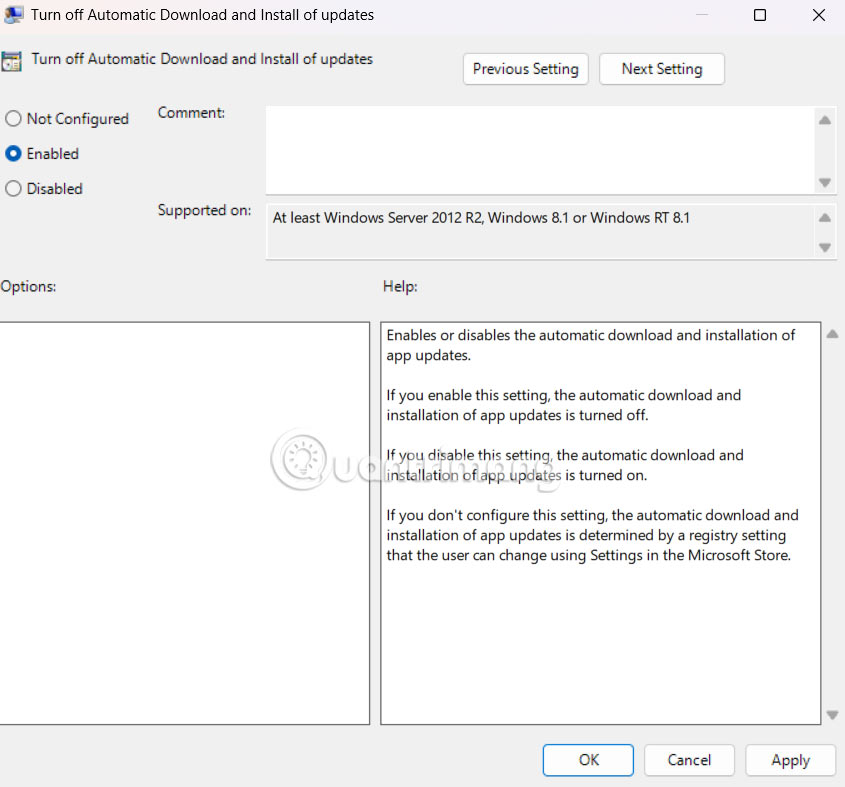
Once enabled, the automatic updates setting in the Microsoft Store will be turned off and grayed out.
If there is an app you don't want to update, you can search for the app name directly to see if the developer offers a direct download version.
Final Thoughts
Following the steps in order and checking version-specific settings should make it easier to Turn Off Automatic App Updates in Microsoft Store. If an option looks different, verify the device, app, or operating-system version before changing additional settings.
FAQ
What is the best way to Turn Off Automatic App Updates in Microsoft Store?
Start with the requirements described in the article and follow the steps in order. Like Windows Update, you can no longer permanently disable automatic app updates in the Microsoft Store. The Store has removed the persistent on/off switch and now only lets you pause updates for 1 – 5 weeks.
What should you know about Turn off Microsoft Store update schedule?
You type Task Scheduler in the search bar on your computer. In the new interface, you access the path Task Scheduler Library > Microsoft > Windows > InstallService.
What should you do if the instructions do not match your screen?
Check the device, software version, account permissions, and regional settings. Interfaces can change after updates, so use the closest matching option and consult the official support documentation when necessary.
Related Articles
 Why Should You Never Turn Off Automatic Application Updates on Your Phone6 minutes read
 How to Stop Windows Updates on Your PC10 minutes read
 How to Turn Off Automatic iOS 26 Updates on iPhone: Step-by-Step Guide3 minutes read
 Instructions to Turn Off Chrome Automatic Updates in Windows4 minutes read
 How to Turn Off Automatic Software Updates on macOS Sierra4 minutes read
 How to Turn Off Automatic Video Playback on App Store iOS 114 minutes read
Reader Comments 0
Sign in with email or Google to join the discussion.