Table of Contents
This updated guide examines Figure: How to Kill Vlove Virus and organizes the essential facts, background, and practical takeaways in clear American English.
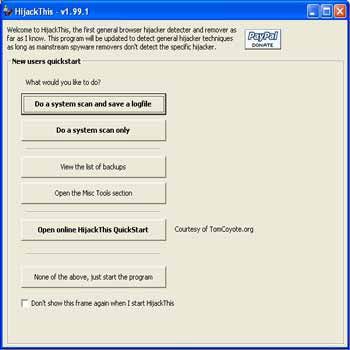 Figure 1
Click " Do a system scan and save a logfile " ( Figure 1 )
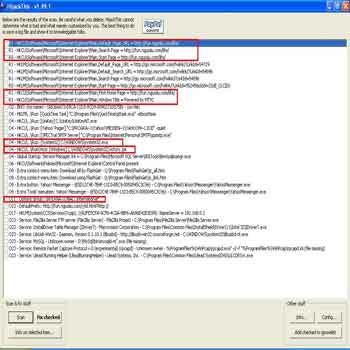 Figure 2
The areas that are highlighted in red ( Figure 2 ) are the viruses created by the virus. Please check all the keys then check the checked to remove them. ( Figure 3 ). You find and click on the following keys: R1-HKCUSoftwareMicrosoftInternet ExlplorerMain, Default_Page_URL = http://fun.nguoiiu.com/life/ R1 - HKCUSoftwareMicrosoftInternet ExlplorerMain, SearchPage = http://fun.nguoiiu.com/life/ R0 - HKCUSoftwareMicrosoftInternet ExlplorerMain, Start Page = http://fun.nguoiiu.com/life/ R1 - HKCUSoftwareMicrosoftInternet ExlplorerMain, First Home Page = http://fun.nguoiiu.com/life/ R1 - HKCUSoftwareMicrosoftInternet ExlplorerMain, Window Title = Power by MTVC O4 - HKCU. Run: (System32) C: WindowsSystem32.exe O4 - HKCU. RunOnce: (Windows) C: (Windows System32victory.jse O11 - Options Group: (International) International *
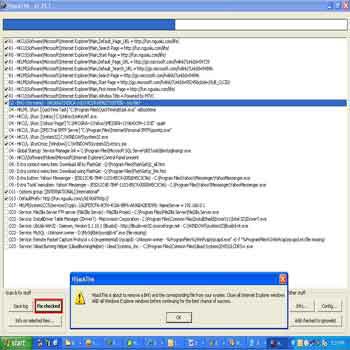 Figure 3
4. Delete files using Killbox: You need to delete the following files: C: WINDOWSsystem32.exe ( Figure 4 ) C: WINDOWSsystem32victory.jse
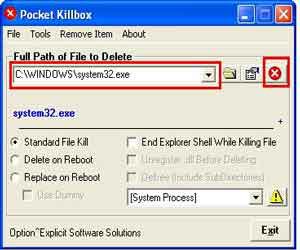 Figure 4
FAQ
What is Figure: How to Kill Vlove Virus about?
It provides a structured overview of figure, explains the main context, and highlights practical takeaways for readers.
Why does this topic matter?
Understanding the main concepts helps readers evaluate the issue, avoid common mistakes, and make better-informed decisions.
How should readers use this information?
Use the guidance as a practical starting point, confirm details that may have changed, and follow current product, safety, or security recommendations.
Related Articles
 Add a Virus Spread Through Yahoo! Im4 minutes read
 The Good News: Finding Antibodies Can Kill 99% of the HIV Virus Strain3 minutes read
 Destroy the Autorun Virus in USB or on PC with 4 Simple Ways7 minutes read
 How to Kill Kido: How to Kill Net-worm. Win32. Kido Virus6 minutes read
 No Need to Use an Antivirus Program, This Is How to Get Rid of4 minutes read
 How to Fix When Facebook Is Infected with Virus4 minutes read
Reader Comments 0
Sign in with email or Google to join the discussion.