Table of Contents
To connect n8n’s Discord node through OAuth2, create a Discord application, copy the callback URL shown by n8n, register that exact URL in the Discord Developer Portal, enter the client ID and secret in n8n, and authorize the app for a test server.
The original title called this a webhook credential, but the illustrated setup uses Discord OAuth2 API credentials. A webhook is a simpler alternative when a workflow only needs to post messages to one channel; OAuth2 is appropriate when the Discord node needs broader, server-authorized operations.
Choose OAuth2 or a webhook
| Method | Use it when | Main security boundary |
|---|---|---|
| Discord OAuth2 / bot installation | The n8n Discord node must perform supported server, channel, member, or message operations. | Application scopes plus server and channel permissions |
| Incoming webhook | The workflow only needs to send messages to one channel. | The secret webhook URL can post to its channel |
Do not automate a normal Discord user account. Discord’s OAuth2 documentation explains that automation should use bot users or supported OAuth2 flows, not self-bots.
Before you begin
- You need permission to create or manage a Discord application.
- You need Manage Server or equivalent authority for the test server where the app will be installed.
- Your n8n instance must have a stable editor URL; use HTTPS for an internet-accessible deployment.
- Decide the exact Discord actions the workflow will perform so you can grant minimum permissions.
1. Create a Discord OAuth2 credential in n8n
Open n8n and select Credentials in the navigation. Creating the credential first gives you the callback URL that Discord must accept.
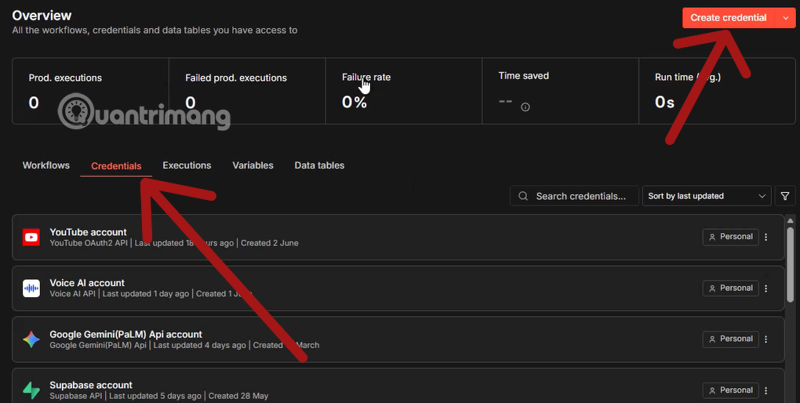
Choose Create credential.
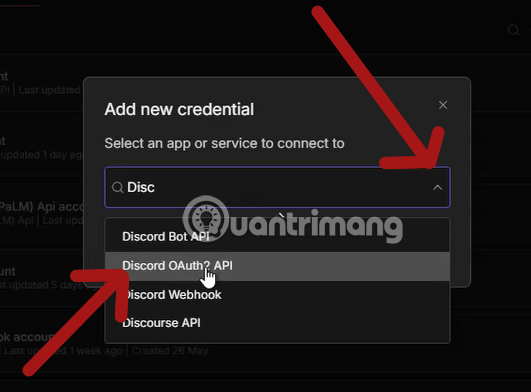
Search for Discord OAuth2 API, select it, and continue. The current n8n Discord credential documentation describes both bot and OAuth2 setup options; follow the credential type displayed by the node in your installed version.
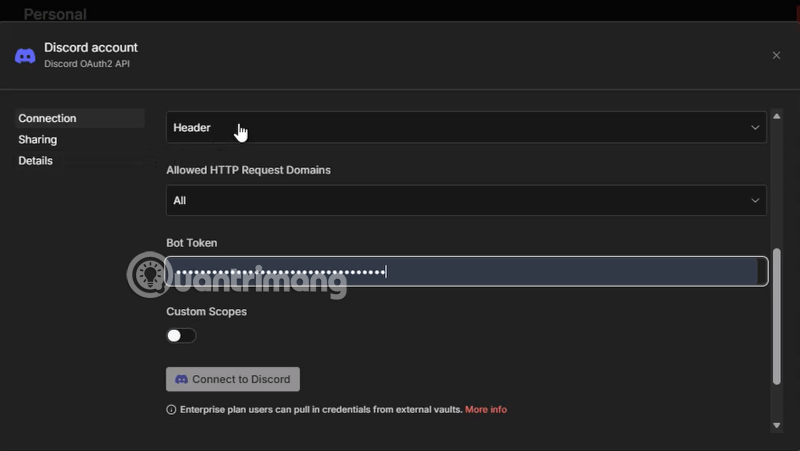
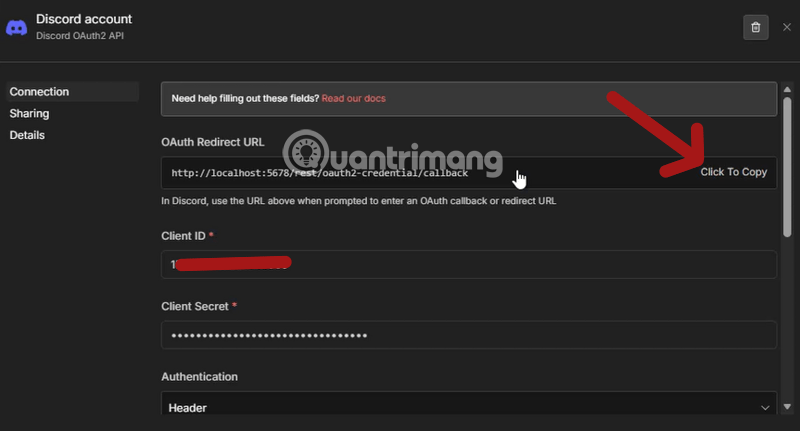
Copy the OAuth Redirect URL. It normally ends with:
/rest/oauth2-credential/callbackCopy the whole value, including protocol, hostname, port if present, path, and any trailing slash. Do not substitute a webhook URL or construct the address manually.
If a deployed n8n server shows localhost or an internal hostname, fix n8n’s public editor/base URL and reverse-proxy configuration first. Discord must redirect the user’s browser to a reachable address.
2. Create a Discord application
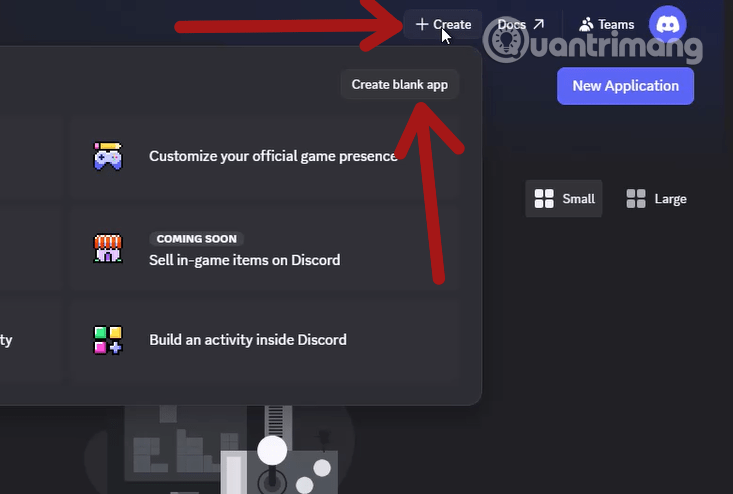
Open the Discord Developer Portal in a separate tab and sign in.
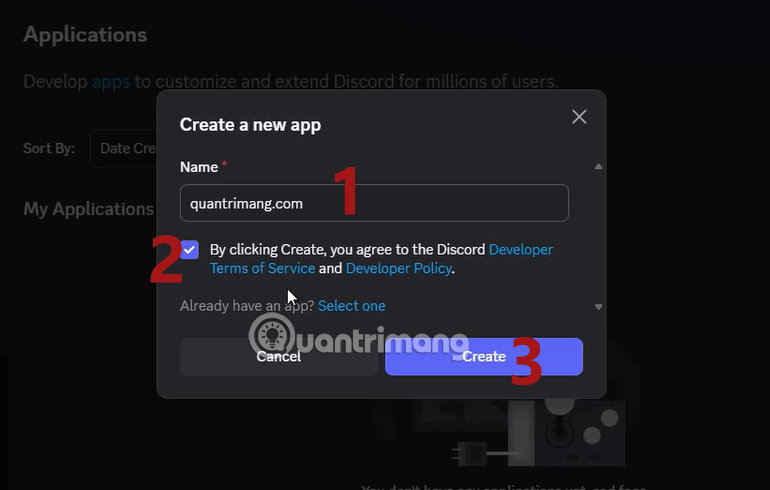
Choose New Application.
Enter a recognizable application name, read the platform terms, and create the application. For a business workflow, use an organization-owned account or team rather than leaving the only ownership with one employee.
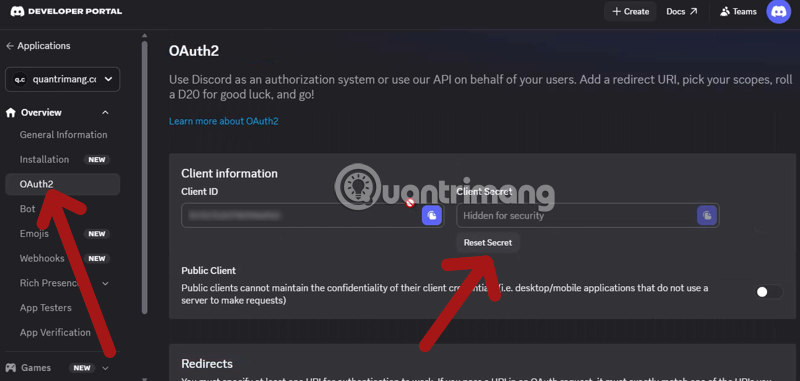
3. Get the client ID and create a client secret
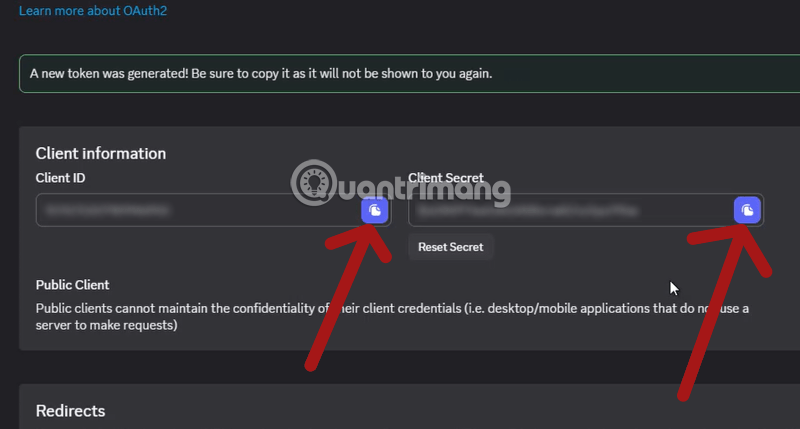
Open OAuth2 in the application settings. Copy the client ID. If n8n requests a client secret and one is not available, choose Reset Secret to generate it.
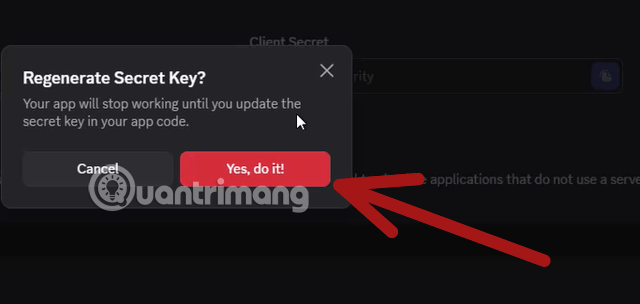
Resetting a secret invalidates the previous value. Do this only when you are prepared to update every credential that uses the old secret.
Confirm the reset.
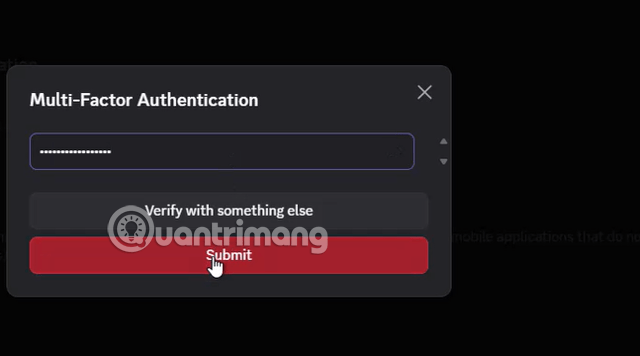
Discord may require account verification or a password before displaying the new secret.
Treat the client secret like a password. Paste it directly into n8n, never place it in a workflow note, screenshot, source repository, support ticket, or chat. Rotate it immediately if exposed.
4. Enter the client credentials in n8n
Return to n8n and paste the client ID and client secret into the Discord OAuth2 credential. Leave the callback URL unchanged.
Do not publish an exported workflow containing credentials. n8n normally stores credentials separately, but verify the export and protect the instance’s credential encryption key and database backups.
5. Register n8n’s redirect URL in Discord
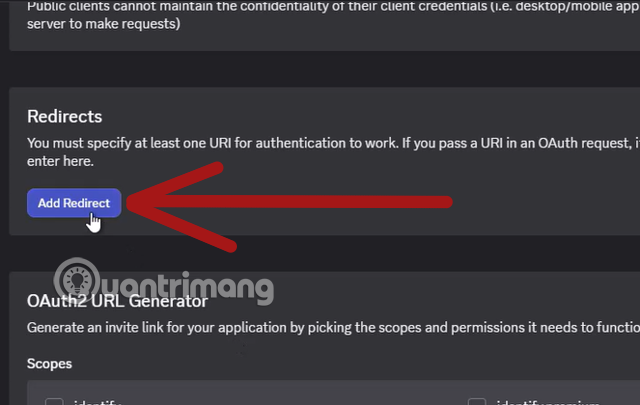
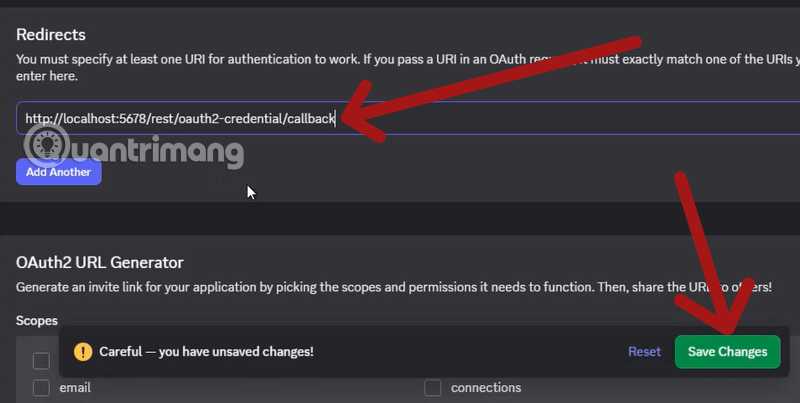
In the Discord application’s OAuth2 settings, find Redirects, choose Add Redirect, and paste the exact URL copied from n8n. Save the changes.
A redirect mismatch usually comes from HTTP versus HTTPS, an old hostname, a different port, or an extra slash. The registered value and the URL sent by n8n must match exactly.
6. Configure installation scopes and permissions
Discord separates OAuth2 scopes from bot permissions:
botinstalls the bot user in a server.applications.commandsallows application commands where used.- Bot permissions control actions such as viewing a channel, sending messages, embedding links, attaching files, or managing messages.
Grant only what the workflow needs. A notification workflow generally does not need Administrator, Manage Server, Manage Roles, or ban/kick permissions. Discord’s permissions guide recommends minimum scopes and permissions.
Also check channel-level permission overrides after installation. A bot may have a server role that allows messages but still be denied in one private channel.
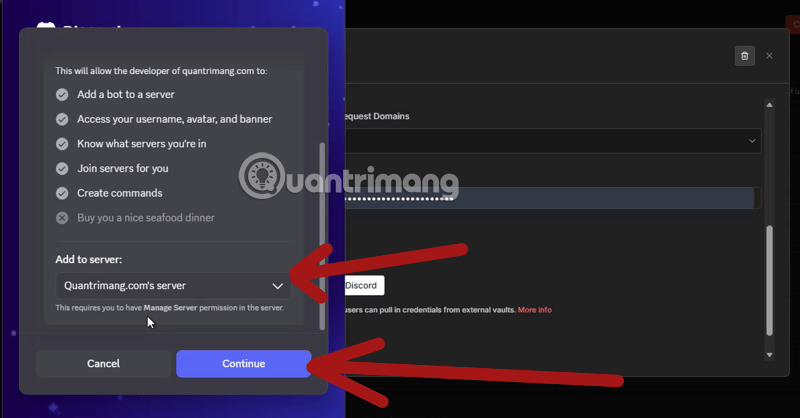
7. Connect from n8n and authorize the server
Choose Connect my account or the equivalent Discord sign-in button in n8n. In Discord’s authorization screen, select a dedicated test server that you are permitted to manage.
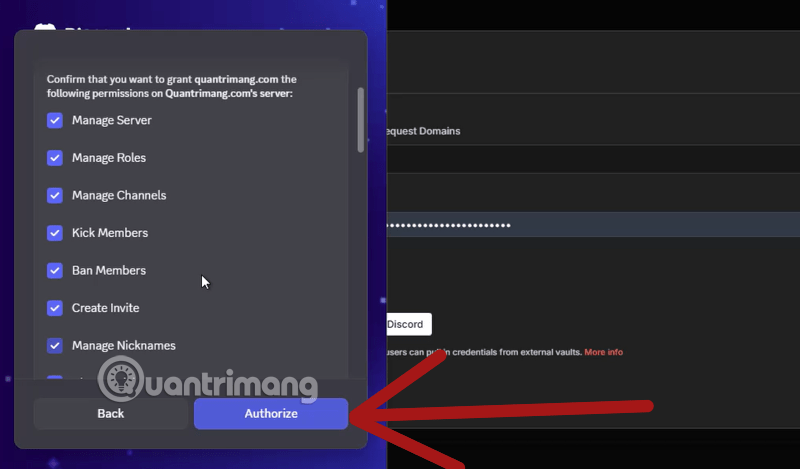
Read the requested permissions. If Discord asks for more access than expected, cancel, correct the application’s install settings, and start again. Do not approve broad access merely to make an error disappear.
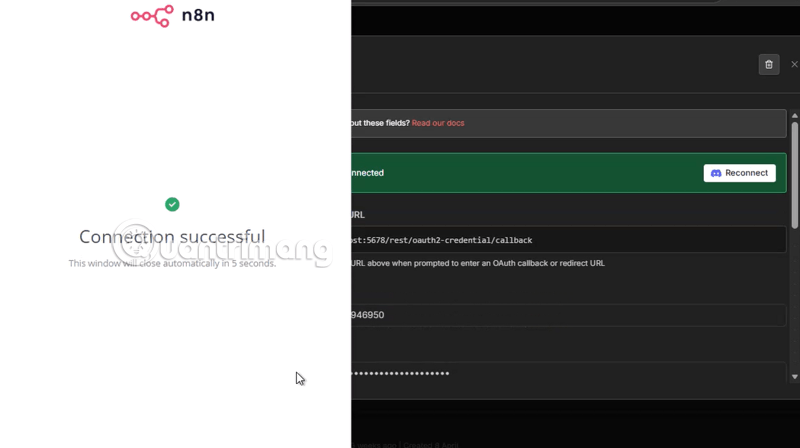
After authorization, n8n should show that the credential is connected.
8. Test a minimal workflow
- Create a new workflow and add the Manual Trigger.
- Add the Discord node and choose the saved credential.
- Select a low-risk action such as sending a test message.
- Choose a private test channel.
- Use plain text without mentions, external links, or attachments.
- Execute the node manually and confirm the sender, server, channel, and message.
- Delete the test message if appropriate, then activate the real workflow only after review.
The n8n Discord node documentation lists the operations supported by the current node. If a Discord API endpoint is missing, n8n can reuse supported credentials in an HTTP Request node where documented.
For another complete integration pattern, see TipsMake’s Supabase-to-n8n workflow guide. The n8n HTTP Request node guide explains how to call endpoints that a built-in node does not expose.
Webhook-only setup for simple notifications
If the workflow only posts to a single channel, an incoming Discord webhook is easier and requires no OAuth callback:
- In Discord, open the target channel’s settings.
- Go to Integrations > Webhooks.
- Create a webhook, name it, and copy its URL.
- Store the URL as an n8n credential or protected secret.
- Send a test payload from n8n to that URL.
A webhook URL contains a token that can post to the channel. Anyone who obtains it can abuse it without signing in. Never expose it in a public workflow export or execution log. Delete or regenerate the webhook if it leaks.
Common errors
Invalid OAuth2 redirect URL
Copy the redirect URL from the n8n credential again and replace the registered Discord redirect. If n8n is behind a proxy, confirm its public URL configuration and forwarded protocol headers.
The server does not appear in the authorization list
Use an account with authority to install applications in that server. Confirm that the app supports the Guild Install context and that its installation settings include the required scopes.
Missing Access or Missing Permissions
Confirm that the bot is installed, the credential points to the intended app, and the bot role has the required server permission. Then inspect channel and category overrides. Avoid solving a narrow permission error by granting Administrator.
Unknown Channel or message sent to the wrong place
Re-select the server and channel in the node. If an expression supplies an ID, log the non-secret ID during testing and validate it before sending. Discord IDs can exceed JavaScript’s safe integer range, so keep them as strings.
HTTP 429 rate limit
Discord applies rate limits by route and globally. Honor the returned retry interval and reduce bursts. In n8n, use batching, Wait nodes, queueing, and controlled retries. Do not retry immediately in a tight loop; that can extend disruption or create duplicate messages.
The message triggers everyone
Do not pass untrusted content directly into Discord mentions. Escape or restrict @everyone, @here, and role or user mentions, and configure allowed mentions where the node or API supports it.
Production checklist
- Use a dedicated Discord app and test server.
- Grant only required scopes and channel permissions.
- Keep the client secret, bot token, and webhook URLs out of logs and exports.
- Add error handling and a dead-letter or alert path for failed messages.
- Deduplicate events before sending.
- Limit message frequency and attachment size.
- Use human approval before announcements, mass mentions, moderation, or role changes.
- Document application owners, credential rotation, and revocation.
- Review active integrations in Discord and unused credentials in n8n regularly.
Discord works well as an operational notification destination, but it should not become an unfiltered dump of every automation event. Route only actionable messages, group repetitive alerts, and include enough context for a person to understand what happened and where to investigate.
If your broader goal is to let an AI coding agent communicate through Discord, keep that setup separate from this general automation credential and apply tighter command and execution controls. TipsMake’s guide to connecting Claude Code to Discord covers that distinct workflow.
Related Articles
 Detailed Instructions on How to Use Webhook Trigger in N8n7 minutes read
 How to Update the Discord App on All Operating Systems5 minutes read
 How to Download, Create an Account and Log into Discord5 minutes read
 6 Best Bots to Improve Discord Server7 minutes read
 How to Create the Discord Bot on the Raspberry Pi7 minutes read
 Is It Safe to Use Discord?6 minutes read
Reader Comments 0
Sign in with email or Google to join the discussion.