Table of Contents
Detailed instructions on how to hard reset (force restart) iPhone 17, iPhone 17 Pro, iPhone 17 Pro Max and iPhone Air when the device is frozen or unresponsive.
One of the main factors that makes the iPhone a popular device is its smooth, stable performance, as well as good compatibility between hardware and software. However, that does not mean that Apple smartphones never encounter software problems, or simply lag, lag, and unresponsiveness.
Apple has just launched the iPhone 17 with a larger screen than the previous generation, reaching 6.3 inches. Meanwhile, the iPhone 17 Pro and iPhone 17 Pro Max still keep the same size as the 2024 version. The most notable point is the appearance of the super-thin iPhone Air, replacing the Plus line last year.
All new iPhones feature the full-screen design, Dynamic Island, Action button, and Camera Control, so the hard reset/force restart procedure remains the same as on recent iPhones. However, if you're upgrading from an iPhone with a Home button, you'll need to get used to the new procedure.
What is hard reset?
A forced restart is a way to force your iPhone to shut down and restart without following the normal procedure, or recommended by the manufacturer. When you reset the device in the normal way (via software), the system will optimize everything before shutting down. But in case your iPhone is not responding, sometimes you are forced to take a more drastic step, which is a forced restart, or can be understood here as a hard reset - restarting with the hardware keys.
Please note that you should only perform a hard reset in a desperate situation, when the device freezes, lags, and does not respond. Frequent hard reset abuse can cause problems with the software and data stored in your iPhone.
Hard reset and factory reset
Both hard reset and factory reset are forms of restarting a device to fix problems. But there is a fundamental difference between the two actions.
Both operations will clear all data stored on the phone's memory, and help the phone run smoothly if the software is in conflict.
That said, hard reset is a way to fix software errors on the phone using hardware keys, including the power key, home key and volume up/down keys. While factory reset is the act of restoring the original settings using the system software and performing.
So basically, hard reset can be simply understood as using the hardware key on the device body, while factory reset is going into the software and performing it.
How to hard reset iPhone 17 (including iPhone Air)
-
Press and quickly release the Volume Up Button.
-
Press and quickly release the Volume Down Button.
-
Press and hold the Side (power) button until the Apple logo appears, then release.
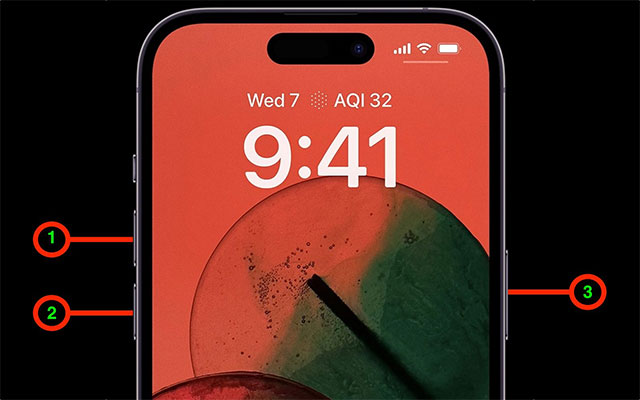
During this process, you may see a slider to power off, but ignore it and continue holding the Side button until the screen turns off and the Apple logo appears. The device will then restart.
What is the difference between hard reset and power off?
- Hard reset/Force restart : helps you restart your iPhone immediately when it freezes or becomes unresponsive. Quick and easy, without many steps.
- Manual power off : go to Settings → General → scroll down and select Shutdown . This method takes longer to restart.
Tip: Hard reset is extremely useful when the iPhone is frozen, the screen is frozen or has a temporary software error.
FAQ
What should you know about hard reset and force restart iPhone 17, iPhone 17 pro, iPhone?
In practical terms, detailed instructions on how to hard reset (force restart) iPhone 17, iPhone 17 Pro, iPhone 17 Pro Max and iPhone Air when the device is frozen or unresponsive.
Why does hard reset and force restart iPhone 17, iPhone 17 pro, iPhone matter?
The article highlights that but in case your iPhone is not responding, sometimes you are forced to take a more drastic step, which is a forced restart, or can be understood here as a hard reset - restarting with the hardware keys.
What is the main takeaway?
The main takeaway is that hard reset/Force restart : helps you restart your iPhone immediately when it freezes or becomes unresponsive.





Reader Comments 0
Sign in with email or Google to join the discussion.