Table of Contents
The Forger Pet Mutation Shard is a Grow a Garden crafting item associated with the Smithing event. Applying it to a pet gives the Forger mutation, which periodically advances progress at an active crafting station.
This is an event recipe, so first check whether the relevant crafting station and recipe are available in your current game. A past event guide does not guarantee that an item can still be crafted.
Materials for the Smithing-event recipe
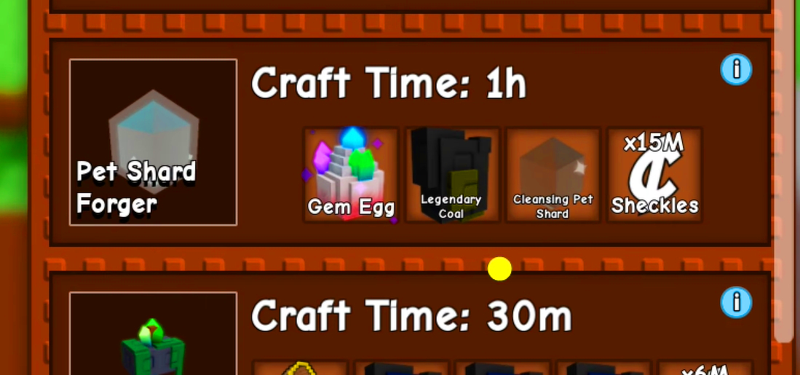
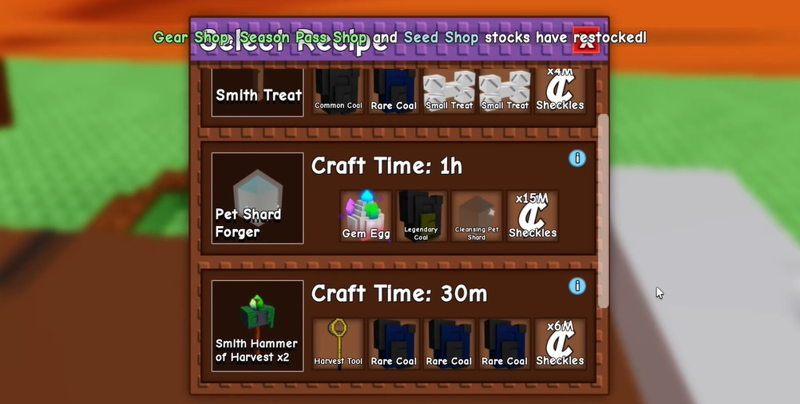
The original recipe featured in this guide required:
- 1 Gem Egg
- 1 Legendary Coal
- 1 Cleansing Pet Shard
- 15,000,000 Sheckles
The listed crafting time was one hour. Check the recipe panel for the current price and timer before submitting materials, as recipes and event availability can change.
During the event, Gem Eggs were offered through the pet crafting and egg systems, Legendary Coal through Smithing rewards, and Cleansing Pet Shards through the Gear Shop. Check the current source and stock for each item before spending resources.
Craft and collect the shard
- Go to the Gear Crafting Station in the Smithing event area.
- Interact with the station. On PC, use the key shown by the prompt, usually E.
- Find Pet Shard Forger or Forger Pet Mutation Shard and select Craft.
- Review the ingredients and Sheckle cost, then submit the required materials using the onscreen controls.
- Start the craft and wait for the displayed timer to finish.
- Return to the station and collect the completed shard.
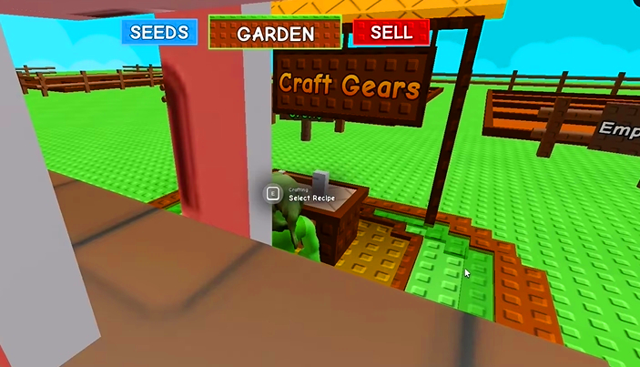
If the recipe is missing, check the event and station rather than repeatedly pressing the interaction key. If a material is rejected, compare its exact item name with the recipe.
Choose a pet and check the ability
Before using the shard, inspect the selected pet and the confirmation prompt. Confirm how the mutation will affect any existing mutation you want to keep. After applying it, use the pet as an active helper when you have crafting jobs running.
Read the pet's ability description for its current activation interval and time reduction. Do not treat one screenshot's decimal value as a universal stat for every pet or update.
Forger is most useful when you regularly run crafting jobs. It does not itself provide the required ingredients or instantly complete every recipe. If you are still building your garden's economy, the Grow a Garden beginner guide covers early progression.
Pet mutations and fruit mutations are different systems. For a crop-focused example, see the Zombified fruit mutation guide.
Related Articles
 How to Get and Use Glimmering Pet Shard in Grow a Garden
 Grow a Garden 2 Gear Guide: Farming, Defense, and Mobility
 How to Make Sheckles Fast in Grow a Garden 2
 How to get Seed Packets in Grow a Garden
 Grow a Garden 2 Beginner Guide: Progression and Survival Tips
 Grow a Garden vs. Grow a Garden 2: Key Differences
Reader Comments 0
Sign in with email or Google to join the discussion.