Table of Contents
This updated guide explains how to get seed packets in grow a garden with clear steps, practical tips, and useful context. In Grow a Garden, you can buy a wide variety of seeds at the Seed Shop. Although this shop changes daily and does not sell every type of seed in the game, it is still a good place to start your farming journey in the game, especially to earn Sheckles fast, so we have a few.
How to Get Seed Packets in Grow a Garden
Along with purchasing individual seeds, you can get Seed Packs – which randomly unlock different seeds.
Seed Packs from Daily Quests

Basic seed packs can be obtained by completing daily quests.
- Step 1: To view the quest, open the Gear Shop – located opposite the Seed Shop.
- Step 2: Talk to the NPC in the Gear Shop to see 3 daily quests.
- Step 3: When you complete all 3, you will receive a Seed Packet as a reward, but you must manually choose to receive it, the reward will not be automatically given.

List of seeds that can be opened from Seed Packets
The rate of receiving seeds is the same:
- Daffodil (Daffodil)
- Watermelon
- Pumpkin
- Apple
- Bamboo
- Cactus
- Coconut
- Raspberry *
- Pear *
- Peach *
- Pineapple *
- Mango
- Dragonfruit
Those with an asterisk will only appear in Seed Packs from daily quests.
What Does Daily Duty Include?
Most of them are simple tasks like harvesting crops or sowing seeds as required. If you play a little harder each day, it will be easy to complete the quests and get the seed packs.
Event Seed Package
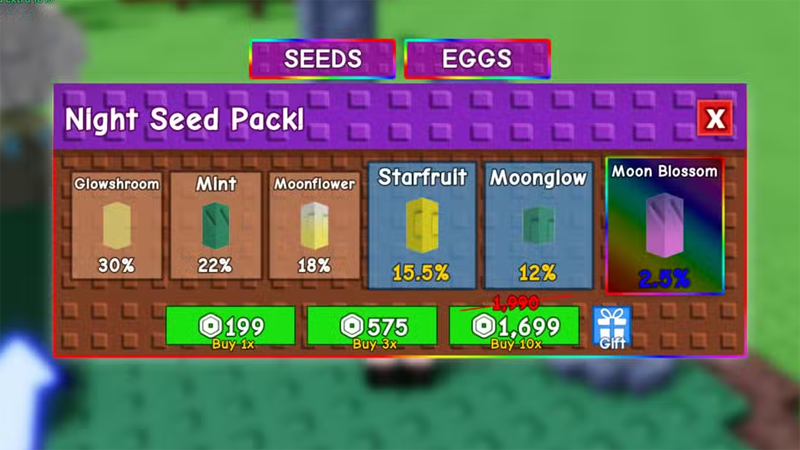
Occasionally, Grow A Garden will have special events. During these times, you can purchase or receive Event Seed Packs. for instance, during the Lunar Glow event, you can receive a Night Seed Pack with limited-edition seeds like Mint and Starfruit.
When there is an event, grab these limited seed packs because once the event is over, they will disappear.
Also, It is best to check the in-game Store, sometimes there will be special seed packs that can only be purchased with Robux.
FAQ
What should I prepare before I get seed packets in grow a garden?
Review the requirements and options in the guide first. Having the correct device, app version, account access, or materials ready helps prevent avoidable errors.
How long does it take to get seed packets in grow a garden?
The time depends on the task and your setup. Most basic steps can be completed quickly, while downloads, updates, scans, or troubleshooting may take longer.
What should I do if the steps do not work?
Repeat the instructions in order, confirm that your software or device is supported, and check permissions, connectivity, and available updates before trying again.
Related Articles
 Seed Tier List Grow a Garden5 minutes read
 Latest Grow a Garden Codes and How to Redeem Codes for Rewards8 minutes read
 How to Get Maple Resin Seeds in Grow a Garden: Step-by-Step Guide5 minutes read
 All the gear in Grow a Garden 2 and their effects - Gear4 minutes read
 How to make money quickly in Grow a Garden 23 minutes read
 How to Get Rainbow Seeds in Grow a Garden 24 minutes read
Reader Comments 0
Sign in with email or Google to join the discussion.