Table of Contents
Learn how to fix file name not accepted error on onedrive with clear steps, practical tips, and troubleshooting guidance for a reliable result.
Check your file or folder name
OneDrive has its own restrictions on naming files and folders.
- File path must not exceed 400 characters
- Names cannot include certain characters such as: ', *,:, <, >,?, /, and |.
- Some file names were used by OneDrive and can no longer be used:.lock, CON, PRN, AUX, NUL, COM0 – COM9, LPT0 – LPT9, _vti_, desktop.ini
- Any filename that begins with a ~$ or a space
- Specific file extensions, such as '.tmp,' 'desktop.ini,' '.ds_store,' '.pst,' '.asmx,' and '.aspx.' Some '.exe' files will also not be accepted.
Use the OneDrive website to download files
If you can't upload files to OneDrive using the desktop software, you can try the web browser. Log in to your account and then upload the file as usual. If that works, your problem may be with OneDrive syncing.
- Sign in to OneDrive web
Unlink OneDrive and reconnect your computer
If you are having sync issues then the best solution is to unlink OneDrive from your computer and then relink it.
Step 1
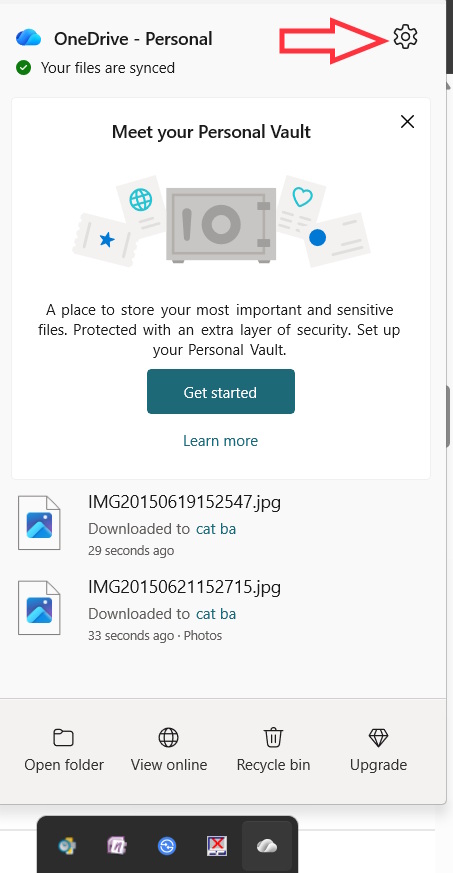
Right- click on the OneDrive icon , then select the gear icon and select Settings.
Step 2
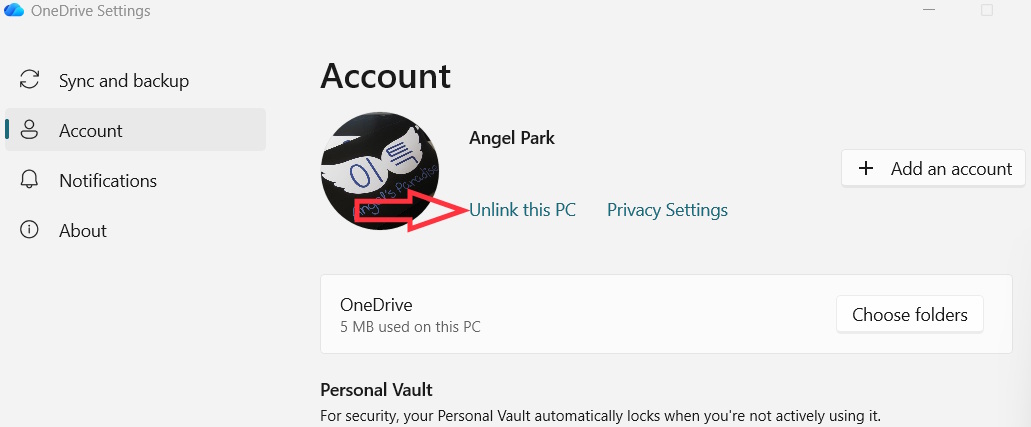
Display the settings interface, click on Account then click on Unlink this PC to unlink OneDrive from this computer.
Then next, re-link to synchronize.
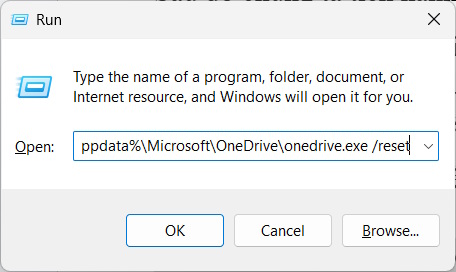
If you still get file and folder name errors, you can unlink it, then clear the app cache and relink it.
We also unlink OneDrive from the computer. Next, open the Run dialog box and type %localappdata%MicrosoftOneDriveonedrive.exe /reset to access.
The application cache is reset then relinking is done.
Final Thoughts
Use this guide as a practical checklist for how to fix file name not accepted error on onedrive. Work through the steps in order, verify each result, and adjust the options to match your needs.
FAQ
What do you need before following this How to Fix File Name Not Accepted Error on OneDrive guide?
Review the required tools, accounts, settings, or materials mentioned in the article. Learn how to fix file name not accepted error on onedrive with clear steps, practical tips, and troubleshooting guidance for a reliable result.
What are the main steps for how to fix file name not accepted error on onedrive?
Follow the sections in order, especially Check your file or folder name, Use the OneDrive website to download files, Unlink OneDrive and reconnect your computer. Complete each step before continuing and verify the result as you go.
What should you do if the process does not work as expected?
Recheck the prerequisites, update the relevant app or service, review the settings, and repeat the step that caused the issue. Use any troubleshooting notes included in the guide.
Related Articles
 Fix the Error That Onedrive Files or Folders Could Not Be Deleted7 minutes read
 How to Fix the Problem of Syncing Onedrive on Windows 108 minutes read
 How to Fix OneDrive Error When Processing Changes4 minutes read
 How to Fix Onedrive Error Makes CPU Overload on Windows 105 minutes read
 Fix Windows Error: Complete Guide: 6 Ways to Fix ''sorry, There Is a6 minutes read
 Fix Error 0x80040c97, Unable to Install Onedrive on Windows4 minutes read
Reader Comments 0
Sign in with email or Google to join the discussion.