Table of Contents
Bilibili China (Bilibili, Bilibili is a popular platform for watching anime and cartoons, offering a diverse content library that is updated daily. After downloading Bilibili China , you can enjoy the feature of downloading and watching videos offline.)

Table of Contents:
1. How to download Bilibili China on Android devices .
2. How to download Bilibili China on iOS devices .
3. Key features of Bilibili China .
How to download Bilibili China on Android devices
1. Quick Guide
First, download the Bilibili China APK for Android using the free download link provided below. After downloading, proceed to install the application on your device as usual and open it when complete.
2. Detailed instructions
Step 1
Access the Bilibili China APK download link here.
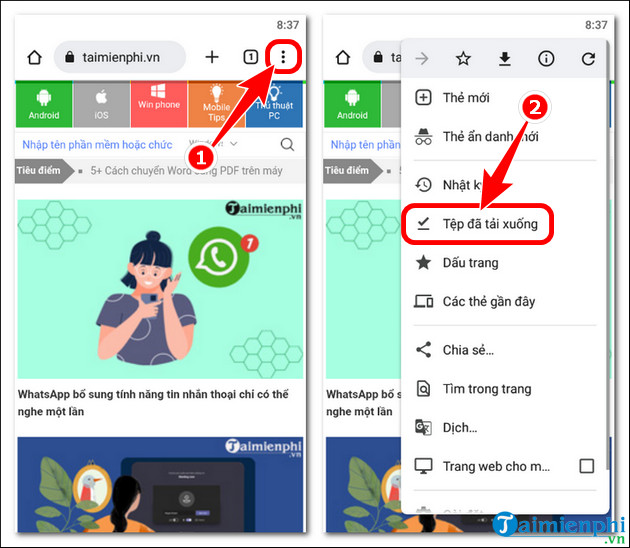
Step 2: Click the three-dot icon => select Downloaded File .
Step 3
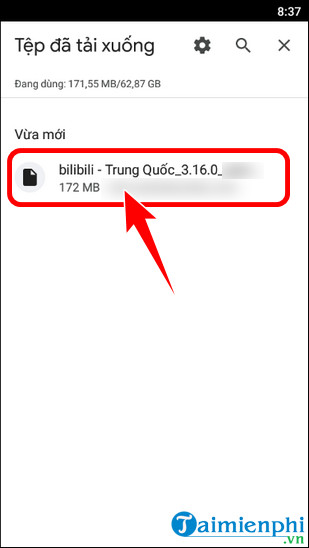
Click directly on the Bilibili China APK download file .
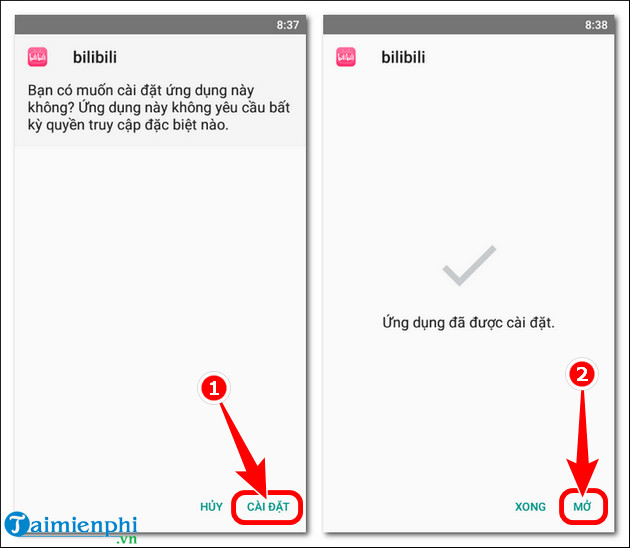
- To install APKs, you need to enable unknown sources on your Android device. Then tap Install => Open the Chinese Bilibili app as shown in the image below.
Step 4
Select Skip .
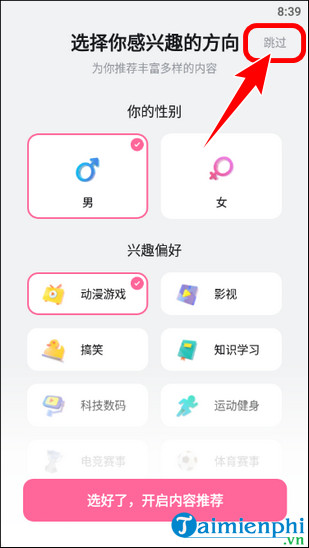
- The Bilibili China interface will look like the image below.

Step 5
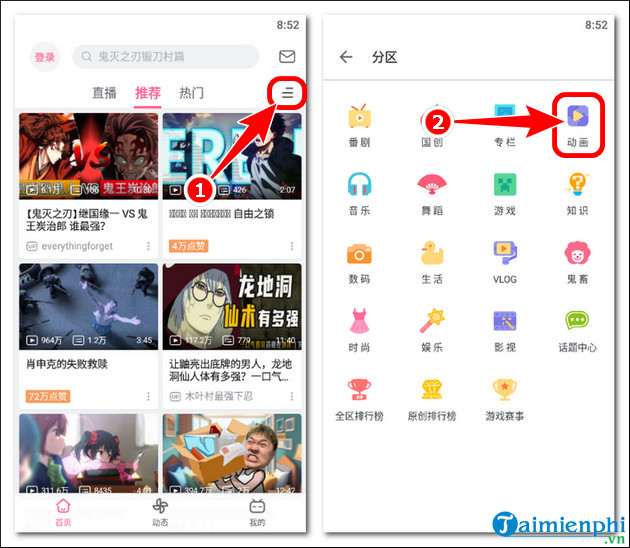
After successfully installing Bilibili China, click the Menu icon => select Anime .
- Open your favorite movie/video .
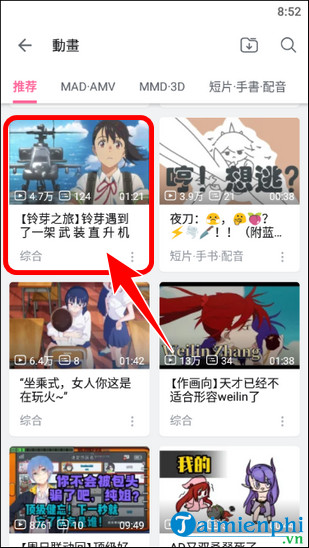
- After successfully downloading Bilibili China, you can see the movie/video viewing interface on the Bilibili China app as shown below. Here, you can use features such as: Like , Dislike , Download , Add to Favorites , and Share content .

In case Bilibili China requires users to provide information, such as a Chinese ID card , before continuing to watch the movie, you can obtain it here. You can also use it to create an account if you wish, avoiding being asked for it later.
II. How to download Bilibili China on iOS/iPhone devices
1. Quick Guide
For iOS devices like iPhones and iPads, you need to change the App Store setting to China , then go to the app store and type 哔哩哔哩 to download the pink Bilibili Chinese version to your computer.
2. Detailed instructions
Step 1
Change your App Store country/region to mainland China .
Step 2: Access the Bilibili China download link for iPhone here.
- Click Install => press Open .
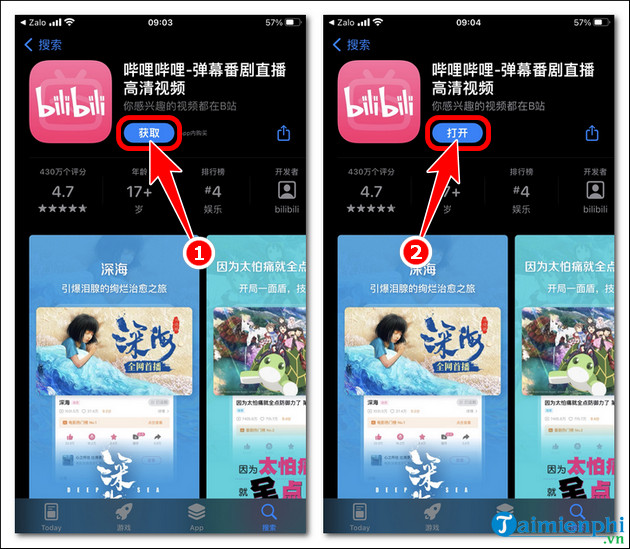
Step 3
Click同意并继续 (Agree to terms and continue) => select跳过 (Skip) .
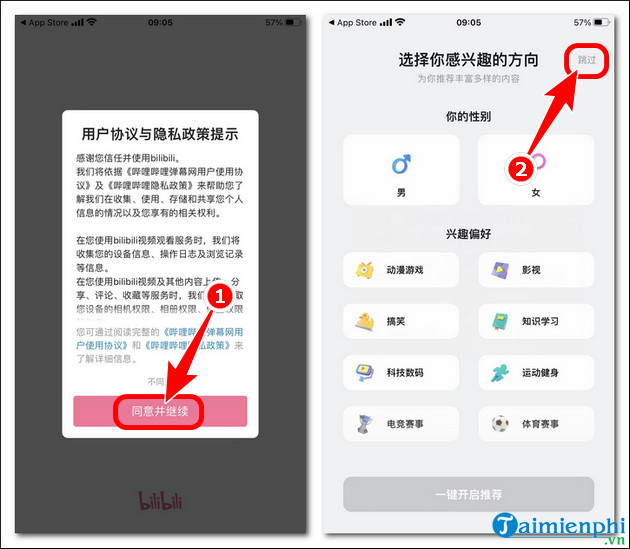
Step 4
The Bilibili China interface on your iPhone will appear as shown below. The process of watching movies/videos is the same as the Android version; just follow the steps above to enjoy uninterrupted entertainment.

III. Key Features of Bilibili China
- Watch and share unlimited videos.
- Diverse and interesting movie/video library.
- Supports users to download and watch movies offline without internet.
- Convenient mini-player feature.
- Ability to enable/disable comment display while watching videos.
- Unlock new features through a level system.
After successfully downloading the Chinese version of Bilibili, readers can watch and enjoy popular anime series, providing entertainment and stress relief during their free time. Currently, the application also has a Vietnamese version; readers can install the Vietnamese version of Bilibili for the best experience, greater convenience, and to watch the best anime series of all time.
Related Articles
 How to Download and Install the Chinese Kwai App9 minutes read
 How to Download TikTok China on Android, iOS, iPhone, iPad5 minutes read
 Instructions for Installing Android SDK - Software Development Kit6 minutes read
 How to Downloading and Installing Android 10 on Your Phone3 minutes read
 How to Install Showbox on Android: Step-by-Step Guide4 minutes read
 How to Install Android Apps on Bluestacks: Complete Guide8 minutes read
Reader Comments 0
Sign in with email or Google to join the discussion.