Table of Contents
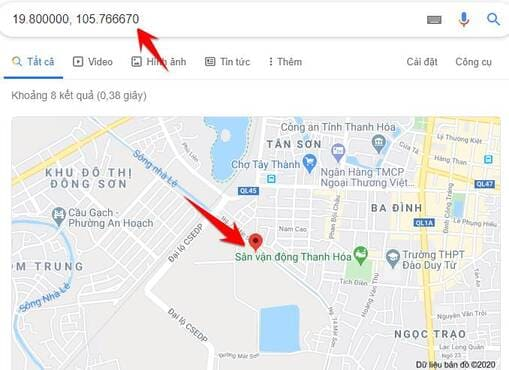
A public IP address can give a rough estimate of where an internet connection appears to come from. A lookup may report a country, region, city, or network provider. It cannot reliably reveal a person's home address or live location. A map pin usually represents a broad area or a network exit point.

Compare location and network registration
- Start with your own public IP address or one you are authorized to investigate. A private address such as
192.168.1.20is reused on local networks and has no unique public location. - Enter the public address in an IP geolocation tool, such as WhatIsMyIP. Record the provider and the reported region. If the tool offers an accuracy radius, treat the location as an area around the returned point.
- For network registration, use an RDAP lookup such as ICANN Lookup. This can identify the organization or network assigned the address block. Its contact or registration address is separate from the location of a device using the network.
Why results differ
Mobile carriers and internet providers can share addresses among subscribers or route traffic through a different city. Databases can lag behind assignments, and different services may give different estimates. A VPN can make a site see the VPN server's address for traffic routed through it. See how a VPN or proxy changes the public IP a site sees.
For an unexpected login, use the region as one clue and check the time, device, and other session details. Avoid using the map result as evidence of an individual's identity. MaxMind's accuracy documentation describes the limits of city-level results.
Related Articles
 How to Determine Current Location on Google Maps
 How to Determine the IP Address on a Mac
 How to Get MAC Address Using Remote IP Address
 How does the device use WiFi to determine your physical location?
 Link this website to friends, you will know their address via the computer's IP
 How to check geographical location via IP
Reader Comments 0
Sign in with email or Google to join the discussion.