Table of Contents
With Grok Imagine, you can create short videos based on detailed or random descriptions from Grok with just 1-2 simple steps. Scroll down below and we will guide you how to create videos from photos with Grok very quickly.
Instructions for creating videos from photos on Grok
To get started, download the Grok app on iOS or Android and make sure you're using the latest version of Grok.
Step 1: Open the app and select the "Imagine" section.
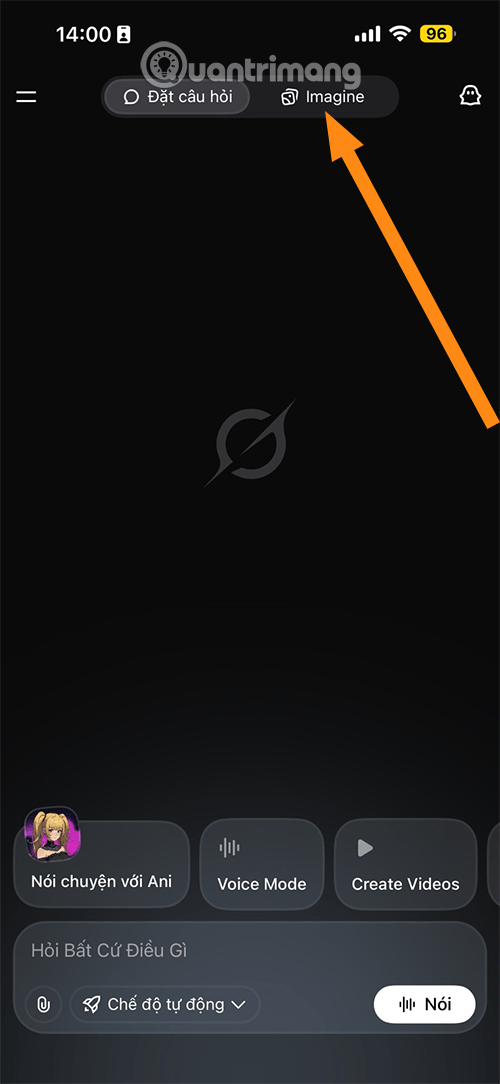
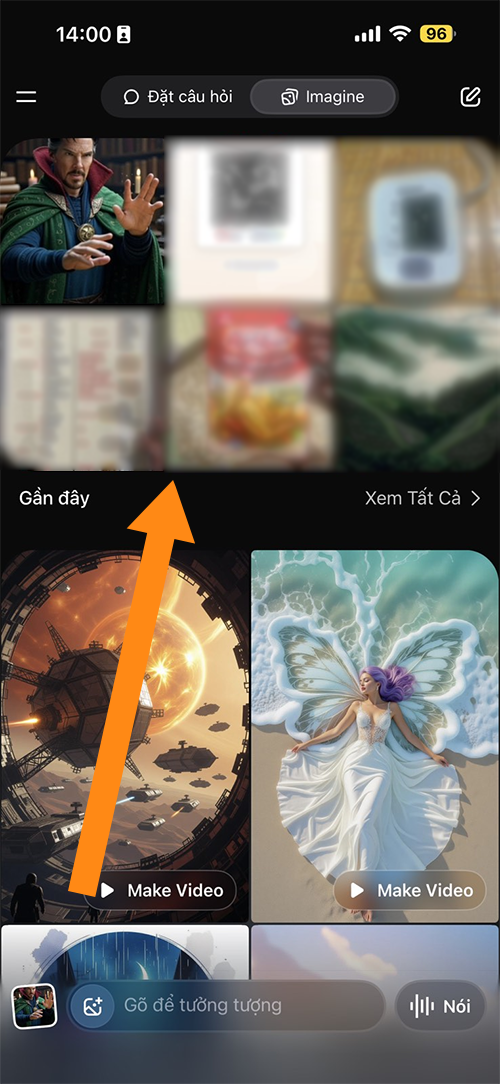
Step 2: Enter descriptive text according to your video creation needs (Type to imagine), or use an existing photo by selecting Photos in Album by clicking Recent.
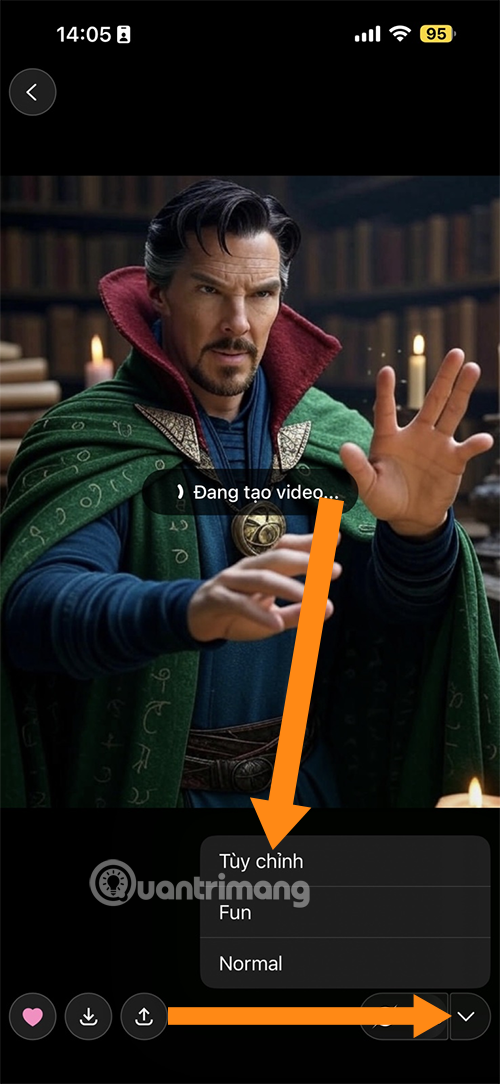
Step 3: Select the video creation option, if you want to create a detailed video according to your wishes, select Custom and enter your request in text. If you just want to create a simple one, select Normal, Fun is to create in a humorous style.
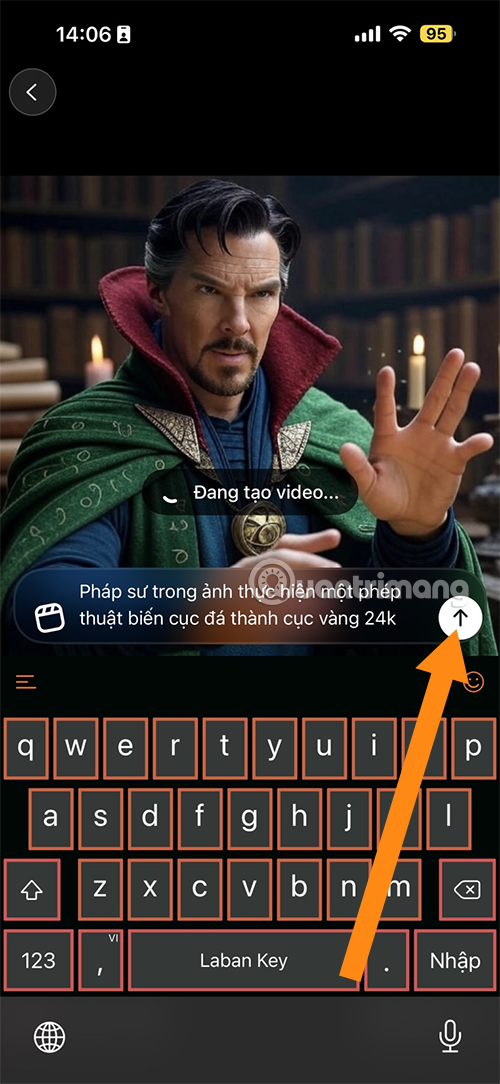
Once you have successfully created your video, you can choose the audio from the 4 audio options that Grok has created for you.
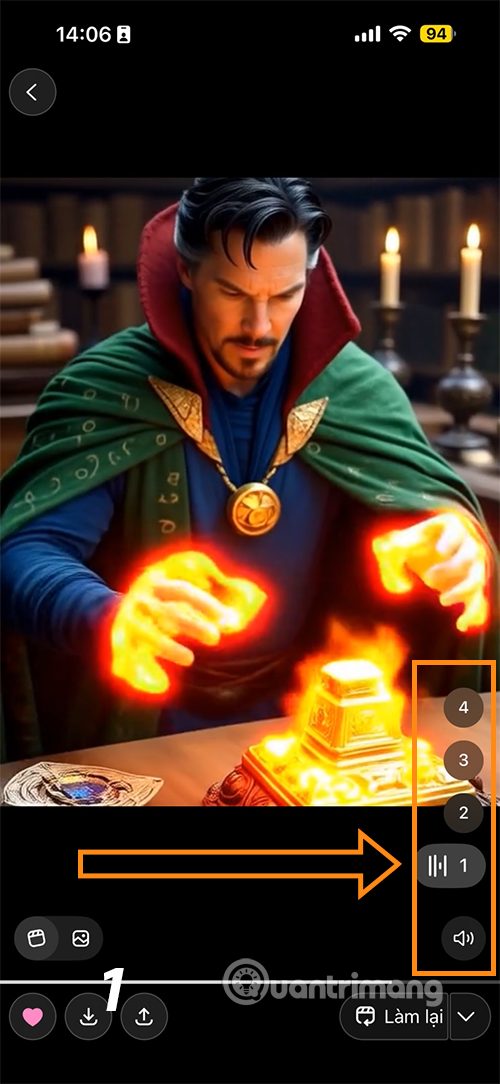
Note that this feature is still in beta, so there may be some limitations such as character eye quality or video length limits.
What is Grok Imagine?
Grok Imagine is an extension of the Grok chatbot, which focuses on using artificial intelligence to generate image and video content. Originally designed to generate images from text descriptions, the tool now goes further by allowing the conversion of existing photos into short videos.
It is powered by xAI's advanced AI model, which generates clips lasting between 6 and 15 seconds with natural audio. The feature is currently available on Grok's mobile app for iOS and Android, primarily for users with a Premium+ or SuperGrok subscription.
Unlike other competitors that often require high fees or strict limits, Grok Imagine offers a free experience for some regions during the initial testing phase, making it accessible to many users without a large investment.
Grok Imagine's Outstanding Capabilities
Grok Imagine goes beyond basic video creation and offers a wide range of flexible options to meet a variety of creative needs. Here are some of the key features:
- Convert photos to videos: Users can select any photo on the X platform or from their personal library, then use AI to add motion, effects and sound, turning static images into animated videos.
- Create videos from text descriptions: Enter a description command, and the tool will generate a complete short video, including appropriate voiceover or background music.
- Customize and Edit: Allows editing of the command prompt to fine-tune the results, add different video modes (like with or without sound), and quickly archive or share.
- Audio Integration: The clips created often come with automated audio, from voiceovers to music effects, adding a professional touch to the content.
- Multi-platform support: Currently focused on mobile apps, but plans to expand to web and advanced features like longer videos are in the works.
These capabilities make Grok Imagine the ideal tool for creating social media content, illustrating ideas, or even testing creative ideas without the need for complex software.
Advantages of Grok Imagine
One of the most outstanding features of Grok Imagine is its outstanding convenience, helping users save time and effort. Here are the specific benefits:
- Fast Processing: It takes only about 15 seconds to create a video from photos, allowing users to produce content immediately without having to wait long. This is especially useful for social media content creators where speed is of the essence.
- Easy to use: With simple operations such as long-pressing on the photo and selecting "Create Video With Grok", users can do it without leaving the X or Grok app. No in-depth video editing skills required, suitable for beginners.
- Cost-effective: In its initial phase, this feature is free for many users, unlike other AI tools that require paid subscriptions. This opens up access to individuals and small businesses.
- Boost Creativity: By adding motion and sound to still images, it helps turn simple ideas into engaging content, ideal for marketing, education or personal entertainment.
- Seamless integration with X: Users can easily share live videos, increasing engagement on Elon Musk's social networks without switching apps.
Grok Imagine represents a new step forward in creative AI, offering a simple way to turn images into animated videos. Fast, easy to use, and low-cost, it promises to change the way we produce content every day. If you're looking for a versatile AI tool, it's definitely worth checking out.
Final Thoughts
Following the steps in order and checking version-specific settings should make it easier to Create Videos on Grok AI. If an option looks different, verify the device, app, or operating-system version before changing additional settings.
FAQ
What is the best way to Create Videos on Grok AI?
Start with the requirements described in the article and follow the steps in order. With Grok Imagine, you can create short videos based on detailed or random descriptions from Grok with just 1-2 simple steps. Scroll down below and we will guide you how to create videos from photos with Grok very quickly.
What should you know about Instructions for creating videos from photos on Grok?
To get started, download the Grok app on iOS or Android and make sure you're using the latest version of Grok.
What should you do if the instructions do not match your screen?
Check the device, software version, account permissions, and regional settings. Interfaces can change after updates, so use the closest matching option and consult the official support documentation when necessary.
Related Articles
 Creating Videos from Photos Using Grok9 minutes read
 How to Create a Long Video on Grok10 minutes read
 Experience the Hilarious Grok AI Chatbot on X3 minutes read
 Guide to Creating 3D Animated Videos About Smartphones with Grok AI6 minutes read
 How to Create Professional 16:9 Aspect Ratio Videos Using Grok Imagine5 minutes read
 How to Write Basic Code with Grok: Step-by-Step Guide11 minutes read
Reader Comments 0
Sign in with email or Google to join the discussion.