Table of Contents
If Grok Imagine starts generating a video when you only want to edit or view a still image, look for the automatic video setting in Grok's account preferences. The control shown in the screenshots is labeled Enable Automatic Video Generation under Behavior. Menus may differ between the Grok website, mobile app and Grok inside X.
Turn off automatic video generation
- Open Grok and select your profile icon or account menu, usually in the side panel. Choose Settings.
- Open Behavior and locate Enable Automatic Video Generation.
- Switch it off, then return to Imagine and test with a new still image. If the setting is not present, check your app version and the available Imagine mode rather than toggling unrelated video or privacy controls.
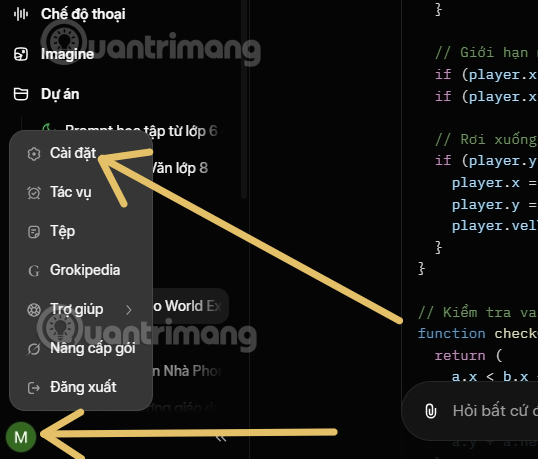
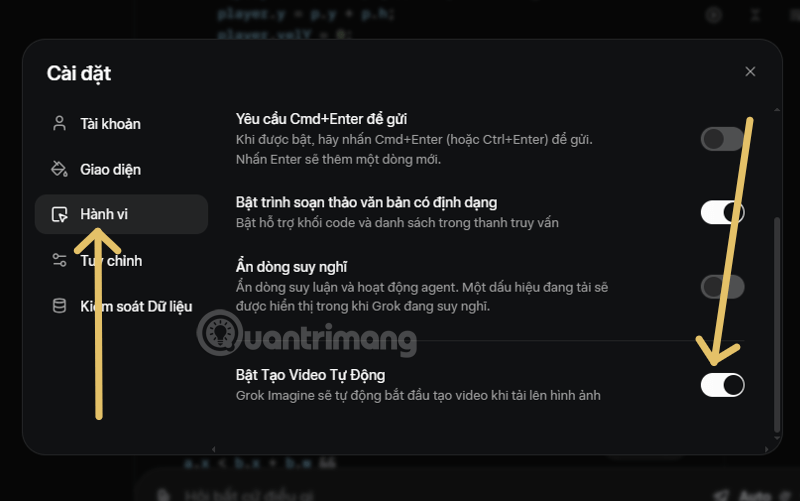
The screenshots show the menu and toggle in the interface available when the article was prepared. This setting is meant to prevent the automatic video step in that workflow; it does not disable deliberately requested video generation or necessarily affect every Grok client.
If a still image still becomes a video
| What to check | What to do |
|---|---|
| Generation mode | Choose the image or still-image mode before submitting a prompt; avoid the Create Video control. |
| Selected image action | Use the image editing action rather than Animate or image-to-video when changing a still. |
| Account and app | Recheck the toggle in the same account and client where the video is generated; a web setting may not appear identically in another interface. |
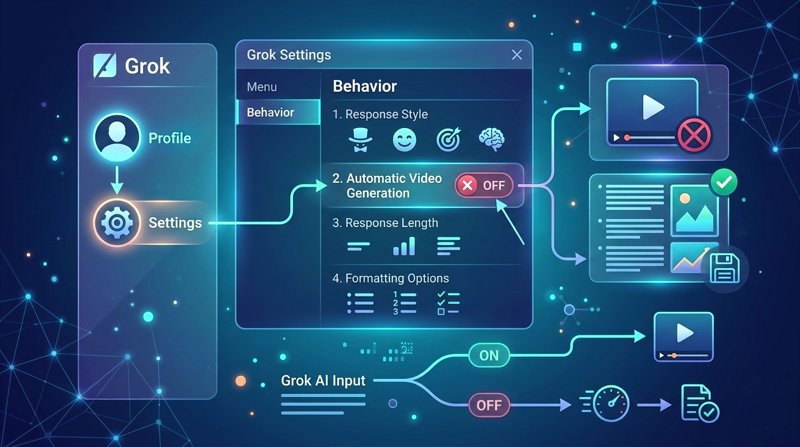
Grok Imagine supports intentional video creation from prompts and images; see our Grok Imagine video guide if that is the result you want. A generated clip can consume more data than viewing a still image, although the exact data use and processing time vary. Verify the behavior in your account after changing the setting.
Related Articles
 How to Create Videos on Grok AI7 minutes read
 Creating Videos from Photos Using Grok9 minutes read
 Turn Still Photos into Videos with Grok's New Tool: How to Do It Super Easy4 minutes read
 Experience the Hilarious Grok AI Chatbot on X3 minutes read
 How to Enable the Memory Feature on Grok to Personalize Your Own AI Assistant6 minutes read
 How to Prevent Grok from Collecting Personal Data to Create AI Images4 minutes read
Reader Comments 0
Sign in with email or Google to join the discussion.