Table of Contents
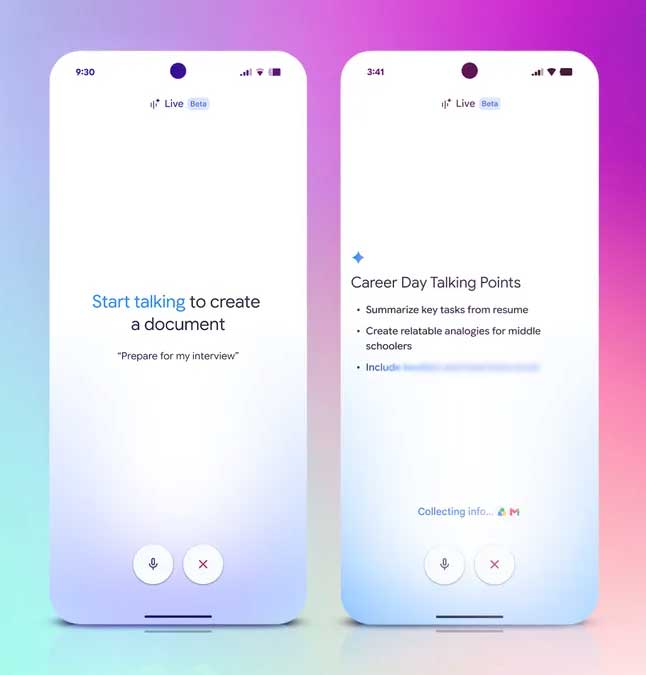
Docs Live is a voice-powered Google Docs feature that uses Gemini to turn spoken ideas into an organized draft. Instead of preserving every word exactly, it is designed to identify the main points, remove conversational clutter, and structure the material as a document that the user can continue editing.
Google announced Docs Live at Google I/O in May 2026. The company said Google AI Pro and Ultra subscribers would begin receiving access in summer 2026. Availability can still vary by account, country, rollout stage, and Workspace administrator, so the absence of a Docs Live control does not necessarily indicate a fault.
What Docs Live is designed to do
Docs Live addresses the gap between recording an idea and writing a useful first draft. Google describes a workflow in which a user speaks naturally or “brain dumps,” while Gemini handles the initial organization.
- Capture a spoken stream of ideas.
- Identify themes and important points.
- Remove some hesitations, repetition, and abandoned phrases.
- Arrange the material into sections or another suitable document structure.
- Continue refining the document through voice requests.
- With the user's permission, add relevant context from Gmail, Drive, Chat, or the web.
Google's I/O announcement describes the voice-first drafting concept, while its I/O feature summary identifies the intended subscription rollout.
Docs Live versus Google Docs Voice Typing
| Feature | Voice Typing | Docs Live |
|---|---|---|
| Primary purpose | Dictate words into the document | Turn spoken ideas into a structured draft |
| Expected output | Text that generally follows what was said | AI-selected, reorganized, and rewritten content |
| Best use | Entering prepared wording or taking direct dictation | Brainstorming, outlining, and creating a first draft |
| Accuracy requirement | Speech recognition still needs proofreading | Both transcription and AI interpretation need review |
| External context | Does not build a draft from Gmail or Drive context | Can use permitted Workspace and web sources as announced |
This distinction matters: Docs Live should not be treated as a verbatim transcript. When exact wording is required—for an interview, testimony, quotation, meeting record, or legal note—keep a proper recording or transcript and verify every quote separately. Traditional voice input is covered in this overview of Google Docs tools including Voice Typing.
How the announced workflow works
Based on Google's demonstration, the intended process is:
- Open a document and start a Docs Live session when the control is available.
- Speak through the subject, audience, purpose, and points you want included.
- Give direct instructions when the draft needs a different structure—for example, ask for sections, bullets, or a table.
- Allow access to specific Gmail, Drive, Chat, or web sources only when that context is needed.
- Review the generated document, correct facts and tone, and continue editing in Docs.
Because Google has not presented Docs Live as ordinary word-for-word dictation, it is better to speak in complete ideas than to dictate punctuation and formatting commands. State the audience and desired outcome early, then name any details that must not be changed.
Who can use Docs Live?
Google announced initial access for Google AI Pro and Google AI Ultra subscribers. It did not announce universal access for every free Google account or every Workspace edition. Staged releases can also reach accounts at different times.
If the feature is missing:
- Check whether the signed-in account has an eligible Google AI plan.
- Use the desktop Docs interface where new Workspace features commonly appear first, unless Google provides platform-specific guidance.
- Ask a Workspace administrator whether Gemini features are enabled for the organization.
- Check Google's Workspace release notes rather than installing an unofficial extension that claims to unlock the feature.
- Do not assume that changing browser flags or account language will bypass a rollout.
Plan names, storage, limits, and regional availability can change. The TipsMake overview of Google's paid AI plans and Workspace integrations provides broader context, but the account's current subscription page remains the authority.
Useful ways to apply voice-first drafting
- Outline a proposal: explain the goal, constraints, stakeholders, and decision needed, then ask for a structured brief.
- Draft a speech: talk through the audience, key story, main message, and call to action.
- Turn field notes into a report: describe observations in sequence, then request sections for findings, risks, and next steps.
- Build a working document: speak a rough process and ask Docs Live to convert it into a checklist or table.
- Break through a blank page: narrate incomplete ideas first, then decide which parts deserve further research.
Docs Live may reduce setup time, but it does not replace subject expertise or editorial judgment. For other options, compare these AI tools for content writing.
Review the draft before sharing it
- Compare the draft with what you intended to say; the model may omit a caveat or overemphasize a side point.
- Verify names, dates, numbers, quotations, citations, and claims against the original source.
- Remove invented transitions or examples that sound plausible but were never provided.
- Check whether the tone suits the audience and whether personal stories still mean what the speaker intended.
- Inspect every item drawn from Gmail, Drive, Chat, or the web and confirm that it belongs in the document.
- Use Docs version history or a separate copy before accepting major AI changes.
Privacy and source-access considerations
Permission to use Workspace sources can make the draft more relevant, but it can also bring sensitive information into a document. Before enabling a source:
- Limit access to the accounts and files needed for the task.
- Check the document's sharing settings and intended audience.
- Do not use personal mail or restricted work files merely to make a draft sound more detailed.
- Follow organizational rules for confidential, regulated, client, student, or employee information.
- If other people are being recorded, obtain any consent required by policy and applicable law.
Google already documents file references for Gemini-generated drafts in its current personalized document guidance. Docs Live extends that general idea to a voice-first workflow, but users should still approve the sources and review the result.
What you can use while waiting for Docs Live
Google Docs Voice Typing can enter spoken words, and the existing Gemini panel can create, rewrite, summarize, and organize document content for eligible accounts. A practical interim workflow is to dictate rough notes, select the text, and ask Gemini to reorganize it—while keeping the original notes for comparison. It involves an extra step, but it preserves a clearer boundary between transcription and AI rewriting.
Related Articles
 How to Insert Link Links in Google Docs Documents4 minutes read
 How to Improve Writing Skills with Duet AI in Google Docs7 minutes read
 Instructions for Creating Caret in Google Docs4 minutes read
 How Many of the Best Features Have You Missed on Google Docs?8 minutes read
 How to Compare Two Documents in Google Docs4 minutes read
 Useful Tools to Know in Google Docs6 minutes read
Reader Comments 0
Sign in with email or Google to join the discussion.