Table of Contents
This practical guide explains how to create Naruto in Infinite Craft, a Character in the Naruto in a clear sequence, including preparation, key settings, common mistakes, and troubleshooting steps.
What This Guide Covers
- How to create characters in Naruto on Infinite Craft
To create Naruto in Infinite Craft, all you need to do is have a Ninja and Anime block. To create those two blocks, you must combine many different elements and objects. As you discover more objects, you open yourself up to new creations.
To create a Naruto block in Infinite Craft, you first need to create Ninja and Anime blocks.
1. How to make Ninja blocks There are many methods you can use to make Ninja blocks. One method is to combine the Samurai block and the Ronin block. To get these blocks will require a series of steps as follows:
- First you need to create the Human block + Combine Earth and Wind to form Dust . + Drag Wind into the Dust you just created to create Sandstorm + Set the Sandstorm block aside. Combining Dust and Earth creates Planet . + Combine Planet and Sandstorm to create Mars blocks . + Combine the Mars block with Earth again to form the Life block . + Drag a Dust block into Life and you will create a Human block .
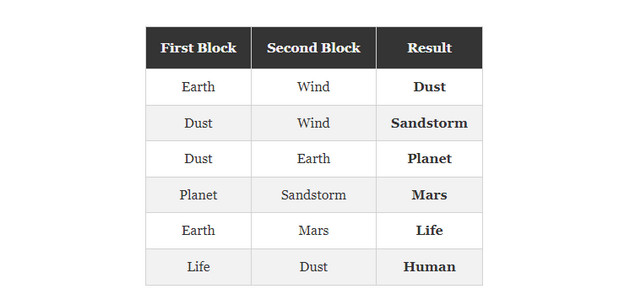
- Next you need to create the Warrior block + Combine the Earth and Fire blocks to form Lava . + Drag a Water block into Lava to form a Stone block . + Get another Lava block , then drag a Stone into it to create Obsidian . + Drag another Stone block to your Obsidian to form a Blade block . + Combining the Human and Blade blocks will create the Warrior block .
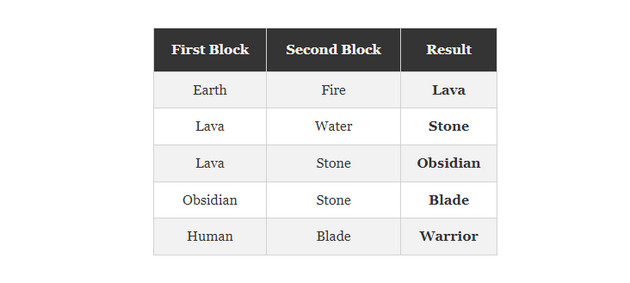
- Next, you will need to create a Japan block + Combine two Water blocks to create a Lake block . + Drag another Water block to the Lake block to create an Ocean block . + Combine the Ocean block with the Earth block to form an Island . + Drag another Earth block onto your Island to create a Continent block . + Combine the Continent block with an Island to form an Archipelago . + Combine two Earth blocks to create a Mountain block . + Combine the Mountain and Continent blocks to form the Asia block . + Combining the Asia and Archipelago blocks will create the Japan block .
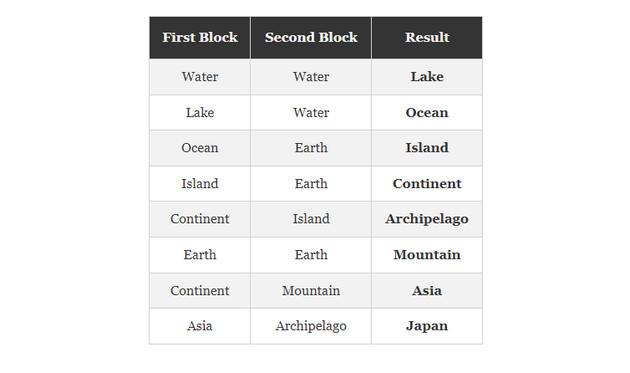
- Combining the Japan block and the Warrior block will create the Samurai block . At this point, all you need to do is combine the Samurai block with the Warrior block to form the Ronin block .
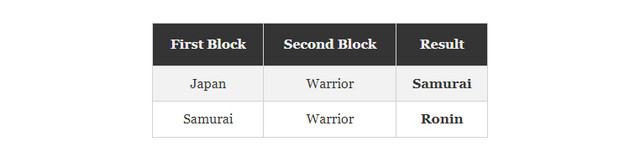
- Then you can create Ninja block by combining Samurai block and Ronin block together.

2. How to make Anime blocks
Your next task is to create an Anime block. To create this block, you simply combine a Japan block and a Manga block .
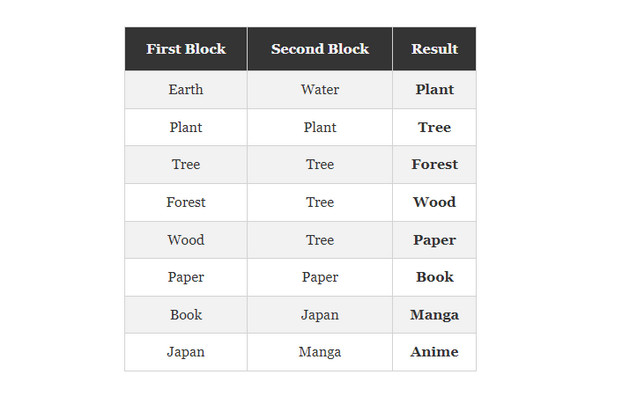
- To create a Manga block , you will need to combine a Book block and a Japan block . You will need to use the Earth and Water blocks to create the Book block . + Combine Earth and Water blocks to form a Plant block . + Combine two Plant blocks to form a Tree block . + Combine two Tree blocks to form a Forest block . + Drag a new Tree block into your Forest and you will see the Wood block . + Drag another Tree into the Wood block to create a Paper block . + You will need to combine two Paper blocks to form a Book block . + Combining the Book and Japan blocks will create the Manga block . + Combining the Manga block with the Japan block will create the Anime block .
3. How to make Naruto blocks
Finally, you have all the blocks needed to craft Naruto blocks. To create this block, you need to take the Ninja block and combine it with the Anime block .

How to create characters in Naruto on Infinite Craft
Once you have the Naruto block, you'll open up your crafting menu with all sorts of new possible creations. One fun thing you can do is use Naruto blocks to craft every Naruto related block you can think of.
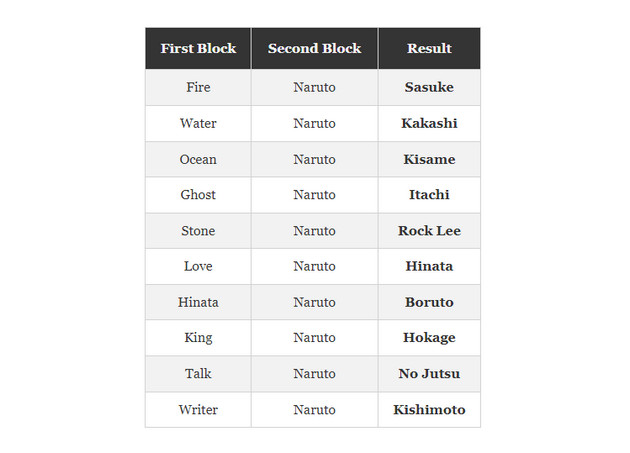
- Discovering what you can do with Naruto blocks is just a matter of being creative with what you combine with Naruto blocks. You can create characters, different items in the game and can even create the author of the series. + Fire combined with Naruto creates Sasuke + Water combined with Naruto creates Kakashi + Ocean combined with Naruto creates Kisame + Ghost combined with Naruto creates Itachi + Stone combined with Naruto creates Rock Lee + Love combined with Naruto creates Hinata + Hinata combined with Naruto creates Boruto + King combined with Naruto creates Hokage + Talk combined with Naruto creates No Jutsu + Writer combined with Naruto creates Kishimoto
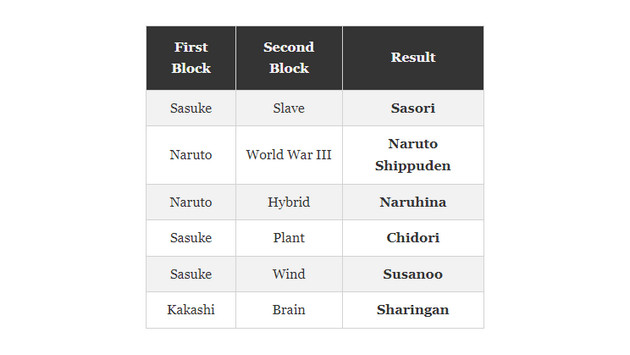
- You can even go a step further and use whatever you create with the Naruto block to find a way to craft all the other possible blocks in the Naruto universe. + Sasuke combined with Slave created Sasori + Naruto combined with World War III created Naruto Shippuden + Naruto combined with Hybrid created Naruhina + Sasuke combined with Plant created Chidori + Sasuke combined with Wind created Susanoo + Kakashi combined with Brain to create Sharingan
Creating Naruto in Infinite Craft is not only fun but also helps you explore many creative possibilities in the game. Follow the instructions and experience new adventures. Don't hesitate to share with your friends to unleash your creativity together in the Infinite Craft world.
Final Thoughts
Use the instructions and checks above in order, verify the result after each major step, and keep a backup whenever the process changes important files or system settings.
FAQ
What should I check before starting?
Confirm that your device or software version matches the instructions, save important data, and note the original settings before making changes.
What should I do if the steps do not work?
Restart the app or device, install available updates, review any error message, and repeat the steps carefully in the same order.
Can I undo the changes?
Many changes can be reversed, but the exact method depends on the feature. A backup or restore point gives you the safest way to recover.
Related Articles
 More Than 70+ Synthetic Naruto Wallpapers for Computers4 minutes read
 Is the Universe Infinite or Finite: Explained5 minutes read
 Discover the 7 Eyes in Naruto and Boruto: Complete Guide9 minutes read
 How to Implement Infinite Scrolling in Vue8 minutes read
 Instructions for Creating Simple Infinite Animations with Cliplets5 minutes read
 Top 5 Weakest Clans in Naruto Anime5 minutes read
Reader Comments 0
Sign in with email or Google to join the discussion.