Table of Contents
Learn how to turn any text into a reminder using Apple intelligence with clear steps, practical tips, and troubleshooting guidance for a reliable result.
How to create reminders from messages using Apple Intelligence on iPhone
Open the email, website, or note containing the information you want to track. Highlight the necessary text, then tap the Share button that appears above the selected text.
Next, tap the Reminders app in the sharing list below. A suggestion panel will appear with reminders extracted from the selected text. You can then enter or edit the content as you wish.
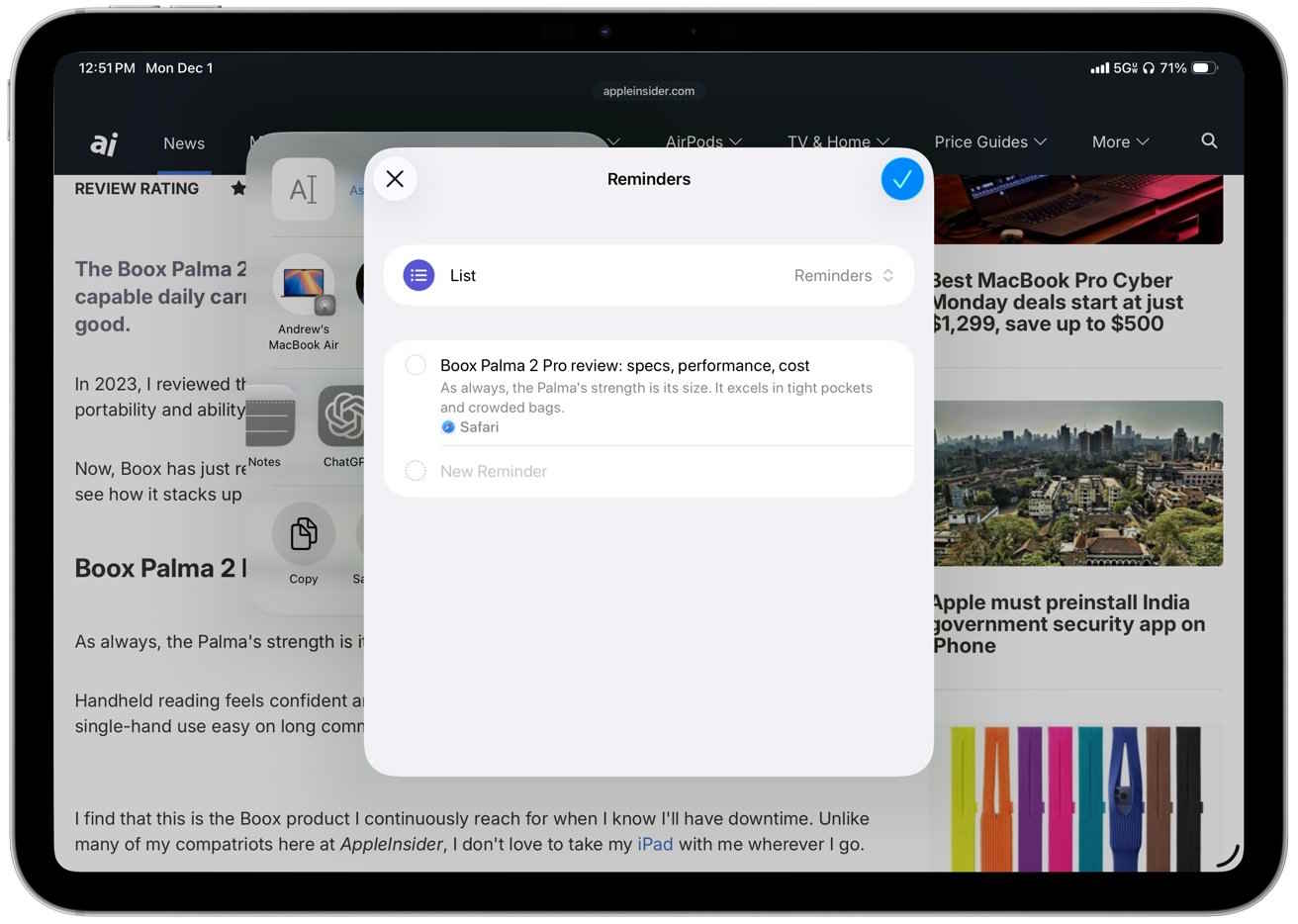
How to create text reminders on a Mac
First, open the document, website, or email, then select the section you want to extract. Highlight the text you want to analyze and then click the Share button. After that, select the Reminders app to create a reminder from the selected content.
Final Thoughts
Use this guide as a practical checklist for how to turn any text into a reminder using apple intelligence. Work through the steps in order, verify each result, and adjust the options to match your needs.
FAQ
What do you need before following this How to Turn Any Text into a Reminder Using Apple Intelligence guide?
Review the required tools, accounts, settings, or materials mentioned in the article. Learn how to turn any text into a reminder using Apple intelligence with clear steps, practical tips, and troubleshooting guidance for a reliable result.
What are the main steps for how to turn any text into a reminder using apple intelligence?
Follow the sections in order, especially How to create reminders from messages using Apple Intelligence on iPhone, How to create text reminders on a Mac. Complete each step before continuing and verify the result as you go.
What should you do if the process does not work as expected?
Recheck the prerequisites, update the relevant app or service, review the settings, and repeat the step that caused the issue. Use any troubleshooting notes included in the guide.
Related Articles
 Instructions to Turn Off Apple Intelligence2 minutes read
 10 Reminder Apps for Mac That Outperform Apple Reminder10 minutes read
 Top 5 Essential Reminder Apps on Android5 minutes read
 How to Turn Off Apple Intelligence on iPhone, iPad, and Mac7 minutes read
 Use Apple Intelligence to Summarize Emails, Web Pages, and Text: Step-by-Step Guide5 minutes read
 How to Turn Off Apple Intelligence Notifications Summary3 minutes read
Reader Comments 0
Sign in with email or Google to join the discussion.