Table of Contents
Highly Anticipated Features on iOS 18.4 is easier to approach with a clear overview and reliable steps. This guide organizes the essential information, highlights practical details, and explains what to check along the way.
Key Takeaways
- Follow the recommended steps in order to avoid common mistakes with highly anticipated features on iOS 18.4.
- Review compatibility, settings, or requirements before making changes.
- Use the troubleshooting notes to confirm the final result.
Many new features are available on iOS 18.4.
The most notable feature in the first beta version of iOS 18.4 is the upgrade of features in the company's AI toolkit Apple Intelligence. Some of the new features include new languages (including Vietnamese); Image Playground with the expected Sketch style with Animation and Illustration options; Genmoji icons on the keyboard have been tweaked to 'Genmoji'; and mail sorting for iPad users with iPadOS 18.4 beta 1.
In addition, the first beta of iOS 18.4 also brings some notable new features such as Apple News+ Food; Vision Pro app; changes in Apple Maps; background music toggle button for Control Center; as well as CarPlay update so that cars with larger screens can now display 3 rows of apps.
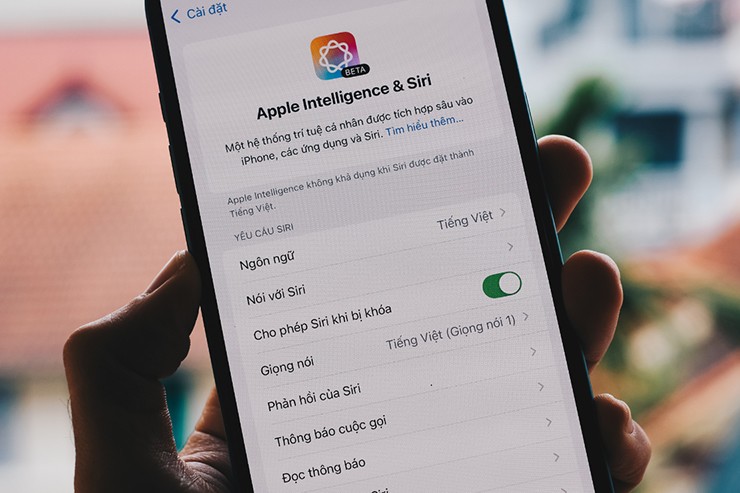
Vietnamese is on the list of new languages added to Apple Intelligence.
In terms of compatibility, iOS 18.4 will work with the following iPhone models: iPhone XR, XS, and XS Max; iPhone 11, 11 Pro, and 11 Pro Max; iPhone SE (2nd and 3rd generation); iPhone 12 mini, 12, 12 Pro, and 12 Pro Max; iPhone 13 mini, 13, 13 Pro, and 13 Pro Max; iPhone 14, 14 Plus, 14 Pro, and 14 Pro Max; iPhone 15, 15 Plus, 15 Pro, and 15 Pro Max; iPhone 16e, 16, 16 Plus, 16 Pro, and 16 Pro Max.
With these new and improved features, iOS 18.4 promises to bring a better user experience to Apple fans.
Final Thoughts
The most reliable way to handle highly anticipated features on iOS 18.4 is to follow the process in order, verify each important setting, and test the result before moving on. Use the guidance above as a practical reference, then adjust the details for your device, software version, or specific goal.
FAQ
What should I know first about Highly Anticipated Features on iOS 18.4?
Unlike previous software updates, Apple has announced that iOS 18.4 will be officially released next April.
How do I get the best results with Highly Anticipated Features on iOS 18.4?
Use current software or equipment, follow the steps in order, review the recommended settings, and test one change at a time so you can identify what improves the result.
What should I do if Highly Anticipated Features on iOS 18.4 doesn't work as expected?
Check compatibility, permissions, connectivity, and version-specific settings. Restart the relevant device or app, then repeat the process carefully before trying a more advanced fix.
Related Articles
 10 Highly Anticipated Features That Turned Out to Be Duds on Windows 109 minutes read
 What's New in Blender 3.04 minutes read
 7 Reasons to Buy Raspberry Pi Zero 2 W: Recommended Choices11 minutes read
 How the Corona Virus Turned Mwc 2020 into a Nightmare14 minutes read
 Why Does Bitcoin FUD Sentiment Escalate 48 Hours Before Halving Explained4 minutes read
 4 Most Anticipated AI Trends in 2025: Complete Guide5 minutes read
Reader Comments 0
Sign in with email or Google to join the discussion.