Table of Contents
This updated guide explains how to check VRAM capacity on mac with clear steps, practical tips, and useful context. This article shows you how to check the amount of VRAM on your computer. It also looks at what VRAM means and how it affects your system's performance.
If you are using a Windows computer, refer to the article: How to check VRAM capacity on Windows 11 to know how to do it.
How to Check VRAM in macOS
On a Mac, checking VRAM is a little different. Here's how to do it:
1. Select the Apple icon in the upper left corner of the desktop.
2. Select About This Mac .
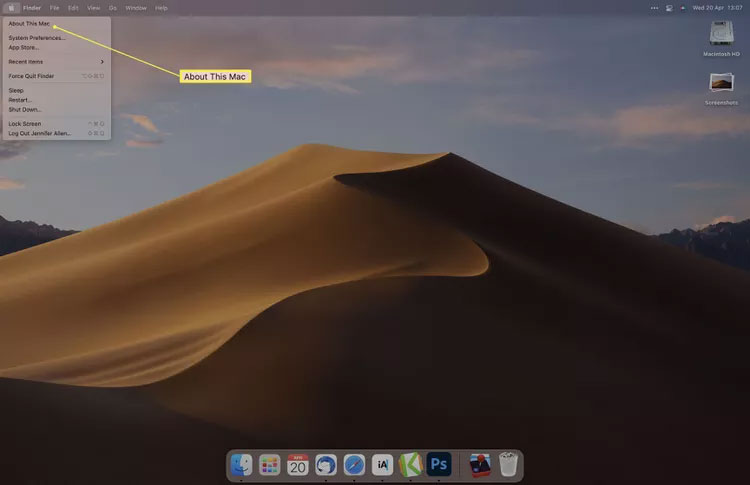
3. Next to Graphics is the name of the graphics card followed by the VRAM capacity of that card.
Note : If you are using an M1-based MacBook Pro or MacBook Air, VRAM will not be displayed as it is integrated into the CPU/GPU.
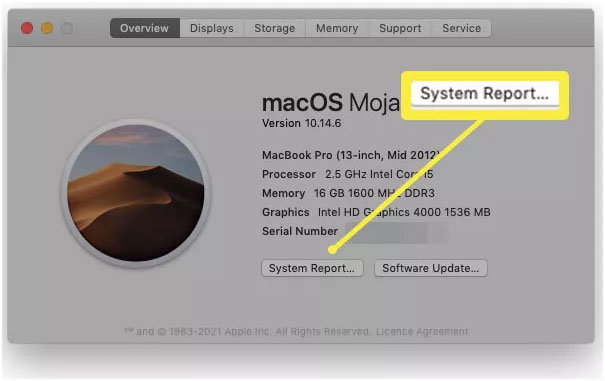
4. For more information, select System Report .
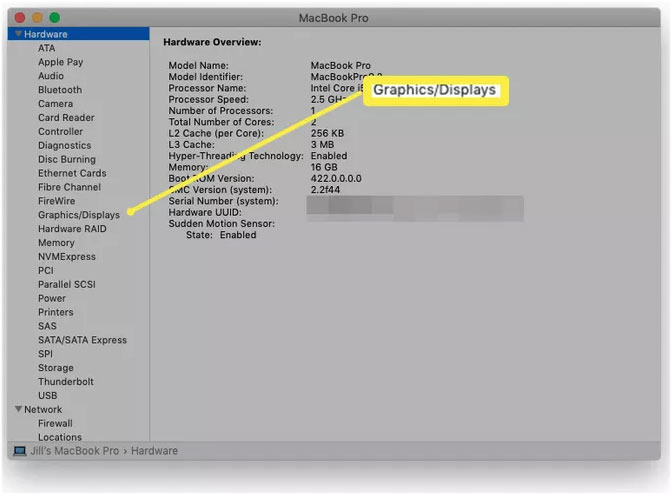
5. Select Graphics/Display.
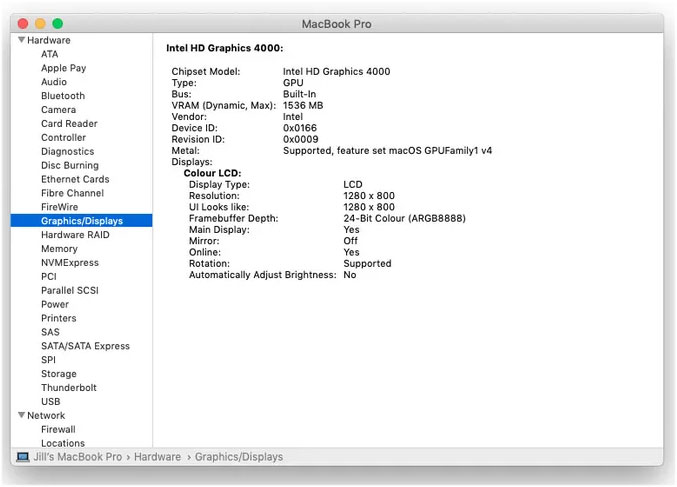
6. Check the number next to the VRAM line.
Is 4GB VRAM Enough?
You need 4 GB of VRAM or more depending on how you use your computer.
To enjoy the latest video games, you may find it difficult to play at any quality settings higher than the minimum. Some games may not even run at all if your system has less than 8GB of VRAM. Performance will largely depend on the specific games you plan to play, with older titles or popular games like Fortnite or Final Fantasy XIV being more likely to scale well to your hardware's capabilities.
Video editors typically require a minimum of 8GB of VRAM. Still, tasks like word processing or web browsing do not require a specific amount of VRAM, so there's no need to consider upgrading to a different graphics card.
Is 128 MB VRAM Good?
No, 128 MB is too low for what modern graphics cards are capable of. If you plan on gaming or video editing, you'll need at least 4 GB of VRAM as an absolute minimum, although 8 GB is best.
FAQ
How much VRAM is enough?
4GB of VRAM is the minimum for 1080p gaming, with 6GB or more needed in many cases. In general, more VRAM is better. Video editors should aim for at least 8GB, with 12GB or 16GB being ideal. If you do not plan on gaming or editing video, there is no minimum VRAM requirement.
How to increase VRAM?
To allocate more VRAM in Windows, you have two options. First, enter the BIOS according to your computer manufacturer's instructions, then navigate to Advanced Features > Graphics Settings > VRAM Size (these options may have different names on your system). You can modify the system registry, but this approach is riskier and can damage your Windows installation.
Related Articles
 How to Check VRAM Capacity on Windows 113 minutes read
![[AZ] All Information About What Is Vram? Simple Way to Increase VRAM](/data8/thumbs_200x120/[az]-all-information-about-what-is-vram-simple-way-to-increase-vram-capacity_thumbs_200x120_5ABtbAYUM.png) [AZ] All Information About What Is Vram? Simple Way to Increase VRAM10 minutes read
[AZ] All Information About What Is Vram? Simple Way to Increase VRAM10 minutes read How to Check VRAM on Windows 105 minutes read
 What Is VRAM?10 minutes read
 VRAM: What It Is and How to Increase It for Computers6 minutes read
 What Is VRAM? VRAM vs. RAM Explained14 minutes read
Reader Comments 0
Sign in with email or Google to join the discussion.