Table of Contents
Pre-ordering an app, game, or other content on the App Store is simple and straightforward. But if your plans change and you want to cancel your App Store pre-order, it's also simple.
Pre-ordering an app, game, or other content on the App Store is simple and straightforward. It gives you easy access to the content as soon as it's released. But if your plans change and you want to cancel your App Store pre-order, it's easy. Here's how.
How to cancel an iPhone App Store pre-order
Go to the App Store and select your account profile. Then Tap Pre-Orders for pre-orders, Then tap the order and select Cancel.
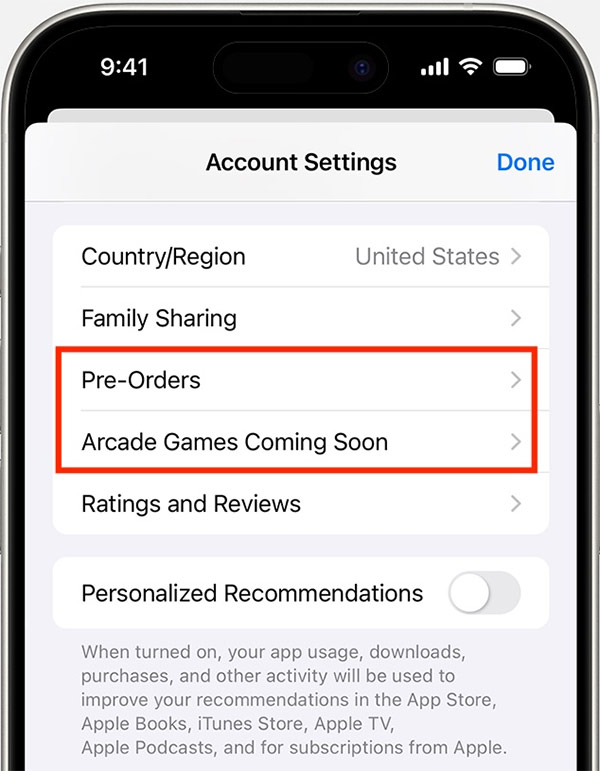
How to cancel an App Store order on Mac
On Mac, you also click on App Store then click on Account Settings at the top of the interface. Next, you scroll down to the Pre-Orders section and click on Manage Pre-Orders or Arcade Games Coming Soon to see the list of pre-ordered games.
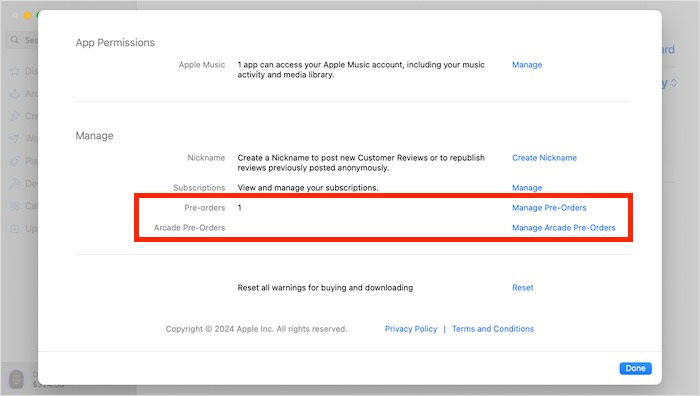
Now you also find the order you want to cancel and click Cancel. Then the order will no longer appear in this interface.
FAQ
How do you cancel a pre-order on the app store: step-by-step guide?
In practical terms, pre-ordering an app, game, or other content on the App Store is simple and straightforward. But if your plans change and you want to cancel your App Store pre-order, it's also simple.
What should you check before getting started?
Review the requirements, compatible device or software version, and any warnings described in the guide before making changes.
What should you do if the steps do not work?
Repeat the steps in order, confirm that your app or system is up to date, and review the troubleshooting details provided above.
Related Articles
 How to Cancel an Order on eBay: Practical Guide9 minutes read
 How to Cancel a Print Job on Word, Excel4 minutes read
 How to Unsubscribe the App on the App Store from iPhone, iPad, Mac5 minutes read
 Subscription: How to Stop iTunes Payments6 minutes read
 Apple Store Started to Order iPhone 64 minutes read
 How to Delete, Cancel Print Orders on Canon, HP4 minutes read
Reader Comments 0
Sign in with email or Google to join the discussion.