Table of Contents
Hot: Microsoft Suddenly Launches Free Version of Office is easier to approach with a clear overview and reliable steps. This guide organizes the essential information, highlights practical details, and explains what to check along the way.
Key Takeaways
- Follow the recommended steps in order to avoid common mistakes with hot: Microsoft suddenly launches free version of office.
- Review compatibility, settings, or requirements before making changes.
- Use the troubleshooting notes to confirm the final result.
There are some limitations with the free Office apps.
According to Beebom, this free version of Office is based on the full desktop applications, but most of the advanced features are only available to users who have a Microsoft 365 subscription. Users will see ads constantly displayed on the screen in applications such as Word, PowerPoint, and Excel when using the free version. Notably, this version only allows saving documents to OneDrive, not supporting local storage.
Users simply bypass the sign-in prompt when they first open the application. This helps you access the free version of Office. They can then choose to use Office for free with the condition that they accept ads and limited features. In this mode, you can open, view, and edit documents just like they would in the web version of Office.
However, limited features include no access to add-ons, dictation functionality, advanced formatting, designer, smartart, and more. This free version is primarily designed for basic writing and editing.
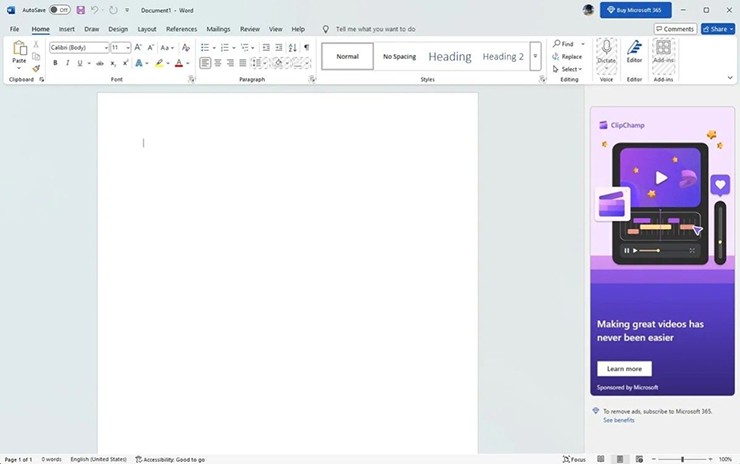
Currently, it appears that the free version of Office is still in limited testing, as some users are unable to bypass the sign-in prompt when running Office on a test machine. It's possible that Microsoft is testing this version in specific regions or with a small group of users.
So far, the company has not officially announced this free version of Office, nor has it acknowledged its existence in support documents. Users can expect more information from Microsoft in the coming days or weeks.
Final Thoughts
The most reliable way to handle hot: Microsoft suddenly launches free version of office is to follow the process in order, verify each important setting, and test the result before moving on. Use the guidance above as a practical reference, then adjust the details for your device, software version, or specific goal.
FAQ
What should I know first about Hot: Microsoft Suddenly Launches Free Version of Office?
Microsoft has quietly introduced a new version of Microsoft Office for Windows, allowing users to create and edit documents for free without subscribing to Microsoft 365 or purchasing an Office license.
How do I get the best results with Hot: Microsoft Suddenly Launches Free Version of Office?
Use current software or equipment, follow the steps in order, review the recommended settings, and test one change at a time so you can identify what improves the result.
What should I do if Hot: Microsoft Suddenly Launches Free Version of Office doesn't work as expected?
Check compatibility, permissions, connectivity, and version-specific settings. Restart the relevant device or app, then repeat the process carefully before trying a more advanced fix.
Related Articles
 Microsoft Added a Chat Feature to the Free Office Version4 minutes read
 How to Download Microsoft Office Version Completely Free?7 minutes read
 Download and Try Office 2013 Professional Plus for Free for 60 Days3 minutes read
 4 Things to Expect in Microsoft Office 154 minutes read
 How to Check the Version of Microsoft Office You Are Using Is 32-Bit5 minutes read
 Students and Students Enjoy Free Office 3654 minutes read
Reader Comments 0
Sign in with email or Google to join the discussion.