Sideloading remains the number one argument against moving to iOS, and for all the right reasons like updating apps to the latest version quickly or installing unreleased apps to satisfy curiosity. Unfortunately, it looks like Google is blocking sideloading on Android after the latest Google Play Integrity API update.
For those who are not familiar with Google Play Integrity, it is an API that allows developers to know through server requests whether the app and operating system the user is running is genuine or not. This API is used to fight against modified apps and prevent users from using them as they may be malicious.
According to Mishaal Rahman via Android Authority, developers can call the API at any time and get an 'integrity judgment.' This could block users from using the app. A recent Play Integrity update can determine whether an app is sideloaded instead of downloading it from the Play Store. It will then redirect users to the original app on the Play Store.
It's basically like checking for game licenses on Steam. When the platform detects that you've installed a game from somewhere else after adding it as a non-Steam game, it will ask you to download it from Steam instead.
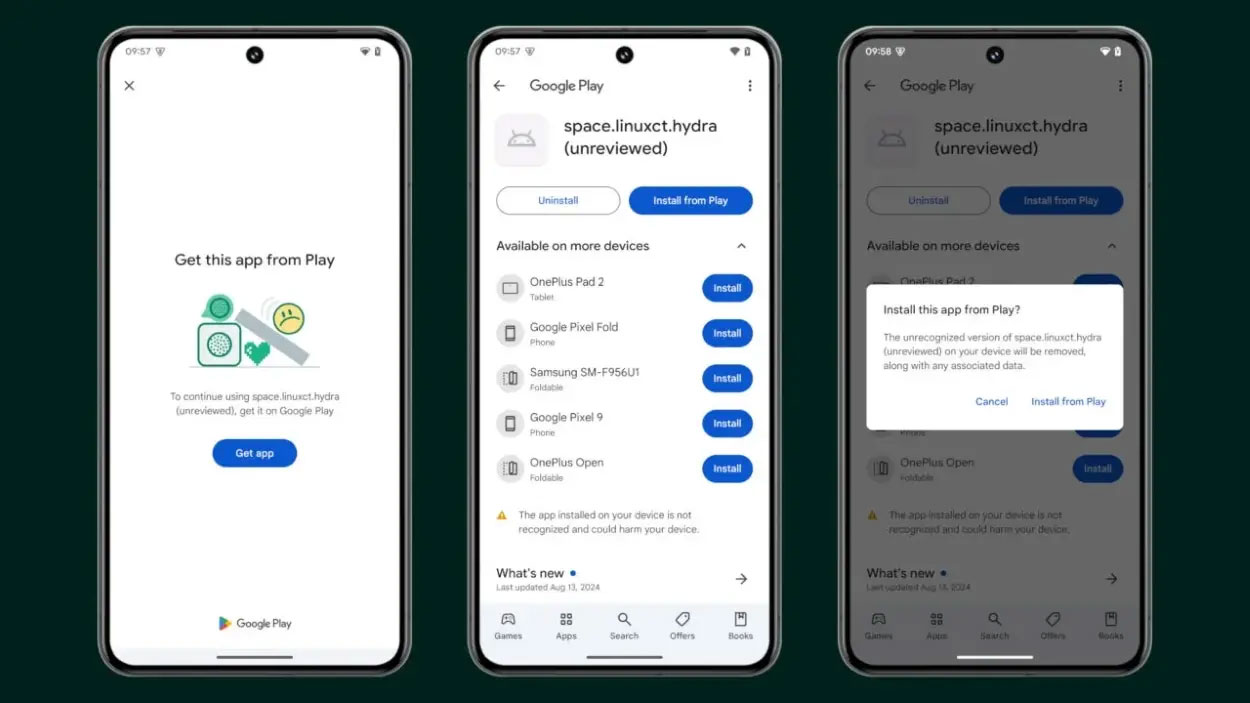
When you sideload an app using Play Integrity, when you launch the app, you'll see a "Get this app from Play" screen. You'll also see a Get app button that takes you to the app's landing page on the Google Play Store. Tapping Install from Play will remove the installed app and reinstall it from the Play Store.
This measure may protect general users from potentially malicious and modified apps, but it is a nightmare for power Android users, especially those who have rooted their devices. Many have expressed concerns about the loss of openness in Android due to these features, with some arguing that moves like this are antitrust.
Play Integrity has also received harsh criticism from Graphene OS developers. Most devices fail Play Integrity's CTS, but Google still accepts the tests.
It's up to app developers to implement the latest Play Integrity checks, but considering the apps and games that have already jumped on the bandwagon, it's safe to say Android enthusiasts are in for a treat. In fact, apps like ChatGPT have already blocked people from sideloading their apps.



Reader Comments 0
Sign in with email or Google to join the discussion.