Table of Contents
The following guide provides a clear overview of Google Docs, with the most relevant background, details, and practical takeaways.
Google Docs Overview
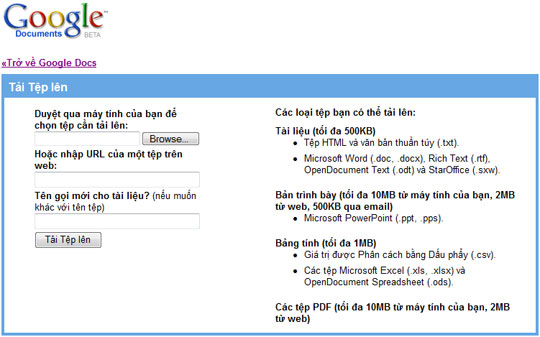 Now docx and xlsx formats are already in Google Docs support list
Docx and xlsx are the two default formats of two text tools (Word) and spreadsheet (Excel), which began to appear when the MS Office 2007 tool was created. These two formats are much smaller than the previous doc and xls formats, which have been around for a long time since MS Office 97. Previously, every time a user tried to import a docx or xlsx document to Google Docs, the site would notify the user that this format was not supported. With this new feature, Google Docs lets you read these two formats right on Gmail or directly on Google search results. In the past, to view this document format, users had to view it via HTML mode. However, Google Docs does not yet support the pptx format of the Power Point 2007 presentation tool. It is known that a direct competitor to Google Docs is Zoho that has supported the XML format since 2008.
FAQ
What happened in Google Docs Supports More Docx and Xlsx?
The following guide provides a clear overview of Google Docs, with the most relevant background, details, and practical takeaways.
What factors influenced Google Docs?
Google Docs Overview Now docx and xlsx formats are already in Google Docs support list Docx and xlsx are the two default formats of two text tools (Word) and spreadsheet (Excel), which began to appear when the MS Office 2007 tool was created.
What was the practical impact on users?
These two formats are much smaller than the previous doc and xls formats, which have been around for a long time since MS Office 97.
Related Articles
 How to Open Files Docx, Xlsx, Pptx on Office 20034 minutes read
 Convert Google Docs to Word: How to Transfer Google Docs to Word3 minutes read
 What File Is XLSX? How to Open XLSX Files3 minutes read
 The Way Google Docs Helps You Become Professional7 minutes read
 Instructions for Translating Text on Google Docs3 minutes read
 Instructions for Dividing and Merging Columns on Google Docs4 minutes read
Reader Comments 0
Sign in with email or Google to join the discussion.