Table of Contents
This guide provides a clear, practical overview of "Gemini Updates New Icons on Android and iPhone". It organizes the most useful details, explains important considerations, and highlights the steps or choices that matter most.
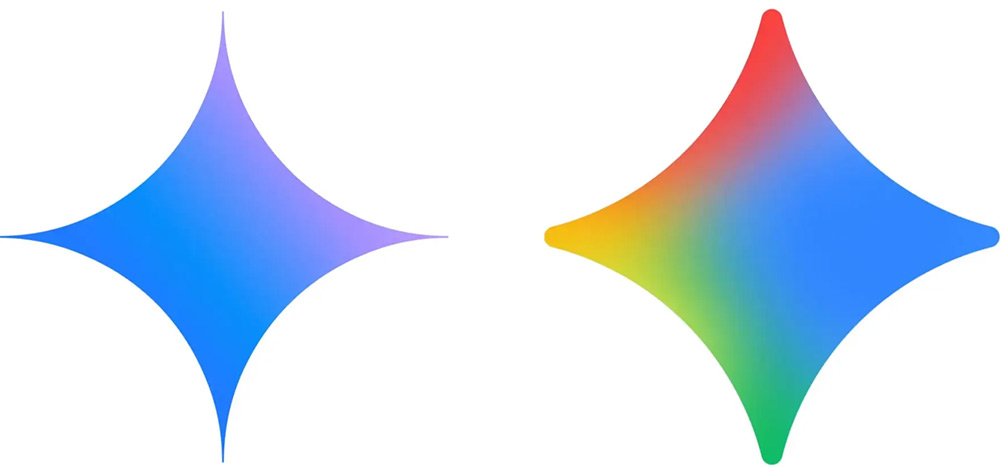
The new four-color logo takes inspiration from every other Google logo. It's still predominantly blue on the right, with red, yellow, and green in the other spots. There's also a nice stripe of color down the middle on the left, just like the current G logo.
The four dots are rounded and not as sharp as before. With the interface sized as small as on the phone's home screen, the icons will not fade and turn into very thin lines and disappear.
With the naked eye, you can see that the new Gemini logo is larger than the old logo. The colors used, including red, yellow, green and blue, are also more diverse and unique so as not to be confused with the logos of other applications.
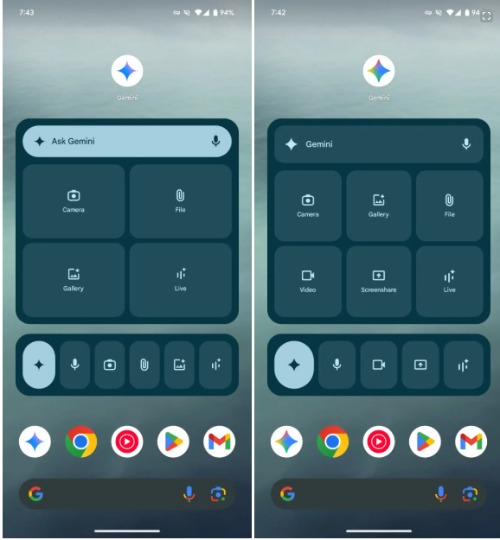
With this update, Google has also tweaked the Gemini widget on the Android home screen. In addition to the new icon, there are now shortcuts for Video and Screenshare to open directly in Gemini Live. At 3×3 and larger, you'll have a total of eight shortcuts: open app (with keyboard enabled), voice input, Camera, Gallery, Files, Video, Screenshare, and Live.
FAQ
What does this guide cover?
This guide explains Gemini updates new icons on Android and iPhone, including the main steps, important details, and practical considerations.
Who is this guide for?
It is designed for readers who want a clear, practical overview and a reliable process they can follow without unnecessary complexity.
What should you check before getting started?
Review the requirements, confirm that your software or device is up to date, and save any important data before changing settings.
Related Articles
 Gemini 3.1 Pro or Gemini 3 Pro: Better?8 minutes read
 4 Gemini Features You Should Use on Your Android Phone7 minutes read
 How to Make Calls on Android Using Gemini3 minutes read
 How to Create Illustrator-Style Icons in Gemini3 minutes read
 How to Easily Identify Songs Using Gemini on Android6 minutes read
 Gemini Tips for Multitasking on Android3 minutes read
Reader Comments 0
Sign in with email or Google to join the discussion.