Table of Contents
Explore fake comments are rampant on linkedin.
Are the comments real or fake?
The last thing you should worry about when reading comments on LinkedIn is whether they're trying to steal your information. You should focus more on having interesting conversations and networking.
Instead, the scammers tricked people into spending extra time looking at the comments, wondering if they were real or just another fake scam on LinkedIn.
The comments look quite genuine, which is why they're so effective. The scammers are impersonating LinkedIn moderation bots. They post warnings about your account in the comments section of your posts. You're told to take immediate action due to a policy violation or your account could be suspended.
Click on the provided link and you'll be taken to a screen that looks like the official LinkedIn website, asking for your login and other personal information. Unfortunately, it's not LinkedIn. It's a fake website stealing all your information.
People are easily fooled by these comments. Unlike many other fake scams, you won't find any obvious grammatical errors. They also use the trusted LinkedIn branding and even shortened links in LinkedIn's 'lnkd.in' format.
When worried about your account suddenly being locked, you might act without thinking, especially when the comment appears to be coming directly from LinkedIn. What makes the whole scam worse is that the scammers are using artificial intelligence (AI) to send comments on a massive scale, while still maintaining a legitimate appearance to deceive users.
Scammers use LinkedIn identities
Currently, most scam accounts use the name LinkedIn Very. LinkedIn user Mark O has shown how the scam appears in comments on his LinkedIn profile.
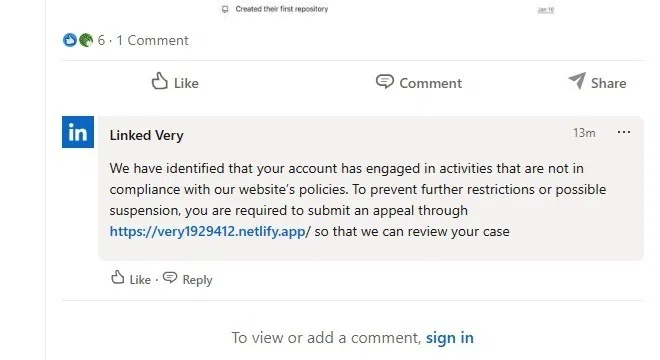
This comment links to a separate page that looks exactly like any other LinkedIn page. There are other versions of this same comment, but you can imagine.
Scammers are very likely to change their current profile names now that LinkedIn is being actively reported as a scam by users.
However, if you see this profile name, do not click on any links from it. Instead, report that profile to LinkedIn. Click on the profile name to open the profile, click the More button, and then click Report/Block . The more fraudulent profiles you block, the safer everyone will be. Even if it's not an identity theft scam, you can still block users who post irrelevant comments.
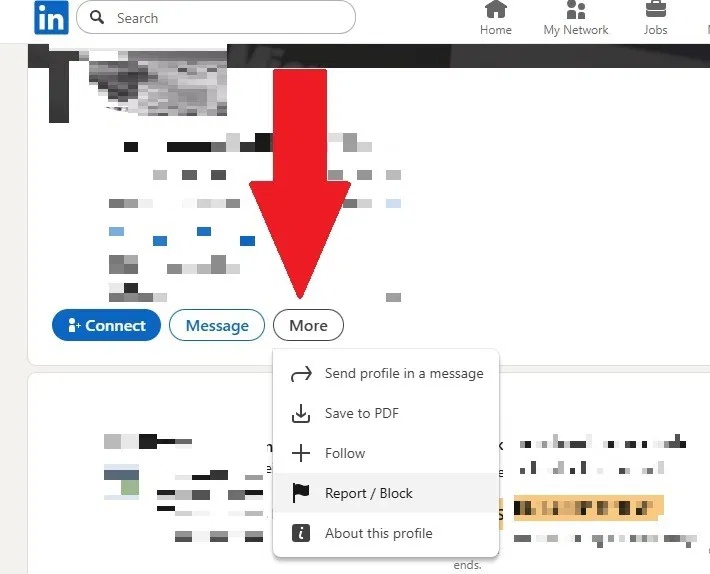
LinkedIn needs users to report these fake comments and profiles so they can remove them. Currently, LinkedIn is actively removing suspicious profiles that fit this type of scam.
Check profile details
If you're unsure whether the alarming comment about your account violating policies is genuine, check the profile. Don't click on any links in the comment. Instead, click on the profile name itself.
Official LinkedIn support pages have followers. For example, the LinkedIn Help profile for LinkedIn's support team has 7,000 followers. Fraudulent profiles usually have 0 followers. If they're lucky, they might get a few. This is an extremely dangerous warning sign. No followers means the page is invalid.
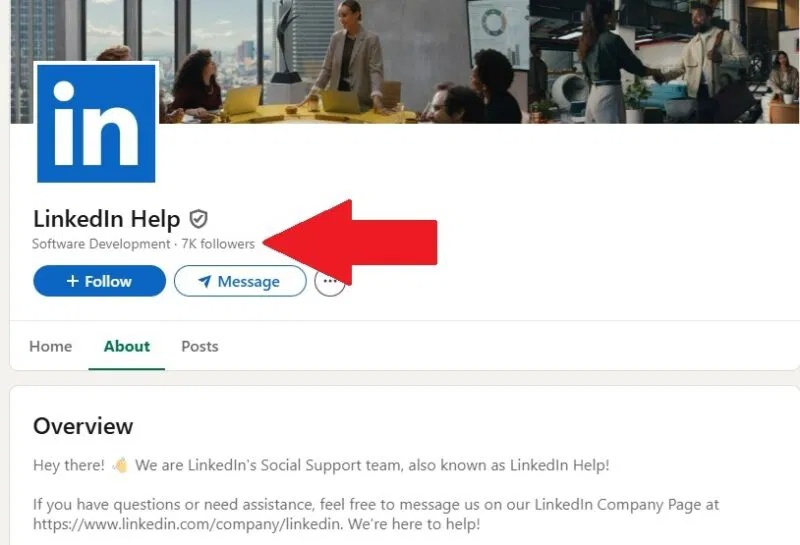
While new or inactive users may not have full profiles, official LinkedIn support pages always have complete profiles. And, if scammers change tactics, you should still avoid clicking on any links from users with extremely sparse profiles and no followers.
LinkedIn doesn't warn you in comments
LinkedIn has never and will never warn you about policy violations in public comments. You will receive an email to the account you registered with. This email explains the violation and the next steps you need to take. While phishing emails do exist on LinkedIn, you should not click on any links in these emails. Simply log directly into LinkedIn and proceed from there.
If you suspect a violation, log directly into LinkedIn. You will also receive a direct message from LinkedIn about the breach. If you receive both, it is an official notification.
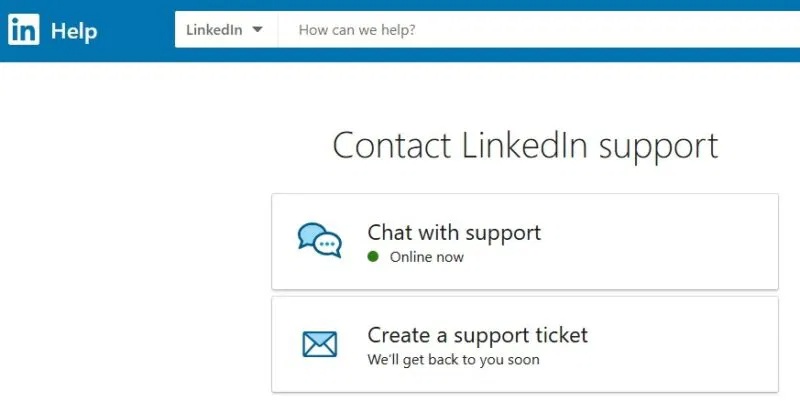
You can always message LinkedIn directly if you're still unsure. Go directly to LinkedIn's contact page to chat live or create a support request.
Avoid providing login information
LinkedIn won't ask you to verify your login information. After all, if you're reading comments on LinkedIn, you're already logged in. If you're redirected to a different page to log in again, don't do it.
In some cases, you may be asked to verify your password when making certain changes to your account. This is normal.
Otherwise, LinkedIn would have recognized you were logged in and allowed you to proceed to the correct form to file a violation complaint.
Final Thoughts
Understanding fake comments are rampant on linkedin makes it easier to evaluate the information and apply the most relevant recommendations. Focus on the key points above and verify details that may change over time.
FAQ
What is fake comments are rampant on linkedin?
Explore fake comments are rampant on linkedin.
What key points does this article cover?
The article focuses on Are the comments real or fake?, Scammers use LinkedIn identities, Check profile details, with practical explanations and examples.
How can you use this information in practice?
Use the explanations to compare options, verify important details, and make a more informed decision. Apply the recommendations that best match your goals and situation.
Related Articles
 5 Tips to Help You Use Linkedin Better5 minutes read
 Guide to Watching and Managing Video Comments on YouTube3 minutes read
 What Is Fake IP? Guide to the Simplest Fake IP for Chrome5 minutes read
 Instructions for Creating a Linkedin Account: What Are Linkedin5 minutes read
 Microsoft Released a Completely New LinkedIn Application for Windows 103 minutes read
 What Is the Standard Linkedin Image Size?: Linkedin Image Sizes4 minutes read
Reader Comments 0
Sign in with email or Google to join the discussion.