Table of Contents
This guide covers durabook d14 e-series protects data safety with practical context and easy-to-follow details. Use it to understand the subject and apply the information confidently.
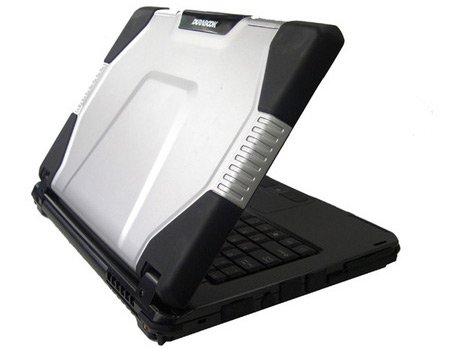 DuraBook D14 E-Series is equipped with a scratch-resistant magnesium case
The E-Series comes with 2 shock-resistant drives with 500GB storage capacity and RAID feature to enhance the data access of users, anywhere and in any situation. The E-Series has 3 models (E0, E1 and E2) that allow you to choose a configuration suitable for your mobile needs. E0 is equipped with a drive that supports RAID-0 protocol to improve data storage capacity as well as machine performance. E1 is a product capable of eliminating concerns about data loss by providing the ability to synchronize backup data in real time with the RAID-1 protocol. Meanwhile, the flexibility of E2 lies in the fact that with two 500GB drives, users can divide the data storage of the drives into different topics. Other E-Series features include: equipped with an Intel Core 2 Duo processor, 7200-rpm drive with optional RAID-0. Case is made of scratch-resistant magnesium alloy and a waterproof keyboard and in / out ports with rubber caps.
FAQ
What should I check before following these steps?
Confirm device and software compatibility, save important data, and make sure you have the required permissions, files, and account access.
Why might the process not work?
Common causes include outdated software, missing permissions, incompatible hardware, an unstable connection, or completing a step in the wrong order.
Can I undo the changes if necessary?
That depends on the tool or setting. Use built-in restore options when available, keep a backup, and record the original configuration first.
Related Articles
 How to Use the Safety Check Feature to Prevent Others from Tracking You9 minutes read
 What Is Twitter's New Safety Mode? How Does Safety Mode4 minutes read
 How to Rename Data Series in Excel Chart2 minutes read
 How to Turn Off Microsoft Family Safety on Windows3 minutes read
 Dpm: Deploy Data Protection Manager 2007 (Part 1)9 minutes read
 Click: Deploy Data Protection Manager 2007 (Part 4)8 minutes read
Reader Comments 0
Sign in with email or Google to join the discussion.