Table of Contents
This guide covers msi continues to upgrade the x-slim series with practical context and easy-to-follow details. Use it to understand the subject and apply the information confidently.
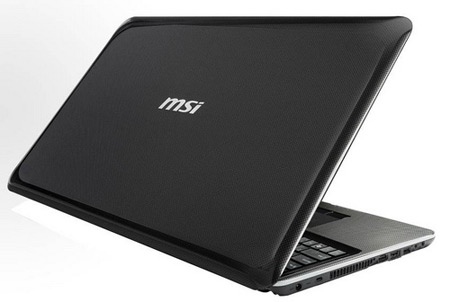 X620 with a beautiful design and impressive battery life Photo: Notebookcheck .
The X620 has a 15. 6-inch HD standard widescreen display with a resolution of 1, 366 x 768 pixels. It is equipped with an Intel Core 2 Duo SU7300 or SU4100 processor, 4GB of RAM, a hard drive of up to 500 GB and an ATI Mobility Radeo HD 5430 graphics card, 1GB of DDR3 memory. This ultra-thin laptop is also equipped with 3D Boost technology and energy saving capabilities with ECO Engine and included DVD burner.
The X620 has connections like Wi-Fi Bluetooth, 2 USB ports, HDMI and eSata. It also has a 1. 3 Megapixel webcam for remote video meetings. This model will come pre-installed with Windows 7 Home Premium operating system and battery life in normal mode can be up to 11 hours continuously. The price of the machine is still not disclosed.
FAQ
What should I check before following these steps?
Confirm device and software compatibility, save important data, and make sure you have the required permissions, files, and account access.
Why might the process not work?
Common causes include outdated software, missing permissions, incompatible hardware, an unstable connection, or completing a step in the wrong order.
Can I undo the changes if necessary?
That depends on the tool or setting. Use built-in restore options when available, keep a backup, and record the original configuration first.
Related Articles
 Should I Upgrade to the New PS5 Slim? Here Is the Answer: Complete Overview5 minutes read
 MSI X-Slim X430 Laptop: the Hidden Bar Contains Power4 minutes read
 MSI Continues to Upgrade CX, CR with Arrandale3 minutes read
 MSI X-Slim - Super Power Saving3 minutes read
 The MSI X600 Shows Off a Slim Look4 minutes read
 Lenovo Introduces New Yoga Slim 7 Pro and Yoga Slim 7 Carbon5 minutes read
Reader Comments 0
Sign in with email or Google to join the discussion.