Table of Contents
The sections below explain download the capture and video app with the stunning kirakira + in a clear and practical way. Review the key details, examples, and considerations before applying the information.
The sections below explain download the capture and video app with the stunning kirakira + in a clear and practical way. Review the key details, examples, and considerations before applying the information. This is the app that is causing fever in the online community and is ranked 180 (Photo & video category) on the App Store. If you have a need, please download this free app for free.
How Download the Capture and Video App with the Stunning Kirakira + Works
Kirakira + outstanding features:
- Shoot video and take photos with sparkling effects and real-time color filters to help details such as light capture, mirror surface, jewelry, glass. emit beautiful light.
- Store to phone memory (camera roll).
- Swipe left and right to change the color filter.
- Adjust the level of convenient effects.
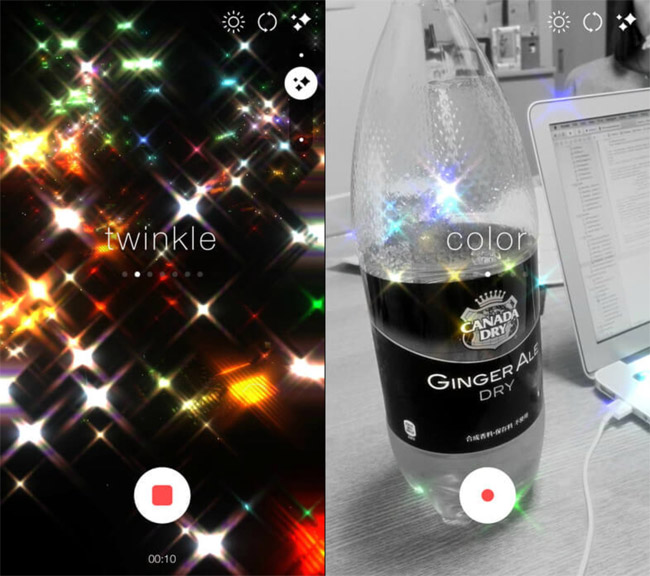
Download the free app to capture and record videos with gorgeous sparkling effect Kirakira +.
- Kirakira + on the App Store
Readers can refer to the article How to shoot sparkling videos with Kirakira + iPhone application to know how to use and create beautiful photos and videos.
- IPhone 7 has a wave loss error that Apple will fix for free
- Acronis Ransomware Protection, a completely free anti-ransomware solution for Windows
- Start Menu does not work and free applications replace
- 5 UWP applications compress and decompress compact, free for Windows 10
FAQ
What is the main benefit of download the capture and video app with the stunning kirakira +?
The main benefit is a clearer understanding of the topic and a practical way to apply the information covered in this guide.
What should I check before using download the capture and video app with the stunning kirakira +?
Confirm compatibility, review the required settings, protect important data, and use the latest supported version whenever possible.
What should I do if the result is different?
Repeat the steps carefully, verify permissions and version differences, and consult the product's official support documentation for changes not shown in the article.
Related Articles
 How to Shoot Sparkling Videos with Kirakira + iPhone App5 minutes read
 6 Best Free Tools to Capture Photos from Video7 minutes read
 Capture One - Capture One Download and Installation Guide6 minutes read
 Download GOM Cam: All-in-one Video Tool for Free6 minutes read
 50+ Websites Download the Best Free Sound Effects7 minutes read
 Download Apowersoft Screen Recorder Pro, a $ 40 High-quality Screen3 minutes read
Reader Comments 0
Sign in with email or Google to join the discussion.