Table of Contents
Use this guide to understand download software that supports backing up spideroak one secure and the factors that affect it. The information is organized to make the topic easier to apply in practice.
Typically, this software is priced at US $ 30 but is currently free until 16h on 11/5/2018. If you have a need to use it, please quickly register to own this useful free copyright SpiderOak One Secure Backup application.
How Download Software That Supports Backing up Spideroak One Secure Works
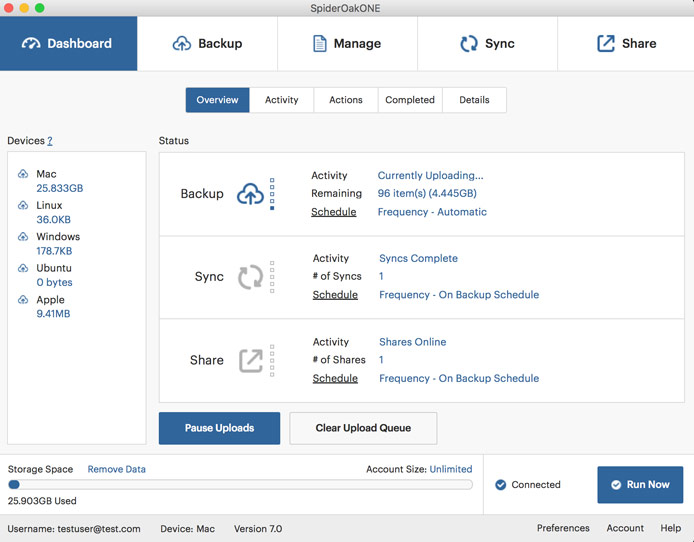
How to own free SpiderOak One Secure Backup license
Step 1: Go to the link below and click the text DOWNLOAD SPIDEROAK ONE SECURE BACKUP NOW.
FREE SpiderOak One Secure Backup

Step 2: Fill in the required information -> reCAPTCHA -> GIVE IT TO ME NOW.

Step 3: In the new window that appears, you will see a link to download the installation file and license key.

Step 4: When installing, the app will require new account registration, you enter the registration information and click Create Account -> in the new window, click Next To continue.

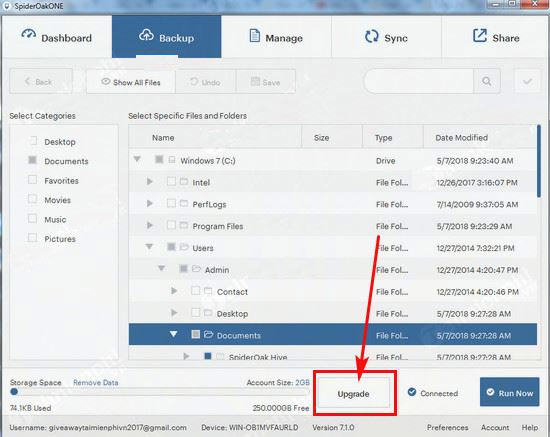
Step 5: In the new window, click Upgrade To activate the license.
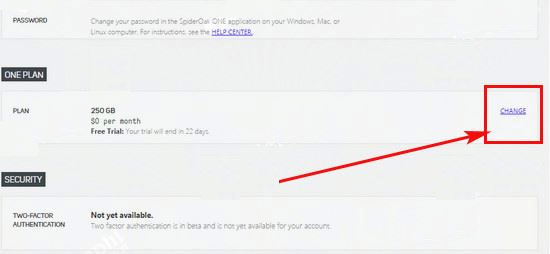
Step 6: A web page on the browser appears, at the ONE PLAN Section, click Change .
Step 7: Enter the key received in step 3 into the empty box and click USE PROMO CODE .
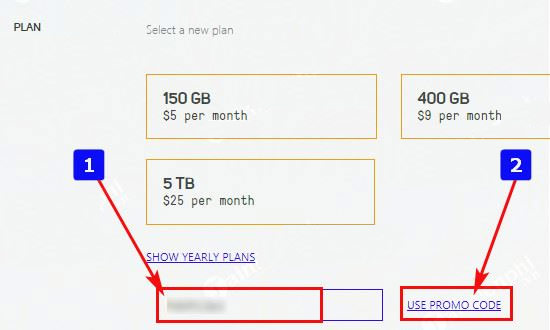
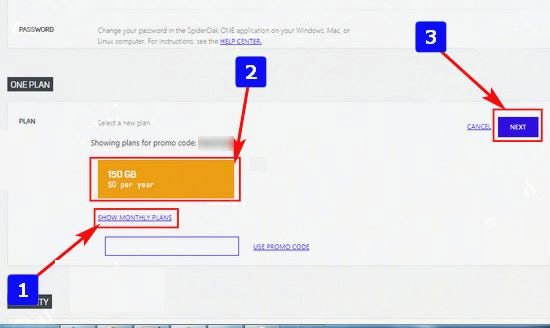
Step 8: click SHOW YEARLY PLANS -> 150GB PLAN -> Next To continue.
Step 9: Click COMPLETE CHECKOUT To complete SpiderOak One Secure Backup license registration.
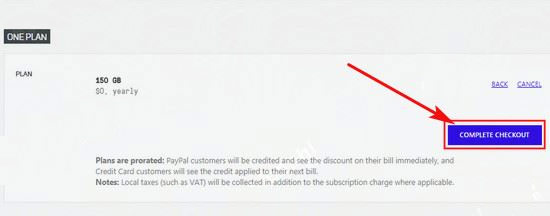
A successful free license activation message appears, you can use the app already.

Note:
- The time for free registration of SpiderOak One Secure Backup will end at 16:00 on 11/5/2018
- You will be able to use the app for free for 6 months to store up to 150GB.
FAQ
What is the main benefit of download software that supports backing up spideroak one secure?
The main benefit is a clearer understanding of the topic and a practical way to apply the information covered in this guide.
What should I check before using download software that supports backing up spideroak one secure?
Confirm compatibility, review the required settings, protect important data, and use the latest supported version whenever possible.
What should I do if the result is different?
Repeat the steps carefully, verify permissions and version differences, and consult the product's official support documentation for changes not shown in the article.
Related Articles
 Backup: Sync Files with Spideroak6 minutes read
 How to Use Iperius Backup Free to Back up Windows Data4 minutes read
 Download the Free Goodsync 10 Computer Data Backup Tool for $5 minutes read
 Are You Backing up Your Data Incorrectly: Explained8 minutes read
 Free Tools for Backing up Data Securely for Your Computer4 minutes read
 Instructions for Backing up All Data on Android Device Without Root6 minutes read
Reader Comments 0
Sign in with email or Google to join the discussion.