Table of Contents
Spotify’s Discover Weekly is a personalized playlist that refreshes every Monday. In the mobile app, Premium listeners with the genre controls can choose from up to five genres at the top of the playlist. Tapping one generates a 30-track selection based on that genre.
Find Discover Weekly and choose a genre
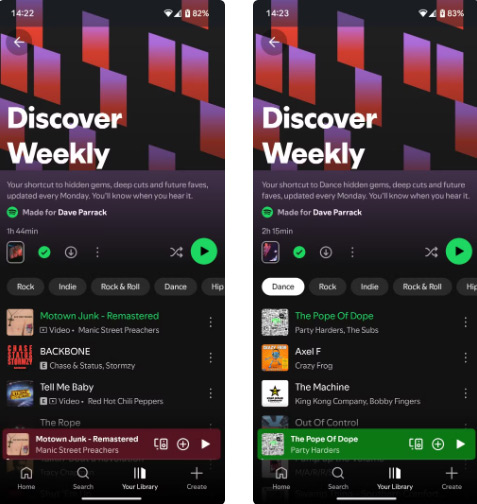
- Open Spotify and search for Discover Weekly, or open the Made For You hub.
- Choose your personalized playlist and look for genre controls above the tracks.
- Tap a genre to explore it. Spotify chooses the available genres based on your listening history.
- Save songs you want to hear again to Liked Songs or your own playlist before the next Monday refresh.
Spotify introduced the controls for Premium mobile users in its 10th-anniversary update. If the buttons are missing, check the mobile app and your plan. You can still listen to the default Discover Weekly mix. For more recommendations, try Smart Shuffle or these sites for finding playlists and new music.
Related Articles
 Why is Last.fm still better than Spotify for finding new music?
 6 pages to discover new music and find playlists for Spotify
 Do you know Spotify has more interesting things than you think?
 How to Play Spotify’s Hidden “Eat This Playlist” Snake Game
 How to turn off booting Spotify when opening the machine on Windows 10
 How to Find the Best Podcasts on Spotify in Seconds
Reader Comments 0
Sign in with email or Google to join the discussion.