Table of Contents
Microsoft Paint's Coloring Book feature turns a text description into several black-and-white coloring-page designs. Open it from Paint's Copilot menu, describe a subject and scene, generate the variations, then add the best result to the canvas for coloring, printing, or saving.
What you need
- A Windows 11 Copilot+ PC.
- The latest version of Microsoft Paint from the Microsoft Store.
- A Microsoft account signed in to Paint.
- Access to the feature in your Windows release and region.
Microsoft introduced Coloring Book to Windows Insiders in Paint version 11.2512.191.0. A newer version also meets that original minimum, but the feature may appear at different times as Microsoft expands its rollout. A normal Windows 11 PC without Copilot+ hardware does not meet the announced requirement.
Create an AI coloring page in Paint
1. Open Coloring Book
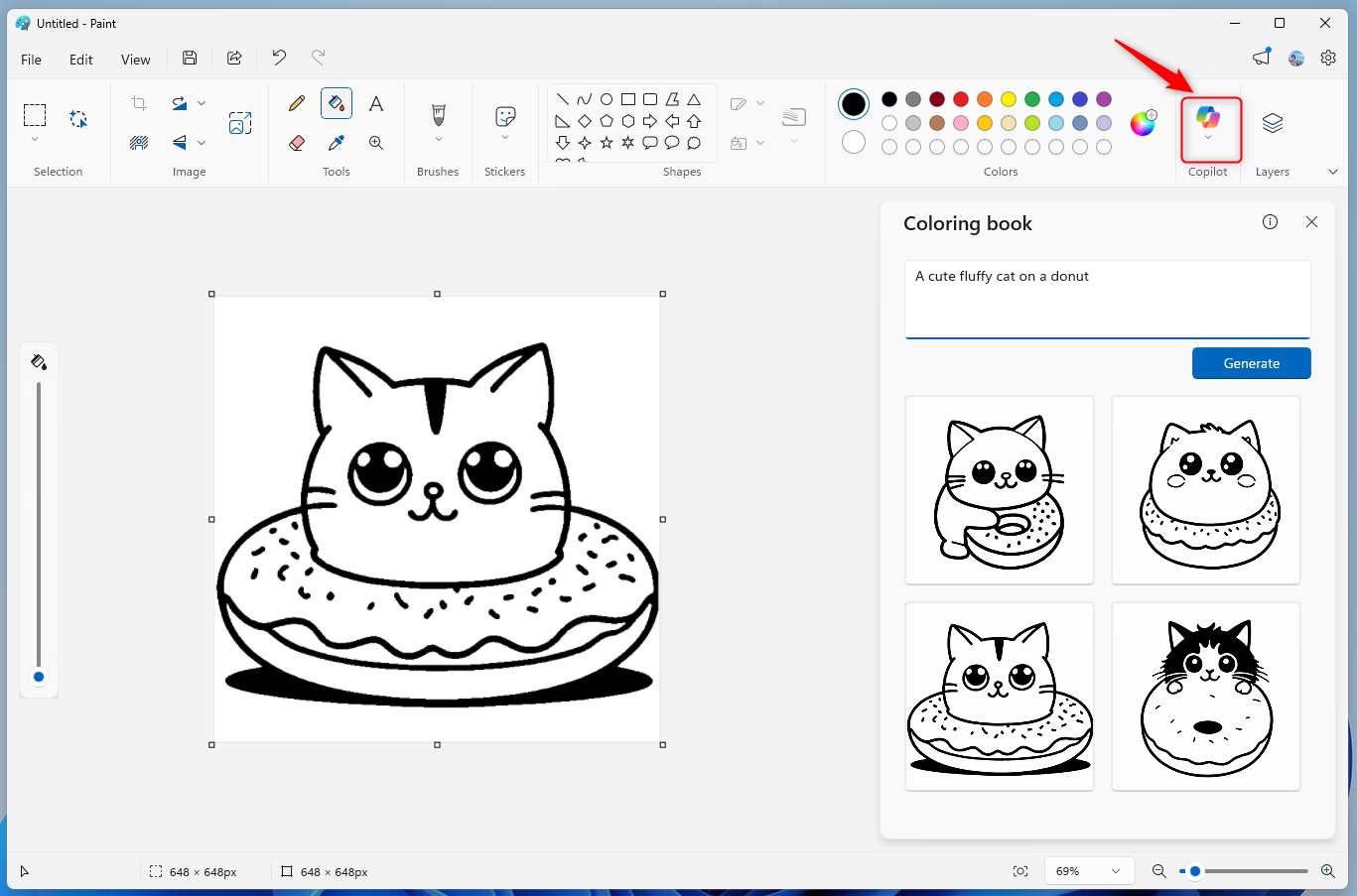
Launch Paint, select the Copilot button on the toolbar, and choose Coloring Book. A panel opens beside the canvas.
2. Describe the page
Enter a concrete description of the subject, setting, and desired simplicity. For example:
- A friendly dinosaur planting flowers, simple thick outlines, large open spaces, no shading
- A small house with a garden and fence, clean coloring-book line art
- A fluffy cat sitting on a donut, bold outlines, child-friendly details
Ask for simple outlines, large shapes, and no shading when the page is for a young child. For an older colorist, request more background objects or finer detail. Avoid asking for a living artist's exact style; describe visual traits instead.
3. Generate and choose a result
Select Generate. Paint returns a set of variations based on the prompt. Select a result to see the available actions:
- Add to canvas places it in the current Paint file.
- Copy puts the image on the clipboard for another app.
- Save stores the generated page as a file for later use.
If none of the images works, revise one part of the prompt rather than adding many unrelated instructions. Specify what is wrong: fewer objects, a centered subject, thicker lines, a blank background, or more open areas for coloring.
Color, print, or export the page
After adding a result to the canvas, use Paint's Fill, Brush, Pencil, Eraser, and color controls as usual. The newer Fill tool includes a tolerance control on supported Paint versions: a lower value limits how far a color spreads, while a higher value can cover pixels with a wider color difference. If color leaks through an outline, undo the fill and try a lower tolerance.
For a clean printable page, keep the canvas background white and save a master copy before coloring. PNG preserves crisp line art well; use the system Print command when you want a paper copy. If you want to place the line art over another color, see how to change a background color in Windows 11 Paint.
If Coloring Book is missing
- Open Microsoft Store, go to Library, and install available updates for Paint.
- Install current Windows updates and restart the computer.
- Confirm that the device is a Copilot+ PC and that Paint is signed in to a Microsoft account.
- Reopen Paint and check the Copilot menu again.
If the menu still does not appear, the feature may not yet be enabled for that Windows channel, build, account, or region. Do not download an unofficial Paint package to force access. While waiting, Paint's related Cocreator feature can combine a sketch with a prompt; see how to use Paint Cocreator.
Microsoft's original Coloring Book announcement documents the requirements and generation workflow. Review every output before printing or sharing it because AI-generated lines and object details can contain visual mistakes.
Related Articles
 Synthetic Princess Coloring Pictures for Babies4 minutes read
 How to Change the Background Color of an Image in Paint on Windows 114 minutes read
 10 Websites to Download Free Coloring Pictures4 minutes read
 Beautiful House Paint: The Most Beautiful House Colors in 20203 minutes read
 How to Find a Car Color Code: Step-by-Step Guide6 minutes read
 How to Draw and Color with Microsoft Paint9 minutes read
Reader Comments 0
Sign in with email or Google to join the discussion.