Table of Contents
To redeem a Higan: Eruthyll gift code, look for Redeem Code or Promo Code in the game’s settings. If your version uses a publisher-hosted redemption form, you’ll need your character UID. A successful claim should be available through in-game Mail.
Previously reported gift codes
The following codes appeared in earlier campaign coverage. Their current availability is unconfirmed, so check the result in the game rather than assuming they still work.
HEgachagamingTIMAEUSSVARSHE46CHAOTICHE46ANTONYCHENTHELAZYPEONHiganEruthyll0406Letsplaytogether3DrealtimecombatRPGRealtimePVPbattlesFreeSSRrewards
Redeem a code and check your mail
Use the in-game settings
- From the main screen, open Settings.
- Choose Redeem Code or Promo Code.
- Paste one code, select Confirm, and check Mail.
Use the web form when the publisher provides it
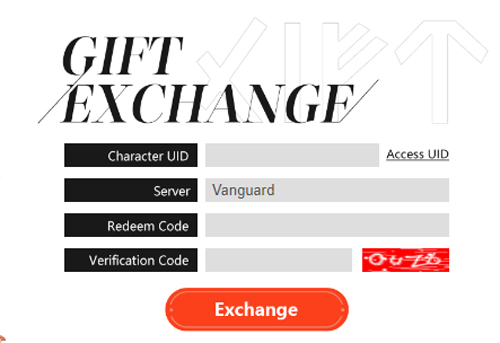
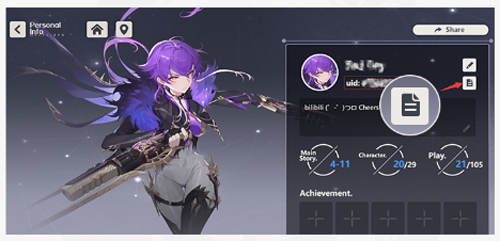
Tap your character name on the main screen and find the UID in Personal Info. Follow the redemption link from an official game announcement. If the form is available, match the UID to the character that should receive the reward, enter the gift code, and follow the form’s verification prompt. The screenshots show the earlier web form and the UID location.
If a code or reward is missing
Check the spelling and capitalization, remove extra spaces, and confirm the code applies to your region or server. If it’s been used before or has expired, another attempt won’t issue a reward. After a successful claim, reopen Mail on the character you selected. Check the publisher’s event announcements for current codes and deadlines.


Reader Comments 0
Sign in with email or Google to join the discussion.