Table of Contents
This guide covers causes and ways to detect iPhone batteries are about to explode with practical context and easy-to-follow details. Use it to understand the subject and apply the information confidently.
Over the past two years, an explosion occurred on smartphones in general and iPhone in particular. In just over the first week of 2018 there were two consecutive iPhone explosion cases in Switzerland and Spain.
The causes of battery explosion of Lithium-Ion:
Hardware error : Although quite rare, this is the main cause of most cases of fire on smartphones. This error occurs during device processing.
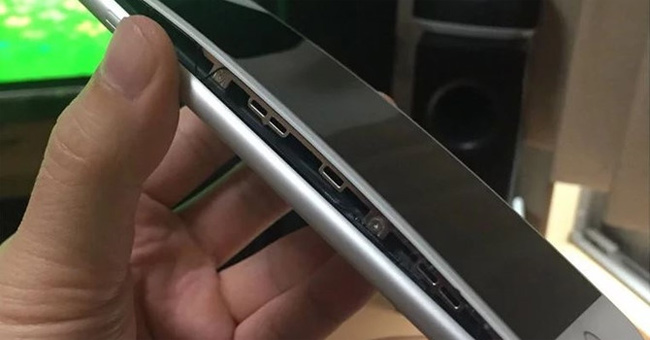 The iPhone 8/8 Plus has a massive battery bulge in 2017.
The temperature is too high : As recommended by Apple, the maximum temperature of iPhone when used is 45 degrees Celsius and iPhone models are supported with heat warning feature. If the temperature of the machine is hotter than this for a long time, it is likely that the inside of the device is having trouble and is likely to cause the Lithium-Ion battery to burn. Choosing the right panel is also a way for your iPhone to radiate better heat.
Poor quality accessories : Many iPhone users often choose to buy unidentified accessories for the device because the genuine accessory price for the iPhone is not cheap. But this makes them face the risk of iPhone explosion. In fact, charging 'lots' also has a greater risk of explosion than the iPhone.
The battery identification sign on your iPhone is having trouble
The following are important signs that iPhone users need to know to prevent fire and explosion incidents:
- The back of the phone is raised and warped : This happens when the Lithium-Ion battery expands excessively. This is the most obvious sign of the battery on your iPhone that is having the most trouble.
- Strange noise emitted from the location near the battery : If you hear a strange noise while charging, quickly disconnect the power source.
- The iPhone heats up abnormally and cannot radiate : This is why the Lithium-Ion battery melts causing a fire. If it is found that your device is unusually hot for a long time, stop using it and place it on a heat-resistant surface for monitoring.
If you find that your device has one of these three signs, go to genuine Apple dealers to check and fix it promptly.
FAQ
What should I check before following these steps?
Confirm device and software compatibility, save important data, and make sure you have the required permissions, files, and account access.
Why might the process not work?
Common causes include outdated software, missing permissions, incompatible hardware, an unstable connection, or completing a step in the wrong order.
Can I undo the changes if necessary?
That depends on the tool or setting. Use built-in restore options when available, keep a backup, and record the original configuration first.
Related Articles
 How to Know Apple Is Slowing Down Your iPhone?7 minutes read
 This Young Man Changed iPhone Batteries and Was Extremely Sad Because Apple Did Not Speak Soon7 minutes read
 Australia Makes Batteries That 'Like' Heat and Never Explode3 minutes read
 Science Reveals 5 Simple Ways of Detecting Lies3 minutes read
 iPhone Battery Exploded Due to Being Bitten by Customers to Check Quality3 minutes read
 Revealing the Secret to Charging Your iPhone Battery Super Fast Explained4 minutes read
Reader Comments 0
Sign in with email or Google to join the discussion.