Table of Contents
This guide provides a clear overview of 4 popular web browsers compared: which is fastest, including how it works, key details, and practical considerations that can help you use the information effectively.
Overview
Neowin news site recently performed performance benchmarks with the 4 most popular browsers today (Chrome, Firefox, Edge and Vivaldi) to find out which web browser is the fastest, most powerful and most suitable for use on Windows today.
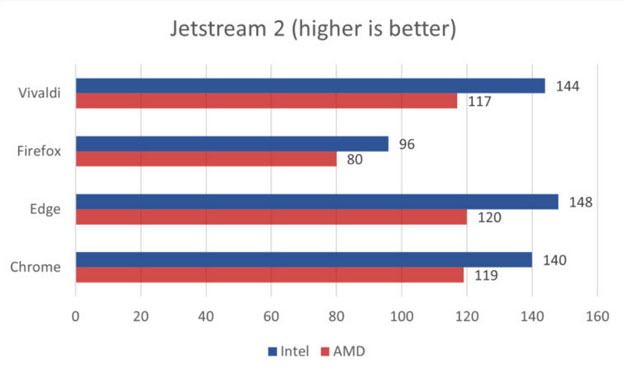
Jetstream 2 is a complex benchmark that tests the performance of modern features in web applications. A higher Jetstream 2 score means that the browser starts up faster, executes code faster, and runs smoother. The results of the Jetstream 2 test of four browsers show that Chromium-based browsers all scored about the same. Only Firefox performed significantly worse.
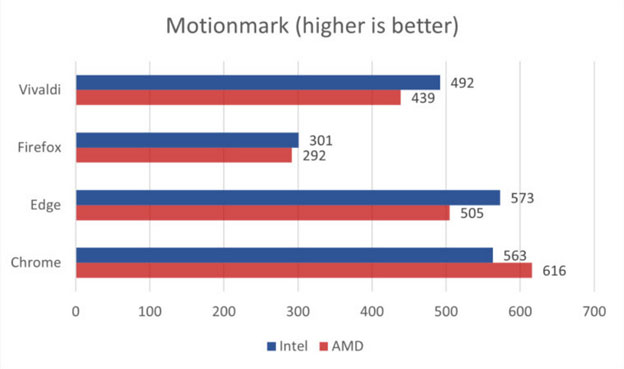
The Motionmark benchmark, which tests a browser's ability to render increasingly complex graphics and effects, is becoming increasingly popular. The Chrome browser performed well, followed by Edge and Vivaldi in third place. Firefox came in last with a significantly lower score.
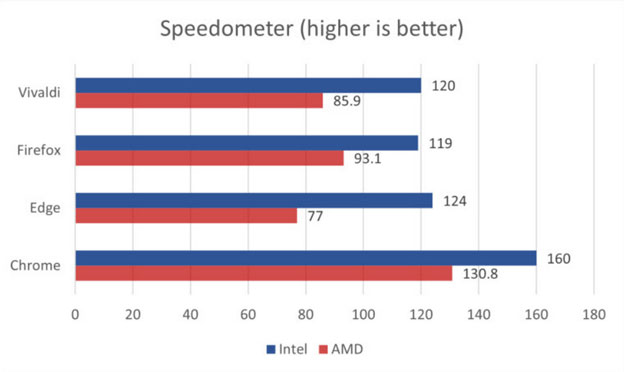
The Speedometer benchmark measures responsiveness in web applications. Browsers that provide a better web and web application experience score higher.
On AMD, Firefox beat both Edge and Vivaldi to take second place, behind Chrome. But on Intel PCs Firefox, Edge, and Vivaldi scored pretty much the same. Chrome, which outperformed its competitors on both systems, maintained its dominance.
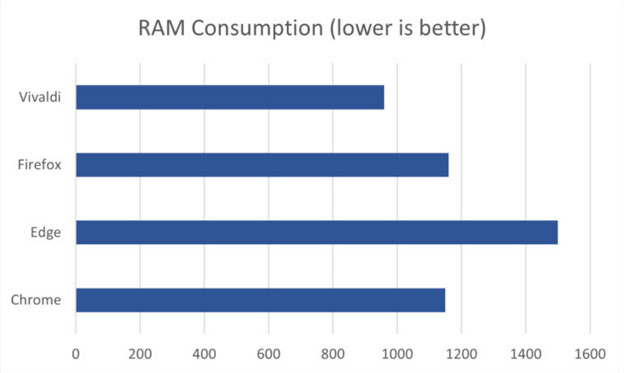
In the final test, Neowin opened 10 web tabs (a YouTube video, an e-commerce site, a document site, and a site with complex animations). This is similar to the user's everyday experience. The results showed that Vivaldi was the most RAM-efficient browser: it only needed 960MB of RAM to display all 10 tabs. The browser that consumed the most RAM was Edge, followed by Firefox and Chrome.
FAQ
What is most ram browser?
It is the main topic covered in this guide, including the relevant tools, settings, features, or steps connected with 4 Popular Web Browsers Compared: Which Is Fastest.
Why is most ram browser useful?
It can make 4 Popular Web Browsers Compared: Which Is Fastest easier to understand, compare, configure, or troubleshoot by organizing the most important information in one place.
What should I check before using this guide?
Confirm that the instructions match your device, software version, region, and intended use, then back up important data before making major changes.
Related Articles
 Top 10 Most Popular Web Browsers Today: Main Insights12 minutes read
 There Were Benchmark Scores of Galaxy S10/S10 +, the Most Powerful Android Smartphone Today4 minutes read
 Top 10 Most Popular Browsers, Google Chrome Tops, Second I.e3 minutes read
 Antutu Benchmark Was Suddenly Removed from the Play Store3 minutes read
 Incidentally: Galaxy Note 9 Lost to iPhone X on the Benchmark Despite Its Launch After 1 Year3 minutes read
 How Is Your Android Device Benchmark?8 minutes read
Reader Comments 0
Sign in with email or Google to join the discussion.