Table of Contents
This article gives a clear answer about After Changing the Network, How Do I Know Which Network I Want to Call. It explains the main idea, practical context, and details that help readers understand the subject.
Understanding After Changing the Network
Starting from today, November 16, 2018, postpaid mobile subscribers of large networks of VinaPhone, MobiFone and Viettel can switch to other networks that keep their familiar phone numbers long ago. Prepaid subscribers will have to wait until January 1.2019 to use this service.
So, how to know if the subscriber is calling from any network, whether it is an internal network or a network? This is a question of many users because it involves call charges. Most carriers have preferential packages for internal calls, even free for less than 10 minutes. Therefore, when making a call without knowing that the subscriber has switched to an out-of-network, it may cause unexpected charges.

According to Mr. Nguyen Phong Nha, Deputy Director of Telecommunications Department, users can access the Telecommunications Department's website (vnta.gov.vn) to download the search tool. The application that identifies network subscribers after switching networks keeps this number available for both iOS and Android operators. After installing on the device, users can look up on the data system of the department to know which subscriber wants to call in the network before making a call.
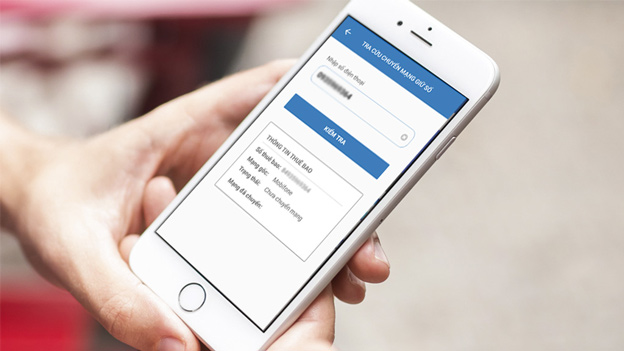
VNTA download link, application supporting lookup information of network transfer subscribers keep number:
- Android: VNTA: Vietnam Telecommunications.
- iOS: VNTA: Vietnam Telecommunications
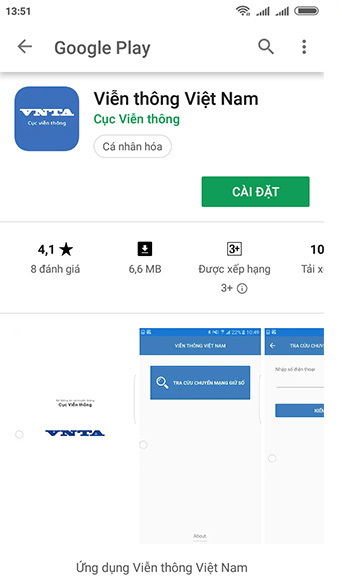
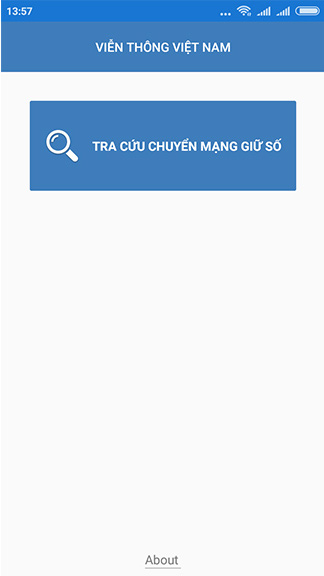
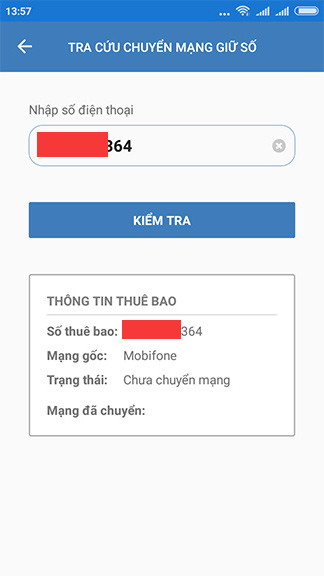
VNTA has very simple usage. After downloading and installing VNTA application on smartphone, users just need to open the application and enter the phone number to look up in the box 'Enter phone number', then select the 'Check' box. Subscriber network information will be displayed (including the original home network, the network after the network transfer) to help users know whether subscribers plan to make calls are in-network or off-net after switching networks.
For details on how to do it, fees and things to keep in mind when transferring numbers, you can refer to the article "Fees and how to switch network numbers of operators".
FAQ
What is the main point of After Changing the Network, How Do I Know Which Network I Want to Call?
Starting from today, November 16, 2018, postpaid mobile subscribers of large networks of VinaPhone, MobiFone and Viettel can switch to other networks that keep their familiar phone numbers long ago. Prepaid subscribers will have to wait until January 1.2019 to use this service.
Why is After Changing the Network, How Do I Know Which Network I Want to Call important?
After Changing the Network, How Do I Know Which Network I Want to Call matters because it can affect how readers understand, choose, use, or respond to the subject discussed in the article.
What should readers verify about After Changing the Network, How Do I Know Which Network I Want to Call?
Check the date, product or software version, compatibility, and any current guidance before acting, especially when technology, security, health, or pricing is involved.
Related Articles
 How to Apply Call Minutes on Network, Off-net When the Money Runs Out5 minutes read
 Call Recording Android with Call Recorder - ACR7 minutes read
 How to Call Video Call on Zalo PC: Video Call Zalo5 minutes read
 How to Call, Video Facebook Messenger on Mobile, Tablet3 minutes read
 Zalo Allows Direct Calling from Contacts: Call Zalo4 minutes read
 Video Call Feature Will Soon Appear on Social Network X (Twitter)3 minutes read
Reader Comments 0
Sign in with email or Google to join the discussion.