Table of Contents
SCUM admin commands let you test items, adjust the environment, or move characters in single-player and on servers where you have the required permissions. Enter them in the in-game chat with a leading #. They are administration tools, not a way to gain privileges on someone else's server.
Open the command suggestions
- Start your single-player session or join a server where you are an authorized administrator.
- Press T, or your configured chat key.
- Type
#and inspect the available command suggestions. - Type part of the command name to narrow the list, then read the argument format shown by your current build.
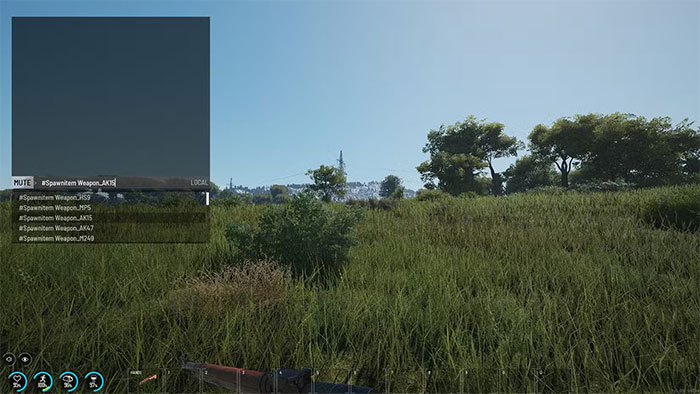
Command availability, names, and arguments can change between builds. The suggestions in your installed version are a better starting point than copying an old command list unchanged.
Useful command groups
Angle-bracketed values below describe inputs you must supply; do not type the brackets. Confirm optional player arguments and permissions in the live command help.
| Command or task | Use | Check before running |
|---|---|---|
# | Inspect available command suggestions. | Do not use #Walk as a command-list shortcut. |
#SetTime <time> | Set the time of day. | Use the 0–24 time format shown by the game, rather than a value such as 1000. |
#SetWeather <value> | Adjust weather intensity. | The documented range is 0–1; confirm behavior for your build. |
| Fame-point commands | Adjust a player's fame for testing or administration. | Search for Fame in the live list; verify whether the command sets or changes the value. |
#Location | Inspect location information. | Check whether you are viewing yourself or a specified player. |
#Teleport <X> <Y> <Z> [Player] | Move yourself or a target to coordinates. | Coordinates come first. Confirm the target and a safe destination. |
| Player-to-player teleport | Move to another character. | Search for Teleport in the current list; do not assume an older name such as TeleportToPlayer is accepted. |
| Map teleport | Choose a destination through the map where supported. | Confirm the command exists and how the map selection is triggered. |
#SpawnItem | Create an item for testing. | Select a valid item identifier and check the quantity. |
#SetGodMode | Enable supported administrative building interactions. | Do not assume this grants damage immunity. Check required elevated permissions. |
Examples for environment testing
For a daytime test, inspect the current command help, then try a suitable time such as:
#SetTime 12For the documented clear-weather endpoint:
#SetWeather 0Record the previous settings if you need to restore them. On a shared server, environment changes affect other players too.
Teleportation and god mode need extra care
For teleportation, verify X, Y, and Z rather than copying coordinates from an unrelated map or old build. An official-forum answer marked by a developer confirms the coordinate-first teleport format, but current in-game help should determine the exact target syntax.
SCUM's administrative god mode should not be confused with invulnerability. A developer-marked forum explanation describes building and lock-related functions rather than damage immunity.
If a command does not work
- Check the leading
#, spelling, required values, and current command suggestions. - Confirm your server permissions; being able to play on a private server does not make you an administrator.
- Verify the intended player and whether the operation requires that player to be online.
- Check the current server build and operator documentation before editing permission files.
- Test one change at a time in a non-production session where possible.
Use commands to learn mechanics or administer an authorized session. Keep a backup before experiments that alter persistent progress.
Related Articles
 A Compilation of GTA V Cheat Codes, Cheats, and How to Enter Them14 minutes read
 10 Cheat Codes to Help You Squeeze Every Last Drop Out of ChatGPT4 minutes read
 Sons of the Forest Console Commands and Cheats Guide10 minutes read
 Best GTA Cheat Codes for Street Pirates IV Game7 minutes read
 ARK Survival Ascended Console Commands and Cheats10 minutes read
 General Cheat Code Game Grand Theft Auto: the Ballad of Gay Tony4 minutes read
Reader Comments 0
Sign in with email or Google to join the discussion.