Table of Contents
Console commands in ARK: Survival Ascended let a single-player host or authorized server administrator change movement, spawn resources, tame creatures, teleport players, and manage a server. They can also delete creatures or structures, so back up the save before experimenting with destructive commands.
This guide focuses on commonly useful commands. Command availability can vary with game updates, maps, and server configuration; the ARK Official Community Wiki command reference is the best place to confirm a command and its parameters before using it on an important save.
Enable and open the console
- Open Settings.
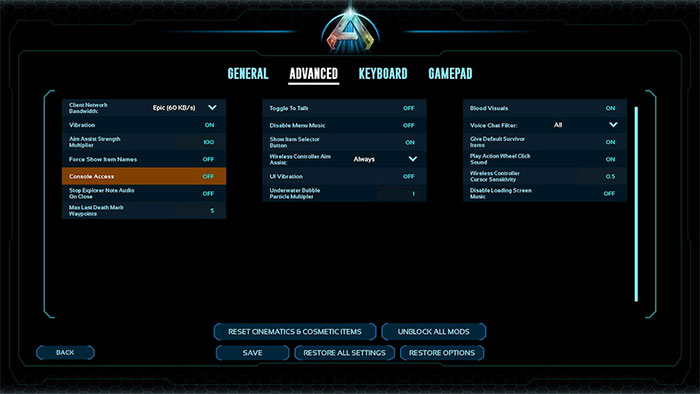
- In the Advanced settings, turn Console Access on.
- Return to the game and open the console using the control for your platform.
| Platform | Common console control |
|---|---|
| PC | Press ~ (tilde). Keyboard layout can affect the key. |
| Xbox Series X|S | Pause, then press LB + RB + X + Y together. |
| PlayStation 5 | Pause, then press L1 + R1 + Square + Triangle together. |
If a console update exposes a dedicated console button in the pause menu, use the current on-screen control. On a multiplayer server, only an administrator with the server admin password can run protected commands.
Authenticate on a server
Enter the following, replacing the placeholder with the server’s admin password:
EnableCheats <admin-password>Never publish or share the password. Server commands are commonly entered with a cheat or admincheat prefix, for example:
cheat SaveWorldIn single-player, many commands work without the prefix. If an otherwise valid command fails on a server, confirm that you authenticated for the current session and used the required prefix.
Movement and player commands
| Command | Effect |
|---|---|
Fly | Enables flight. |
Walk | Returns the character to normal movement after Fly or Ghost. |
Ghost | Allows movement through terrain and structures. |
God | Enables god mode for many types of damage. |
InfiniteStats | Keeps common character stats from draining. |
LeaveMeAlone | Combines several protection effects, including god mode, infinite stats, and creature invisibility. |
EnemyInvisible true | Makes creatures ignore the player in most circumstances. |
EnemyInvisible false | Turns creature invisibility off. |
ToggleInfiniteAmmo | Toggles unlimited ammunition. |
ChangeSize <multiplier> | Changes character scale; 1 is normal size. |
SetTimeOfDay <hh:mm> | Sets the map time. |
Teleport | Moves the player forward in the viewing direction until an obstruction is reached. |
SetPlayerPos <x> <y> <z> | Moves the player to world coordinates. |
AddExperience <amount> 0 0 | Adds the specified amount of experience; understand the sharing parameters before changing the zeros. |
Use Walk before saving after flying or ghosting. Teleport and ghost commands can place a character inside terrain; keep a recent backup and note safe coordinates first.
Resources, items, engrams, and creative mode
| Command | Effect |
|---|---|
GiveResources | Adds a standard bundle of common resources. |
GiveEngrams | Unlocks engrams for the current character. |
GiveEngramsTekOnly | Unlocks Tek engrams. |
GiveCreativeMode | Enables creative mode for the current player. |
GiveCreativeModeToTarget | Enables creative mode for the targeted player. |
GiveCreativeModeToPlayer <player-id> | Enables creative mode for the specified player ID. |
GFI <item-name> <quantity> <quality> <blueprint> | Spawns an item by a partial item name. |
GiveItem <blueprint-path> <quantity> <quality> <blueprint> | Spawns an item using its full blueprint path. |
GiveItemToPlayer <player-id> <blueprint-path> <quantity> <quality> <blueprint> | Gives an item to another player. |
GiveArmorSet <tier> <quality> | Gives an armor set matching supported tier and quality parameters. |
GiveWeaponSet <tier> <quality> | Gives a weapon set matching supported tier and quality parameters. |
GiveItemSet <tier> | Gives a predefined item set. |
For GFI and GiveItem, the final blueprint value is normally 0 for the item and 1 for its blueprint. Item names, blueprint paths, tiers, and valid quality values must match the game data. Confirm them in the current item reference instead of guessing.
Creature commands
Aim at the intended creature before running a target-based command.
| Command | Effect |
|---|---|
DoTame | Tames the targeted eligible creature. |
ForceTame | Force-tames the targeted creature and may allow riding without a saddle. |
ForceTameAOE <radius> | Force-tames eligible creatures within a radius; use a small radius deliberately. |
Summon <creature-blueprint> | Spawns a wild creature from a blueprint class. |
SummonTamed <creature-blueprint> | Spawns a tamed creature. |
GMSummon "<creature-blueprint>" <level> | Spawns a tamed creature at a specified level. |
GiveToMe | Changes ownership of the targeted eligible creature or structure to the player. |
DestroyWildDinos | Removes wild creatures so the population can respawn. Expect a temporary empty map and server load during repopulation. |
Server and player administration
| Command | Effect |
|---|---|
ShowMyAdminManager | Opens the in-game server administration interface where supported. |
Broadcast <message> | Sends a message to everyone on the server. |
SaveWorld | Forces a world save. |
AllowPlayerToJoinNoCheck <platform-id> | Adds a player ID to the server whitelist. |
DisallowPlayerToJoinNoCheck <platform-id> | Removes a player ID from the whitelist. |
BanPlayer <platform-id-or-name> | Bans the identified player; the required identifier depends on platform and server setup. |
UnBanPlayer <platform-id-or-name> | Removes a ban for the matching identifier. |
DoExit | Shuts down a server process. Save first and use only from an authorized administration session. |
Destructive commands: back up first
The following command families can permanently remove entities from the current save:
DestroyAll <class-name>removes every loaded entity of a specified class.DestroyTribeDinos,DestroyTribeStructures, andDestroyTribePlayersaffect the tribe associated with the targeted entity.ClearPlayerInventorycan remove a player’s inventory, equipped items, or slot items according to its parameters.
Do not test these commands on a live server. Stop normal play, create and verify a backup, confirm the target while nothing obstructs the crosshair, and make sure the command uses the intended class or player identifier.
Why a command may not work
- Console Access is off: enable it in Advanced settings and reopen the pause menu.
- Server authentication expired: run
EnableCheatsagain after reconnecting. - Missing prefix: try the server’s required
cheatoradmincheatprefix. - Wrong parameters: preserve spaces, quotes, blueprint suffixes, and numeric argument order.
- Wrong target: target-based commands require the correct creature, structure, or player under the crosshair.
- Outdated identifier: an item or creature class may differ between Survival Evolved, Survival Ascended, a mod, and a particular map.
- Insufficient permission: ordinary players cannot run protected admin commands.
For a safe first test, use a non-destructive command such as SetTimeOfDay or Fly, then return to normal with Walk. Save and back up before spawning large numbers of creatures or changing a live server.
Related Articles
 A Compilation of GTA V Cheat Codes, Cheats, and How to Enter Them14 minutes read
 10 Cheat Codes to Help You Squeeze Every Last Drop Out of ChatGPT4 minutes read
 Sons of the Forest Console Commands and Cheats Guide10 minutes read
 Best GTA Cheat Codes for Street Pirates IV Game7 minutes read
 General Cheat Code Game Grand Theft Auto: the Ballad of Gay Tony4 minutes read
 List of GTA Vice City Cheat Codes and the Latest Grand Theft Auto Cheats12 minutes read
Reader Comments 0
Sign in with email or Google to join the discussion.