Compilation of cheat codes and console commands for Sons of the Forest

Cheats in Son of the Forest can be very helpful in your progress. Therefore, this article will summarize the most common Son of the Forest cheats for you.

Sons of the Forest is a captivating open-world survival horror game. In the game, players take on the role of a member of a rescue team sent to a mysterious island to search for a missing billionaire. However, after a helicopter crash, you are stranded on the island and must face numerous dangers.

Players need to gather resources, craft tools, build shelters, hunt animals, and find food to survive. The vast island contains numerous caves, underground bunkers, and secrets related to bizarre experiments. During your exploration, you will encounter cannibalistic tribes and terrifying mutated creatures.

One highlight of the game is its companion system, particularly Kelvin – a helper who can perform tasks such as gathering wood or fish at the player's command. There's also Virginia, a friendly mutant girl who can assist in combat. With beautiful graphics, detailed building mechanics, and a mysterious horror atmosphere, Sons of the Forest offers a captivating and challenging survival experience for all players.

Console commands allow players to access a range of cheats in Sons of the Forest . With these commands, players can add items to their inventory, copy companions, activate Godmode, and more. Even better, players don't need to download any external programs to use them.

In this guide, let's learn how to activate and use console commands in Sons of the Forest , along with a list of Sons of the Forest cheat codes to make this survival game easier.

How to enable console commands in Sons of the Forest

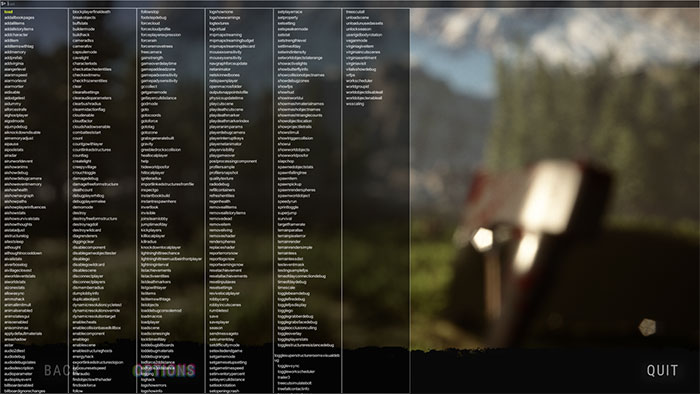
To activate console commands in Sons of the Forest, load a save file, type "cheatstick, " and press F1 . Simply type "cheatstick" in normal gameplay; no pausing is required. The character might move slightly, but it will still activate.

If done correctly, pressing F1 will display the developer console command menu with a huge list of cheat codes attached. From there, simply type the cheat you want to use and press Enter .

images 1 of Compilation of cheat codes and console commands for Sons of the Forest
Images 1 of Compilation of cheat codes and console commands for Sons of the Forest

List of cheat codes for Sons of the Forest

Cheat code Effect
addallitems Add all items to the inventory.
addallstoryitems Add the necessary items for the story to your inventory.
additem [item name] Add the specified item to the inventory.
additemswithtag [item tag] Add an item with the specified tag to the inventory.
godmode [on/off] Toggle Godmode on/off, making the character invincible and granting maximum health, hunger, water, and energy.
speedyrun [on/off] It allows for running at much higher speeds than normal.
superjump [on/off] Allows for higher-than-normal jumps when activated.
instantbookbuild [on/off] Allows you to build anything immediately when selected in the build log.
setplayerrace [number] Change the skin color of the player character.
gotocoords [number X] [number Z] [number Y] Spawn at the specified coordinates.
addcharacter robby [quantity] Spawn a specified number of Kelvin into the game.
addcharacter virginia [quantity] A defined number of Virginias will appear in the game.
aiangerlevel [number] Change the anger level of all AI.
aianimspeed [number] Change the animation speed of all AI (1 is the default, so 10 is super fast and 0.1 is super slow).
aiarmorlevel [number] Change the level of protection that AI provides.
aidisable [on/off] Add/remove all AI from the game.
aidummy [on/off] Make the AI ​​unaware of your presence.
aigodmode [on/off] Make AI invincible.
aipause [on/off] Pause all AI immediately (it will turn off if the game is paused).
animals enabled [on/off] Remove all animals when turning on.
spawnitem [number of tag items] [quantity of items] Spawn a certain amount of the specified item.
spawnitem 78 50 Spawn 50 records.
spawnitem 362 50 Spawn 50 boxes of pistol ammunition.
spawnitem 363 50 Spawn 50 cases of Shotgun Slugs.
spawnitem 364 50 Spawn 50 boxes of Buckshot pistol ammunition.
spawnitem 369 50 Spawn 50 boxes of Stun Gun ammunition.
settimeofday [1 to 24] Set the time of day.
treescutall [on/off] Chop down all the trees around the player; this is useful if you want to free up space for your base.
airadar [on/off] Create a box below each AI, showing its distance from the player.
aishowdebugcamera [on/off] Move your camera out of the character's line of sight.
aishowstats [on/off] Create a box under each AI, displaying general indicators of their anger, fear, and energy levels.
aishowsurvivalstats [on/off] Create a box at the bottom of the AI, displaying metrics on their satiety, hydration, and energy levels.
aistatadjust [stat] [+/- number] Allows modification of AI's own statistics.
aivillageclosest [on/off] Create a box that displays the distance and direction of the nearest village to the player.
aiworldeventstats [on/off] A box is displayed in the upper left showing the cannibal's rage, the time of day, and other world events.
aiworldstats [on/off] A box is displayed in the upper left showing statistics on cannibals, animals, and other AI worldwide.
aizonestats [on/off] A box appears in the upper left corner displaying statistics on cannibals, animals, and other AI in the player's current area.
showfps [on/off] The FPS (frames per second) number is displayed in the upper right corner.
showhud [on/off] Turn the HUD on and off.
showui [on/off] Turn the user interface on and off.

How to spawn items in Sons of The Forest

If you simply want to spawn all items in Sons of the Forest, you can easily do so using the `addallitems` command . However, if you want to add a specific item to your inventory, you will need to specify the item you want, using the following command:

additem [tên vật phẩm]

Note that gamers will need to remove the square brackets and enter the item name as a single word, without spaces.

Players can also add items to their game via item IDs, as each Sons of the Forest item has a unique ID. With this, gamers can add items to their inventory by adjusting the game's source code and entering the exact quantity of the item they want.

  1. Enter the directory SonsOfTheForestSaves.
  2. Open the folder with the 17-digit code.
  3. Open the Single Player or Multiplayer folder , depending on the game mode you are playing.
  4. Click on the folder containing the most recent save file (players should create a backup of themselves before using cheats).
  5. Find the PlayerInventorySaveData file and open it in Notepad.
  6. Enter the following string: {"ItemId":XXX,"TotalCount":X,"UniqueItems":[]},
    Make sure you replace XXX with the item ID you want to add to your inventory. Similarly, replace X with the desired quantity of items.

Below is a list of item IDs for all Sons of the Forest items. With this list, players will be able to craft weapons and armor like pistols and golden armor without having to wander through caves full of cannibals. Gamers can also craft tools like rope guns or shovels more easily.

Item Item ID
Vodka 414
Aloe Vera 451
Air Canister 469
Source 402
Leak 527
Blueprint Book 552
Bone fracture 494
Buckshot 364
Canned Food 434
Fight 496
Chainsaw 394
Cloth 415
Cooking Pot 517
Crafted Spear 474
Creepy Armor 593
Cross 468
Crossbow 365
Crossbow Bolt 368
Duct Tape 419
Emergency Pack 483
Energy Drink 439
Energy Bar 441
Energy Mix 461
Energy Mix + 462
Feather 479
Fish 436
Flare 440
Flashlight 471
Flask 426
Food Tray 512
Frag Grenade 381
Golden Armor 572
GPS Locator 529
GPS Tracker 412
Grab Bag 351
Grappling Hook 560
Guest Keycard 526
Guide Book 589
Style Mix 455
Style Mix + 456
Hide the Desert 519
Knife 380
Leaf 484
Leaf Anti-Slip 473
Loot Pouch 508
Log 78
Maintenance Keycard 566
Medium Rock 506
Modern Arrow 373
Molotovs 388
MRE Snack Rations 438
Noodles 421
Pistol 355
Ammo pistol 362
Pistol Silencer 374
Plasma Lighter 413
Printer Arrow 618
Printer Resin 390
Radio 590
Raw Meat 433
Rebreather 444
Revolver 386

Below are the console commands you can use in the debug console mod. Some commands may require additional numbers to function, while others may require additional toggle statements. Use them carefully and remember to back up your progress.

  1. addallbookpages
  2. addallitems
  3. addallstoryitems
  4. add character
  5. additem
  6. additemswithtag
  7. addmemory
  8. addprefab
  9. addvirginia
  10. aiangerlevel
  11. aianimspeed
  12. aiarmorlevel
  13. aiarmortier
  14. adisable
  15. aidodgetest
  16. aidummy
  17. aiforcestrafe
  18. aighostplayer
  19. aigodmode
  20. aijumpdebug
  21. aiknockdowndisable
  22. aimemoryadjust
  23. pause
  24. aipoolstats
  25. airplane
  26. airunworldevent
  27. aishowanims
  28. aishowdebug
  29. aishowdebugcamera
  30. aishoweventmemory
  31. aishowhealth
  32. aishownavgraph
  33. aishowpaths
  34. aishowplayerinfluences
  35. aishowstats
  36. aishowsurvivalstats
  37. aishowthoughts
  38. aistatadjust
  39. aistructurelog
  40. aitestsleep
  41. aithought
  42. aithoughtnocooldown
  43. aivailstats
  44. aiverboselog
  45. aivillageclosest
  46. aiworldeventstats
  47. aiworldstats
  48. aizonestats
  49. allowasync
  50. ammohack
  51. animallimitmult
  52. animalsenabled
  53. animstatesgui
  54. anisoenabled
  55. Anisominmax
  56. applydefaultmaterials
  57. areashadow
  58. astar
  59. audio2dtest
  60. audiodebug
  61. audiodebugstates
  62. audiodescription
  63. audioparameter
  64. audioplayevent
  65. billboardenabled
  66. billboardignorechanges
  67. blockplayerfinaldeath
  68. breakobjects
  69. buffstats
  70. buildermode
  71. buildhack
  72. cameradiss
  73. camerafov
  74. capsulemode
  75. cavelight
  76. characterlods
  77. checkattachedentities
  78. checkexitmenu
  79. checkfrozenentities
  80. clear
  81. clearallsettings
  82. clearaudioparameters
  83. clearbushradius
  84. clearmidactionflag
  85. cloudenable cloudfactor
  86. cloudshadowsenable
  87. combatteststart
  88. count
  89. countgowithlayer
  90. countlinkedstructures
  91. counttag
  92. createlight
  93. creepyvillage
  94. damagedebug
  95. damagefreeformstructure
  96. deathcount
  97. debugplayerhitlog
  98. debugplayermelee
  99. demomode
  100. destroy
  101. destroyfreeformstructure
  102. destroyragdoll
  103. destroywildcard
  104. diagrenderers
  105. diggingclear
  106. disablecomponent
  107. disablegameobjecttester
  108. disablego
  109. disablegowildcard
  110. disablescene
  111. disconnectplayer
  112. disconnectplayers
  113. dismemberradius
  114. dumplobbyinfo
  115. duplicateobject
  116. dynamicresolutioncycletest
  117. dynamicresolutionoverride
  118. dynamicresolutiontarget
  119. enablecheats
  120. enablecollisionbasedkillbox
  121. enablecomponent
  122. enablego
  123. enablescene
  124. enablestructureghosts
  125. energyhack
  126. exportlinkedstructurestojson
  127. exposuresetspeed
  128. filteraudio
  129. findobjectswithshader
  130. firstlookforce
  131. follow
  132. followstop
  133. footstepdebug
  134. forcecloud
  135. forcecloudprofile
  136. forceplayerexpression
  137. forcerain
  138. forceremovetrees
  139. freecamera
  140. gainstrength
  141. gameoverdelaytime
  142. gamepaddeadzone
  143. gamepadxsensitivity
  144. gamepadysensitivity
  145. gccollect
  146. getgamemode
  147. getlayerculldistance
  148. godmode goto
  149. gotocoords
  150. gotoforce
  151. gototag
  152. gotozone
  153. grabsgeneratebuilt
  154. gravity
  155. greebledrockscollision
  156. heallocalplayer
  157. help
  158. hideworldposfor
  159. hitlocalplayer
  160. igniteradius
  161. importlinkedstructuresfromfile
  162. inspectgo
  163. instantbookbuild
  164. instantrespawnhere
  165. invertlook
  166. invisible
  167. joinsteamlobby
  168. jumptimeofday
  169. kickplayers
  170. killlocalplayer
  171. killradius
  172. knockdownlocalplayer
  173. lightninghittreechance
  174. lightninghittreemustbeinfrontplayer
  175. lightninginterval
  176. listactiveentities
  177. listdeathmarkers
  178. listgowithlayer
  179. listitems
  180. listitemswithtags
  181. listobjects
  182. loaddebugconsolemod
  183. loadmacros
  184. loadplayer
  185. loadscene
  186. loadscenesingle
  187. locktimeofday
  188. loddebugbillboards
  189. loddebugmaterials
  190. loddebugranges
  191. lodforce2ddistance
  192. lodforce3ddistance
  193. logging
  194. loghack
  195. logshowerrors
  196. logshowinfo
  197. logshownone
  198. logshowwarnings
  199. logtextures
  200. logvirtual
  201. mipmapstreaming
  202. mipmapstreamingbudget
  203. mipmapstreamingdiscard
  204. mousexsensitivity
  205. mouseysensitivity
  206. navgraphforceupdate
  207. netanimator
  208. netskinnedbones
  209. netspawnplayer
  210. openmacrosfolder outputsnappointstofile
  211. physicsupdatetime
  212. playcutscene
  213. playdeathcutscene
  214. playdeathmarker
  215. playdeathmarkerindex
  216. playeranimparams
  217. playerdebugcamera
  218. playerinterruptkeys
  219. playernetanimator
  220. playervisibility
  221. playgameover
  222. postprocessingcomponent
  223. profilersample
  224. profilersnapshot
  225. qualitytexture
  226. radiodebug
  227. refillcontainers
  228. refreshentities
  229. regenhealth
  230. removeallitems
  231. removeallstoryitems
  232. removedead
  233. removeitem
  234. removeliving
  235. removeshader
  236. renderspheres
  237. replaceshader
  238. Reporterrors
  239. reportlogsnow
  240. reportwarningsnow
  241. resetinputaxes
  242. resetsettings
  243. revivelocalplayer
  244. robbycarry
  245. robbyincutscenes
  246. rumbletest
  247. save
  248. saveplayer
  249. season
  250. sendmessageto
  251. setcurrentday
  252. setdifficultymode
  253. setexitedendgame
  254. setgamemode
  255. setgamesetupsetting
  256. setgametimespeed
  257. setinventorypercent
  258. setlayerculldistance
  259. setlookrotation
  260. setopeningcrash
  261. setplayerrace
  262. setproperty
  263. setsetting
  264. setspeakermode
  265. setstat
  266. setstrengthlevel
  267. settimeofday
  268. setwindintensity
  269. setworldobjectstaterange
  270. showactivelights
  271. showbutterfly info
  272. showcollisionobjectnames
  273. showdebugzones
  274. showfps
  275. showhud
  276. showinworldui
  277. showmeshmaterialnames
  278. showmeshobjectnames
  279. showmeshtrianglecounts
  280. showobjectlocation
  281. showprojectiletrails
  282. showstimuli
  283. showtriggercollision
  284. showui
  285. showworldobjects
  286. showworldposfor
  287. slapchop
  288. spawnedobjectstats
  289. spawnfallingtree
  290. spawnitem
  291. spawnpickup
  292. spawnrenderspheres
  293. spawnworldobject
  294. speedyrun
  295. sprinttoggle
  296. superjump
  297. survival
  298. targetframerate
  299. terrainparallax
  300. terrainpixelerror
  301. terrainrender
  302. terrainrendersimple
  303. terraintess
  304. terraintessdist
  305. testeventmask
  306. testingsamplefps
  307. timeofday
  308. timeofdayconnectiondebug
  309. timescale
  310. togglebeamdebug
  311. togglefiredebug
  312. togglefpsdisplay
  313. togglego
  314. togglegrabberdebug
  315. togglegrabsfacedebug
  316. toggleocclusionculling
  317. toggleoverlay
  318. toggleplayerstats
  319. togglestructureresistancedebug
  320. togglesuperstructurerooms
  321. togglevsync
  322. toggleworkscheduler
  323. trailer3
  324. treecutsimulatebolt
  325. treefallcontactinfo
  326. treeocclusionbonus
  327. treeradius treescutall
  328. unloadscene
  329. unloadunusedassets
  330. unlockseason
  331. visualdebug
5 | 1 Vote
« PREV : How to transport...
Roblox: Ways to Earn... : NEXT »