Table of Contents
This updated guide compares Samsung apps that may run in the background and highlights the details that matter most. If you own a Samsung phone, you're well aware of the amount of bloatware that comes with it. What you may not know, Still, is that there are many hidden pre-installed system apps that run in the background. What exactly do they do? And do they collect your data? Let's find out!
- 10 Samsung Galaxy Features All Android Phones Should Learn
AppCloud
AppCloud is adware that provides personalized app recommendations based on your usage habits and location. it is not available on the high-end Galaxy S series, but all cheaper models seem to have it pre-installed.
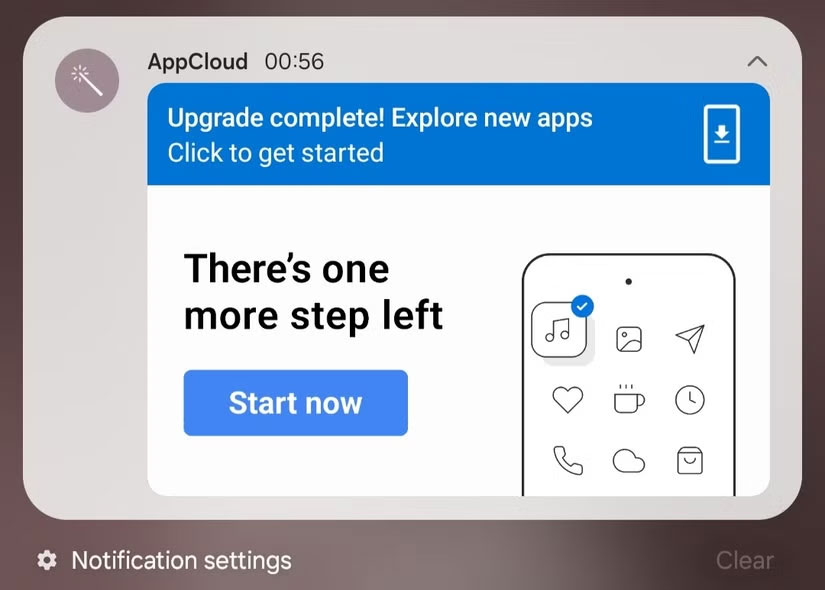
Some users on Samsung's community forums have complained that the service automatically installs third-party apps, especially after a software update, factory reset, or initial device setup. Many people have recently installed secure links on their Galaxy phones, and then AppCloud sends promotional notifications to "discover new apps" after the update is complete.
Samsung Core Services
Samsung Core Services is an important application that aims to "quickly and easily deliver key features used by Samsung applications through application updates instead of through the distribution of software updates" . This application is responsible for providing and updating essential features for system applications such as the camera, gallery, messages, contacts, and settings.
The app cannot be disabled and has access to a number of permissions, including calendar, call log, contacts, gallery, and messages. Still, these permissions are essential for the app to function as intended. Since the app performs functions that support everyday use, It is best to leave it alone.
Auto Blocker
Auto Blocker is one of Samsung's many security features. It blocks potential threats like app installations from unauthorized sources, harmful USB commands, and spyware. Since it is an optional feature, you'll need to enable it manually to start using it. To do so, open Settings > Security and privacy > Auto Blocker and turn it on.
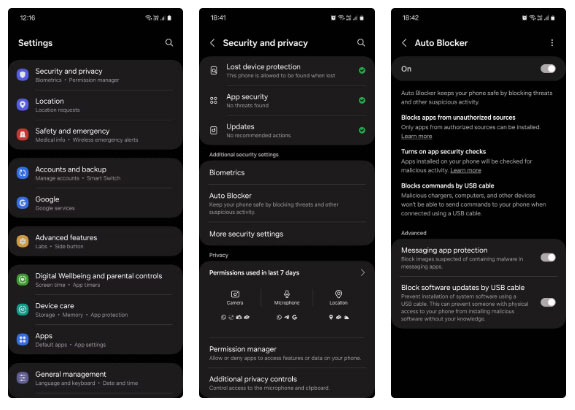
Functionally, this feature is a win for privacy and security, but it also discourages power users who like to sideload apps from outside. it is not really necessary, and you can turn it off if you know what you're doing, but it is worth keeping on. it is simple to use and does not collect any personal data from your phone.
Samsung Push Service
Samsung Push Service handles push notifications for Samsung-specific services, such as Samsung Account updates, Samsung Pay, and Galaxy Store alerts. Without this feature, you may miss notifications from some of Samsung's core services.
it is not harmful, but it is another always-on process because it is tied to a number of Samsung apps and can indirectly enable tracking and push advertising content. It cannot be disabled or uninstalled, but It is best to check to see if it has access to any other permissions besides displaying notifications.
Content Suggestions
If you've used Secure Folder on a Samsung phone, you've probably seen the Content Suggestions app inside your phone. This optional feature scans your library for private content and suggests you move it to Secure Folder. During setup, you'll be asked to choose specific people, payment cards, or other types of content you want the app to identify as private.
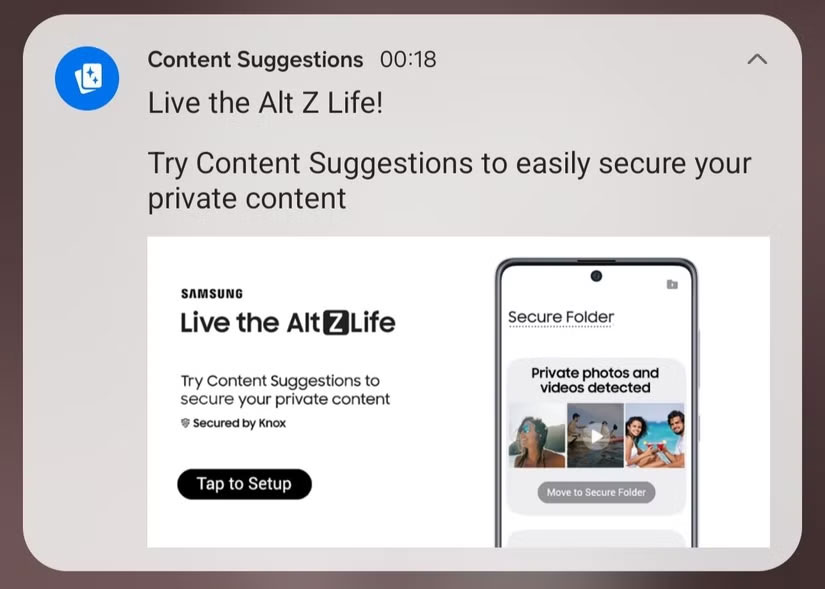
All the processing happens on the device, so nothing leaves your phone or goes to the cloud. This is handy if you use Secure Folder regularly, but it is certainly not necessary. Feel free to manually select each item from your library that you want to move to Secure Folder, but you may feel differently. Content Suggestions cannot be uninstalled or turned off.
Customization Service
Customization Service is similar to AppCloud in that it also recommends personalized ads, app and content recommendations using your device information, location, contacts, browsing history, user behavior, etc. it is basically Google 's version of ad personalization for Samsung.
You will be surprised to find that the app has access to every permission on your phone by default. Sadly, the app cannot be disabled or uninstalled, but you can and should deny permissions to the app.
Continuity Service
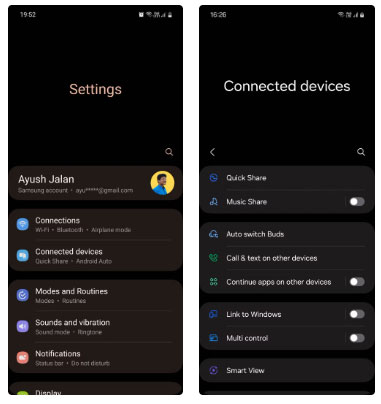
Continuity Service is Samsung's cross-device sync solution. With it, you can pick up where you left off with apps (like Samsung Internet and Notes) on other Galaxy devices, copy text, images, files, or videos on your phone, and then paste them on another device.
This feature requires your devices to be connected via Bluetooth and to the same Wi-Fi network, and signed in to your Samsung account to sync. You can enable this feature by going to Settings > Connected devices and turning on Continue apps on other devices .
Samsung Free
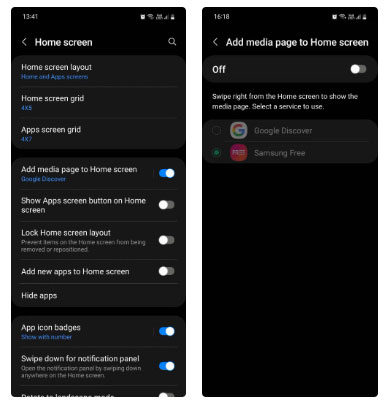
Samsung Free is a content aggregation service that appears on the left home screen on many Galaxy devices. It compiles free content like news, TV shows, podcasts, and games and customizes it based on your activity, interests, and location.
This service is unnecessary and many users find it more annoying than useful. The app cannot be disabled, but you can replace it with Google Discover or disable the media page entirely by going to Settings > Home screen and turning off Add media page to Home screen .
Samsung Max
Samsung Max is a free, ad-supported VPN app and data-saving service. It routes all incoming traffic through Samsung's servers for compression and encryption. While it saves data and provides some protection on public networks, you're essentially trading one form of privacy for another because the app collects your advertising ID for marketing purposes.
You can upgrade to a paid plan for fewer ads and better security, but many users opt for a traditional VPN. The app can be disabled, but not uninstalled.
Samsung is primarily a hardware company, so its business model does not focus on targeted advertising. Still, quite a few of its system apps do collect personal data.
The good news is that most of these services are optional, so the chances of them running in the background, collecting your data without your knowledge, are very low.
FAQ
How were the samsung apps that may run in the background options evaluated?
The comparison focuses on practical features, ease of use, limitations, compatibility, and the type of user each option is most likely to help.
Which option is best for beginners?
Beginners should prioritize a clear interface, useful documentation, reliable support, and the core features needed for their first project.
Should I choose a free or paid option?
Start with a free option when it covers your needs. A paid plan may be worthwhile when you need advanced tools, commercial rights, collaboration, or professional support.
Related Articles
 How to Turn Off Applications Running in the Background on Android Saves6 minutes read
 Apps That Are Secretly Draining Your Phone Battery: Complete Guide6 minutes read
 Separate Samsung Phone Background Images: Complete Guide3 minutes read
 Pre-installed Apps That Can Be Safely Uninstalled on Samsung Phones7 minutes read
 How to Stop Background Apps Running on Windows 105 minutes read
 Fix Windows Error: Complete Guide8 minutes read
Reader Comments 0
Sign in with email or Google to join the discussion.